EV Weekly Main Insight Module
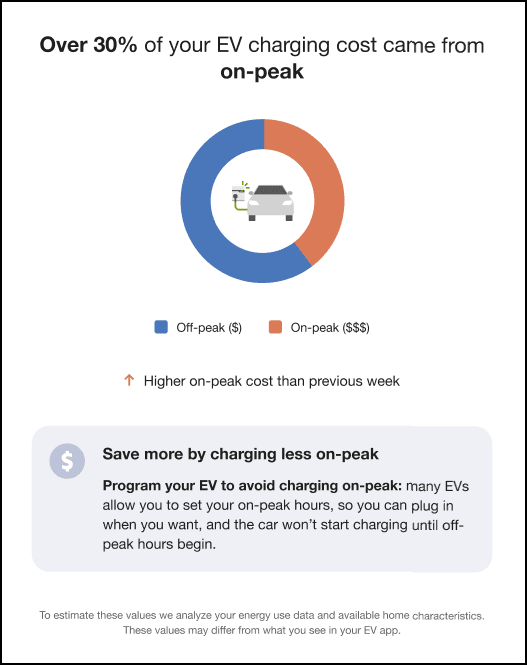
The EV Weekly Main Insight module is used to give the reader an overview of their EV charging for the week, provides a comparison to how they charged during on-peak hours the previous week, gives them a tip about how they can improve their charging habits, and explains how the utility identifies their EV charging habits.
Requirements
- AMI (hourly or more granular) data and use of the hourly disaggregation service are required.
- EV charging must be detected by the hourly disaggregation service.
- Only L2 chargers are supported.
- Estimated reads are not supported.
User Experience Variations
This section describes how the module can vary.
Success State
A success state occurs when the user charges their EV during the hours that the utility has specified as "times to avoid" less than the threshold that is set by the utility. By default, the threshold is set to 10%. Therefore, if the user charged their EV 8% of the time during the times to avoid, they would fall into the Success state.
In this state, the email varies as follows:
- Header Statement: The header statement reads, "Thank you! Your EV charging schedule is making a difference."
- Charging Time Statement: The statement reads, "Less than 10% of your EV charging took place during peak hours when demand on the grid is highest".
Needs Improvement State
This state occurs when the user charges their EV during high-demand times more than the threshold that is set by the utility, and they were not previously in the Success state. By default, the threshold is set to 10%. For example, if the user did 20% of their EV charging during high-demand periods this bill period, and they were not in a Success state last bill period, they would fall into this state.
In this state, the email varies as follows:
- Header Statement: The statement reads, "It looks like around X% of your EV charging took place during <hours>, when demand on the grid is highest". The percentage is rounded to the nearest 5%.
Transition State
This state occurs when the user charges their EV during high-demand times more than the threshold that is set by the utility during this bill period, but they were in a Success state during the previous bill period. For example, if they did 5% of their charging during high-demand times last bill period, but did 20% of their charging this period during high-demand times, they fall into the Transition state.
In this state, the email varies as follows:
- Header Statement: The statement reads, "It looks like around X% of your EV charging took place during <hours>, when demand on the grid is highest". The percentage is rounded to the nearest 5%.
Configuration Options
For each element listed in the table, indicate the desired configuration in the Input Value column. If you do not provide an input for optional configurations, the default will be used.
Table 6-10 Configuration Options
| Configuration Option | Input Value |
|---|---|
|
Images The images can be configured to use client-specific colors. Other than that, the image can not be changed. |
Optional Specify client branding colors. |
|
TOU Period Names Specify the names of each of the peak periods. For example:
|
Required if using TOU Rates Specify the names of each period:
|
|
High Threshold When users spend more than this percentage of their EV charging during on-peak hours, they receive the message that they are above the specified threshold. The high and low threshold values are used to determine the messaging for the module. Default: 30% |
Optional Select one of the following:
|
|
Low Threshold When users spend less than this percentage of their EV charging during on-peak hours, they receive the message that they are below the specified threshold. The high and low threshold values are used to determine the messaging for the module. Default: 10% |
Optional Select one of the following:
|
|
Text and Extra Mile Statement Utilities are encouraged to review the statements and adjust them to ensure that they are pushing customers to charge at the times that are most beneficial to the utility. |
Optional Select one of the following:
|
|
Missing Disaggregation Days Allowed Specify the number of days that disaggregation data can be missing before the module fails. For example, if you set this option to 5, the module will fail if there are 6 days of disaggregation data missing for the bill period. Note that the email is sent without this module if it fails. Default: 2 days |
Optional Specify one of these options:
|
|
Total EV Charging Threshold Specify the required amount EV charging that must be detected for the module to be included. For example, if you set this option to 5 kWh, the module will fail if the customer's EV charging totals 4 kWh. Note that the email is sent without this module if it fails. Default: 5 kWh |
Optional Specify one of these options:
|
To see how this module fits into the overall user experience, see Design and Configuration.