Rate Comparison
The Rate Comparison feature allows customers to see an overview of rate plans for which they are eligible, estimated cost information, and details about each rate plan option. Customers can compare rate plans in terms of estimated annual costs and quickly identify their cheapest rate. Further rate analysis is available through additional rate details and the ability to perform what-if scenarios representing energy use choices the customer can make.
Requirements
Utility Requirements
| Category | Description |
|---|---|
| Required Cloud Service(s) | The following cloud services are required:
|
| Scale | No scale limitations. |
Customer Requirements
| Category | Description |
|---|---|
| Billing Frequency | Monthly. |
| Data Delivery Frequency | Monthly. |
| Data Requirements | Billed Usage Data: Billed data is required to determine if a customer is on the best rate.
Interval Data: AMI data (daily or subdaily) is required. Rates Data: Rates must be modeled. Additionally, rate plan eligibility and rate plan information are required, such as the name and type of each rate plan (for example, standard or time-of-use), eligibility rules, pricing details, tier structures, and special conditions. Your Contact Your Delivery Team will work with you to collect this information. |
| Data History | Minimum: At least 270 days of AMI data must be available, as well as nine months of billing data (that is, nine bills).
Recommended: A full year (12 months) of billing data history. This will result in more accurate rate plan comparisons. |
| Data Coverage | By default, the customer must have at least 270 days of AMI data available, and a minimum of 75% of AMI reads from this period must be available. If required AMI, billing, or rate plan data is missing, the widget will not display any experience to avoid presenting inaccurate information. |
| Supported Fuels | Electricity. |
User Experience
The following components are included in the Rate Comparison feature:
- Rate Comparison (Widget): Allows customers to see a comparison of their eligible rate plans.
- Rate Details: Allows customers to view additional information on each eligible rate plan.
- Rate Simulator: Allows customers to simulate how their energy costs may be reduced under other eligible rate plans if they make changes to their energy use habits.
Rate Comparison (Widget)
The Rate Comparison component allows customers to see a comparison of their eligible rate plans. This component compares the estimated annual costs for each rate plan and highlights the cheapest rate for the customer.
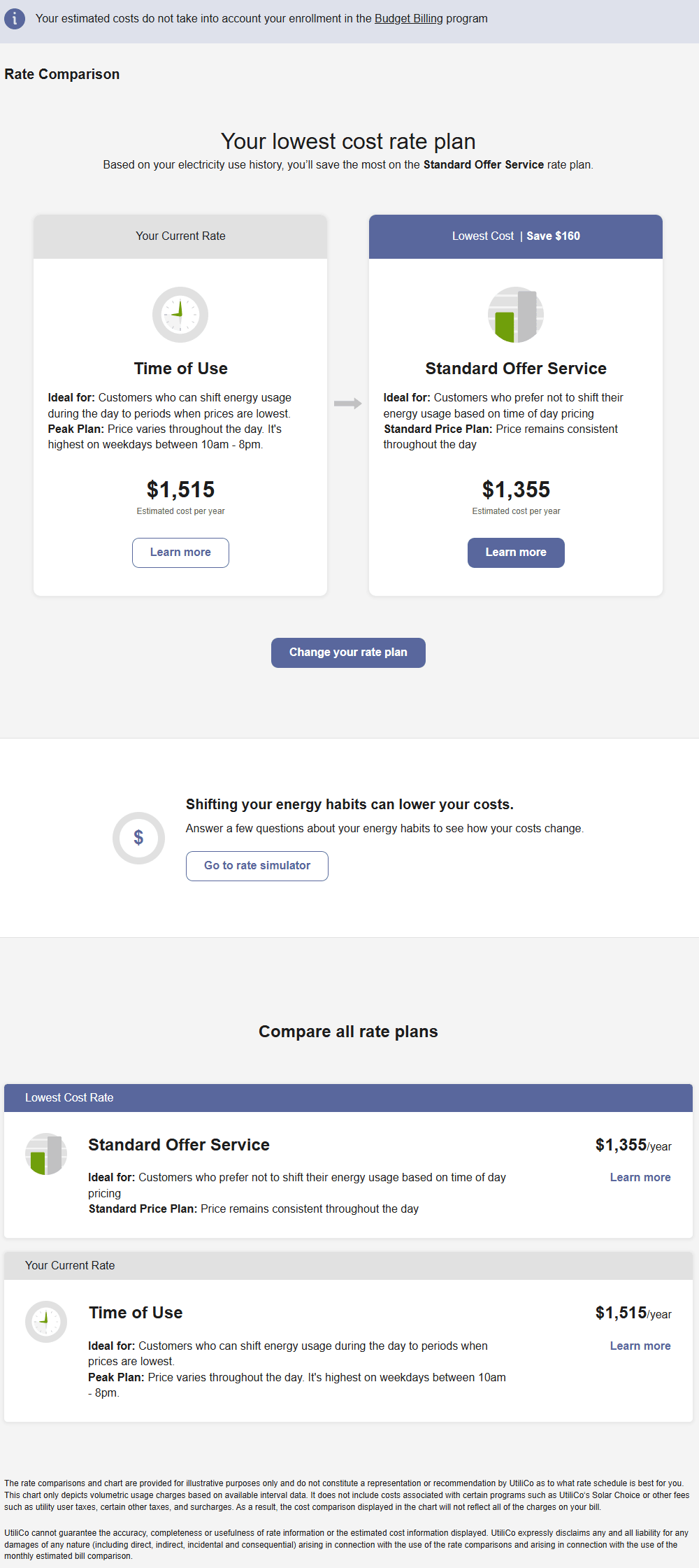
Lowest Cost Plan: Customers can compare their current rate plan to another rate plan they are eligible for. This comparison shows the customer at a glance which plan is their cheapest option. The name and key details of each plan are provided, along with a link to view additional details about a specific rate plan using the Rate Details component.
Change Your Rate Plan: A call-to-action for customers to change their rate is provided, which directs customers to a website location where they can change their rate plan. Alternatively, utilities can provide a phone number that their customers can call to change their rate plans.
Rate Costs Simulator Call-to-Action: A message is displayed to customers prompting them to see how changes in their energy use habits could lower their costs for varying rate plans. A link is provided that sends the customer to the Rate Simulator.
Compare All Rate Plans: All rate plans a customer is eligible for are displayed to the customer, which includes highlights of the rate plan, estimated annual cost, and a link that sends the customer to the rate details information. The rate plans are sorted to list the least expensive rate plan listed at the top and the most expensive rate plan at the bottom. A customer's current rate plan and lowest cost rate plan are also highlighted.
Legal disclaimers related to the information provided in the Rate Comparison can also be provided in a footer at the bottom of the page.
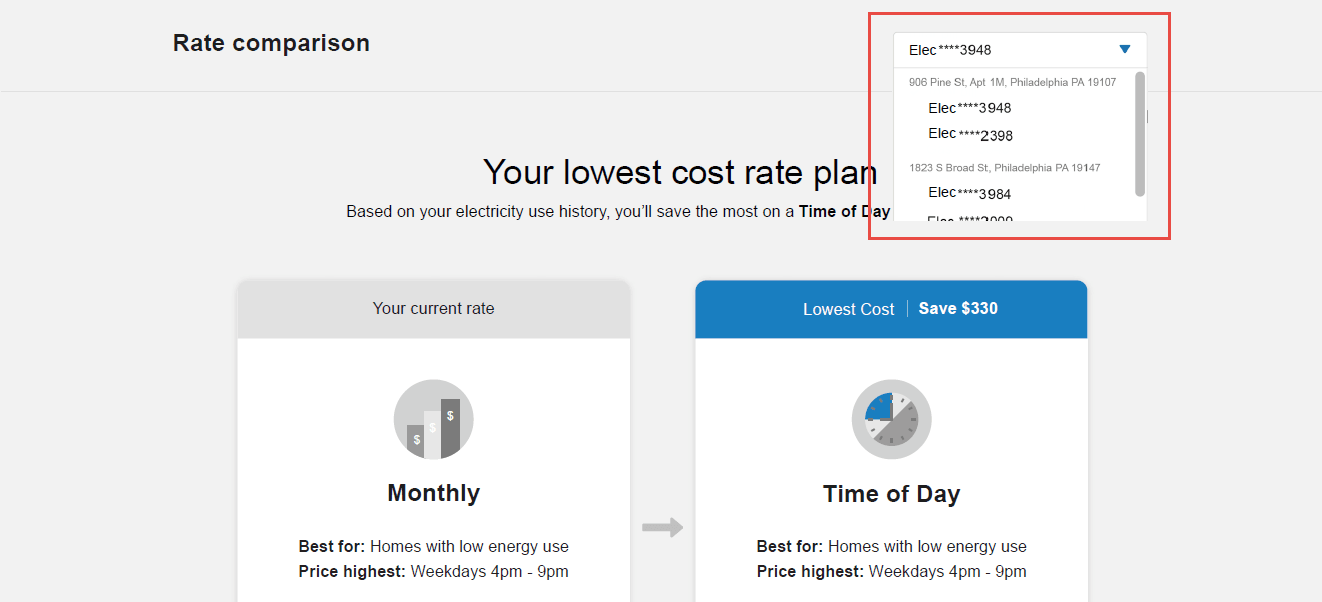
Multiple Premises and Service Points: If the customer has multiple premises and service points, then the customer can use a drop-down menu to view a rate comparison associated with each one. The drop-down menu lists each account premise, along with the service points associated with the premise. In this case, customers are able to select a service point, but not the premise itself.
Rate Details
The Rate Details component allows customers to view additional information on their eligible rate plans to better understand how a rate plan is structured and how their costs may vary throughout a year.
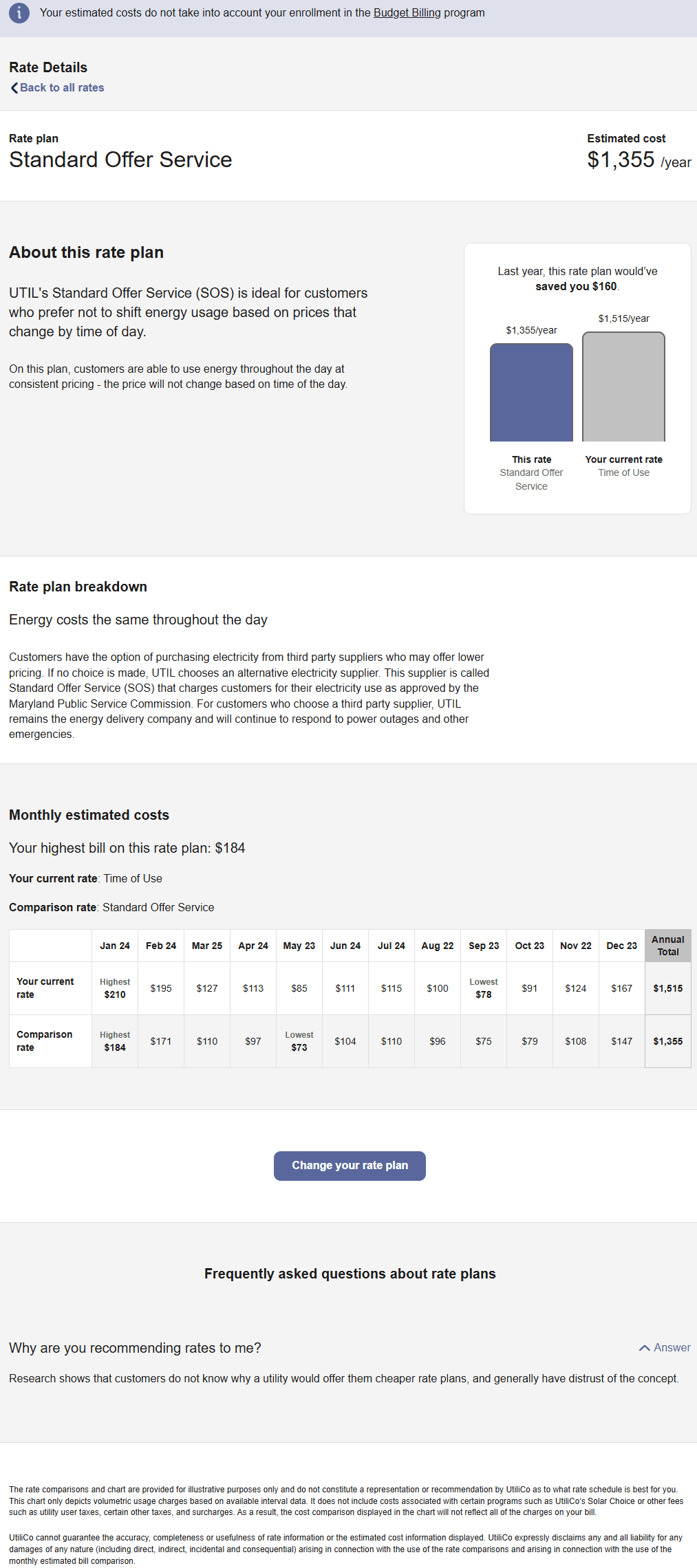
Rate Plan Title and Estimated Costs: The rate plan title (for example, "Time of Day") and estimated annual costs for the rate plan are provided. Annual costs are rounded to the nearest $5.
Rate Plan Headline and Description: Descriptive information about the selected rate plan, which includes:
- A headline and general description that highlights how the plan works and why a customer would want to select the plan.
- A comparison between their current rate plan and the selected rate plan. The comparison includes bar graphs that display the costs of the rate plans for the customer.
- A link that directs the customer to a page where they can sign up for the rate plan.
Costs Per Bill: The Costs Per Bill table displays the per-bill costs, rounded to the nearest dollar, for each bill period within the last 12 months. Bill periods are always arranged in a January to December order. The current rate prices are used with historical usage data to calculate what a customer's costs would be if the current rate prices were applied to the last 12 months. The customer's current rate and the selected rate are included in the table. The highest and lowest bills for each rate plan are highlighted in the table. The insight headline above the table displays the amount of the highest bill for the selected rate plan.
Note:
The annual totals in the Costs Per Bill table are not expected to match the exact annual total costs in all cases. This is due to the Costs Per Bill table rounding to the nearest $1, while annual costs are rounded to the nearest $5.- Change Your Rate Plan: A call-to-action for customers to change their rate is provided, which directs customers to a utility website location where they can change their rate plan. Alternatively, utilities can provide a phone number that their customers can call to change their rate plans.
- Additional Rate Content: Utilities can provide content for each available rate, including content such as FAQs, key details, rate structure explanations, and so on.
Legal disclaimers related to the information provided in the Rate Details can also be provided in a footer at the bottom of the page.
Rate Simulator
The Rate Simulator prompts customers to answer a few short questions about how they might change their energy use. Based on the customer's responses, their energy use data is updated, reducing or shifting a certain percentage of their applicable energy use. As a result, customers can be shown whether other rate plans might provide reduced costs if they make changes to their energy habits.
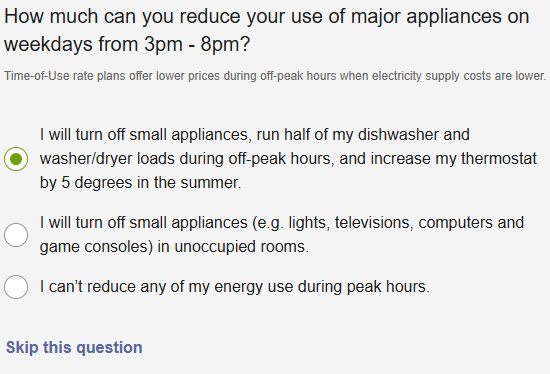
Rate Simulator Questions: The standard questions are related to shifting energy use to avoid peak times, reducing energy use during peak events, and reducing overall energy use. Answering the first question is required. Most of the other questions can be skipped if necessary. The image below is an example of one of the standard questions.
Depending on the utility's setup and configuration, the rate simulator may also include a question about whether the customer plans to purchase an electric vehicle (EV). This allows the energy usage for charging the EV to be simulated. The customer can enter a number of miles per week which they anticipate driving. Data validation is used to prevent customers from entering zero or an unrealistic number exceeding a maximum threshold.
Impact of Customer Responses: Customer responses are used to inform the results of the Rate Comparison widget. The lowest cost rate plan is highlighted at the top of the summary, and includes a reference to the customer's responses to the rate simulator survey. All the rate plans for which a customer is eligible are also displayed. Each rate plan includes the new estimated cost, along with the cost prior to completing the survey. Furthermore, the order of rate plans in the Compare all rate plans section is updated to list the least expensive rate plan at the top and the most expensive rate plan at the bottom.
Customers who select Learn More and navigate to the Rate Details widget are presented with the new estimated cost for the rate plan, along with the cost prior to completing the survey. This includes updating the insight message that compares the customer's current rate plan to reflect the new difference between a customer's current rate plan and the selected rate plan.
Updating Survey Responses: Customers can modify their responses at any time by using the links to update their answers or completely reset the simulator.