Rates Light
The Rates Light widget is a dashboard-friendly tool designed to help customers quickly view and compare utility rate plans. Customers can use the widget to understand at a glance whether they are on the best rate, and if not, which plan is recommended. The widget directs customers to the detailed Rate Comparison Feature for a more in-depth comparison.
Requirements
Utility Requirements
| Category | Description |
|---|---|
| Required Cloud Service(s) | Both of the following cloud services are required:
|
| Scale | No scale limitations. |
Customer Requirements
| Category | Description |
|---|---|
| Billing Frequency | Monthly. |
| Data Delivery Frequency | Monthly. |
| Data Requirements | Billed Usage Data: Billed data is required to determine if a customer is on the best rate.
Interval Data: AMI data (daily or subdaily) is required. Rates Data: Rates must be modeled. Additionally, rate plan eligibility and rate plan information are required, such as the name and type of each rate plan (for example, standard or time-of-use), eligibility rules, pricing details, tier structures, and special conditions. Your Delivery Team will work with you to collect this information. |
| Data History | Minimum: At least 270 days of AMI data must be available, as well as nine months of billing data (that is, nine bills).
Recommended: A full year (12 months) of billing data history. This will result in more accurate rate plan comparisons. If less than a year of data is available, the widget can still display, but with less information. See Insufficient Data History. |
| Data Coverage | By default, the customer must have at least 270 days of AMI data available, and a minimum of 75% of AMI reads from this period must be available. If required AMI, billing, or rate plan data is missing, the widget will not display any experience to avoid presenting inaccurate information. |
| Supported Fuels | Electricity. |
Limitations
The widget only presents rate plans that customers are eligible for. This ensures that the information is relevant to the customer. If the customer is only eligible for one rate plan, then only one will be shown, along with a link to more information about that plan.
User Experience
This section describes the user experience for electricity customers who have multiple service points and are eligible for two or more rate plans.
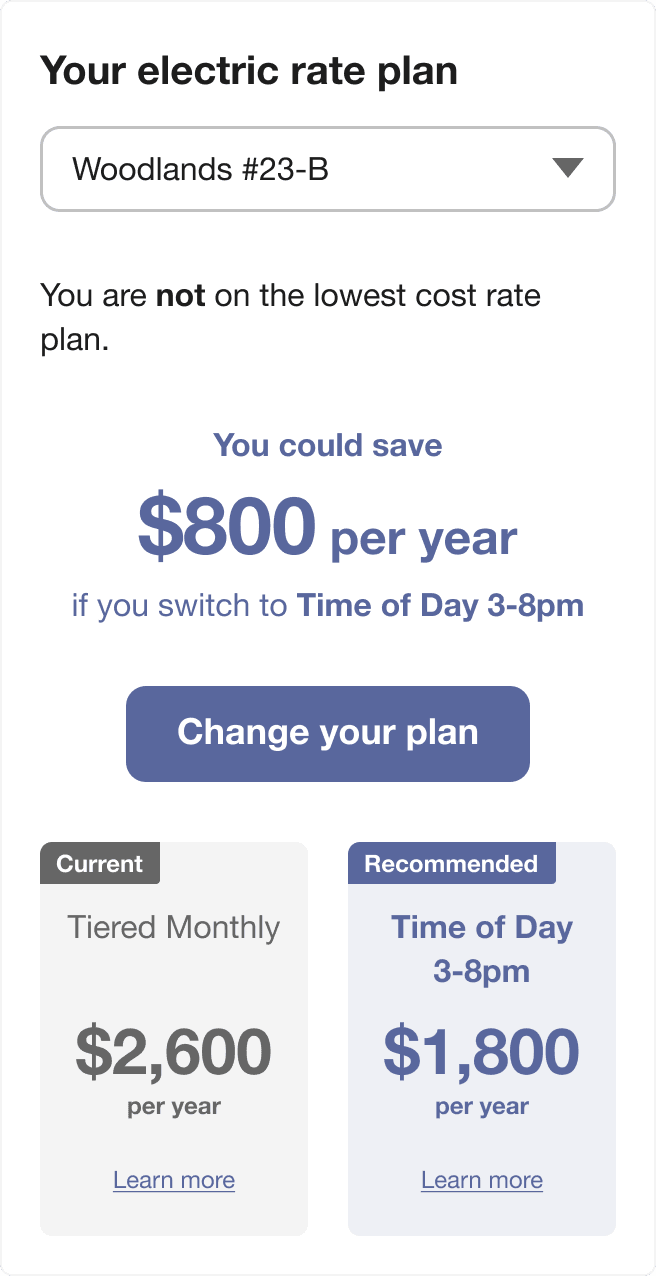
Title: The title at the top of the widget tells customers that the information shown relates to their current and potential electricity pricing plans.
Service Point Selector: This drop-down menu appears for customers who have multiple service points. A service point is the specific location at which energy is delivered to (or from) a building or home. The rate plans shown are based on the selected service point. (For customers who do not have multiple service points, this menu is hidden.)
Rate Plan Status Insight: This simple text message informs customers whether or not they are currently using the most cost-effective plan available.
Potential Savings Message: This section highlights how much money customers could save annually by switching to the recommended plan. It names the specific alternative plan and displays the estimated yearly savings in large, bold numbers.
Call-to-Action: This is a clickable button that lets customers start the process of switching their current rate plan to the recommended one. When clicked, customers are taken to a utility-defined web page with information about how to switch. Alternatively, the call-to-action can show text and a clickable phone number that customers can use to initiate a phone call with their utility company and switch their plan.
Current Plan Summary: This card shows details about customers' present rate plan, including its name (such as "Tiered Monthly") and the estimated annual cost. Learn more leads to the Rate Details page for the current plan, which shows additional information about the plan’s structure and pricing.
Recommended Plan Summary: This card compares customers’ current plan with the recommended alternative, showing its name and lower yearly estimated cost. Learn more leads to the Rate Details page for the recommended plan, which shows additional information about the plan’s structure and pricing.
User Experience Variations
Already on Lowest Plan
If the customer is already on the lowest rate plan, a message displays to say so. Customers also see the current rate plan name and a green circled checkmark that provides a visual cue, as well as a link to see all rate plans available to them. No comparison to another plan is shown.
Compact Layout (No Rate Plan Cards)
Depending on your setup and configuration, a more compact version of the Rates Light widget can be shown. The widget shows the customer’s rate plan status, potential yearly savings, and a call-to-action to change their plan. However, the detailed rate comparison cards are hidden, providing a cleaner and smaller display.
The compact widget state can only be used for the vertical layout of the widget, and for customers who are not already on the lowest cost rate plan. (If the horizontal layout is used, the detailed cards are shown.)
Insufficient Data History
For customers who do not have a full year of historical billing data, the widget displays the customer’s current rate plan and a link to explore other plans. By default, the link is configured to go to the Rate Comparison page. The widget shows no call-to-action, and there is no comparison of eligible rate plans to which the customer can switch.
Only One Rate Available
For customers who only have one available rate plan, the widget displays the customer’s current rate plan and a link to more details about it. By default, the link is configured to go to the Rate Details page. The widget shows no call-to-action, and there is no comparison of eligible rate plans to which the customer can switch.
Rate Riders
If a customer’s current plan or the recommended plan includes any riders, a footnote appears below the comparison cards, listing the specific riders included in each rate plan.
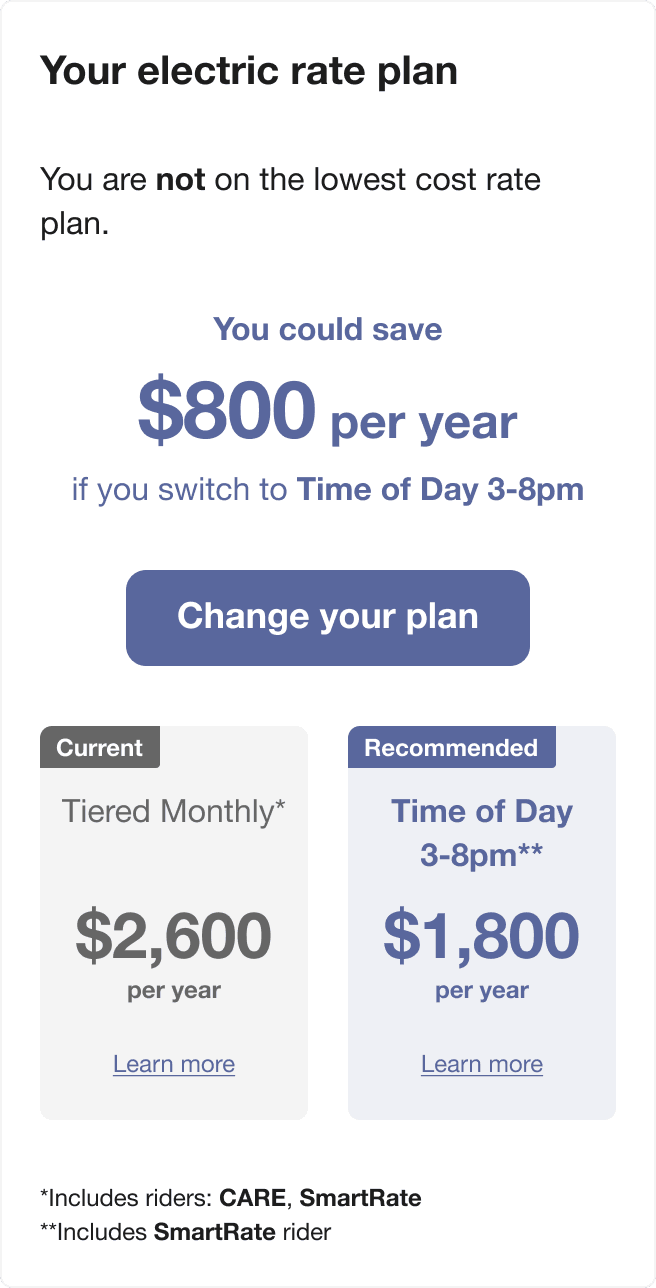
A “rider” is an additional feature or adjustment that can be added to a customer’s electricity rate plan. Riders are usually optional or apply to specific groups of customers, and they modify how the total bill is calculated—either by adding extra charges, discounts, or special rules. In this case, when customers click Learn more, they will see additional rate details, including all relevant rider information, providing a complete picture to guide their decision. This helps customers make informed choices by clearly showing which special rate characteristics are factored into the estimated annual costs for each plan.
Vertical Layout
Depending on your setup and configuration, the widget may display the rate plan cards vertically stacked on one another. The widget may also switch to the vertical layout automatically based on the length of the currency values or the rate plan name length. For example, business customers may see longer cost values, in which case the widget may automatically switch to the vertical layout.