Running the CM Content Upgrade Process for Integration Flows
Integration flows are developed using components from two or more Oracle Utilities Testing Accelerator product packs belonging to different Oracle Utilities Enterprise applications.
Before upgrading integration flows, import the product packs required for the destination product versions. During an upgrade, Oracle Utilities Testing Accelerator automatically imports the product pack for the Oracle Utilities Enterprise cloud service that it is part of. To import additional product packs used by the integration flows, navigate to Tools > Import > Product Pack Import.
For details, refer to the Product Pack Import section in Development Accelerator Tools.
Triggering the CM Content Upgrade process is the same for both the integration flows and non-integration flows. To upgrade an existing set of flows, follow the steps in the Running the CM Content Upgrade Process for Flows section.
After step 7, during the initiation phase, the CM Content Upgrade process checks to see if any of the flows being upgraded use components from two or more product packs. If it finds such a flow/flows, it determines them as integration flows. The CM Content Upgrade process will then prompt to select the “from” and “to” product pack versions for each of the source product from which components have been used in the flow.
Figure 6-3 Product mapping for integration flow upgrades
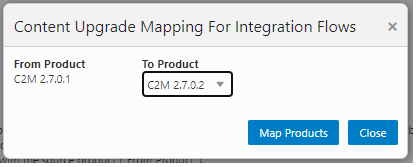
After selecting the appropriate “from” and “to” product versions, click Map Products. The CM Upgrade process upgrades the flows by mapping the components appropriately between various product packs.
The flows being upgraded will still be created under the To Product specified in the main screen of the CM Content Upgrade process (before step 7 of the process). The upgrade mapping for integration flows only defines the component mapping to be done for integration flows.
Example: If one or more flows are created in CCS 26.4 and they use components from WACS 26.4 along with CCS 26.4 components, then during the course of the CM content upgrade process, the product mapping screen will be displayed with the source product as WACS 26.4 and the destination product containing a list of available product packs in UTA, such as WACS 26.4/WACS 26.10, and so on. To proceed with the upgrade, the appropriate destination product needs to be selected. If WACS 26.10 is selected as the destination product for WACS 26.4 components, in this example, then the upgrade process will upgrade the flows from CCS 26.4 to CCS 26.10 and will also upgrade all the WACS 26.4 components being used in the upgraded CCS 26.10 flows to WACS 26.10.