Note:
- This tutorial requires access to Oracle Cloud. To sign up for a free account, see Get started with Oracle Cloud Infrastructure Free Tier.
- It uses example values for Oracle Cloud Infrastructure credentials, tenancy, and compartments. When completing your lab, substitute these values with ones specific to your cloud environment.
Automate OCI IAM Identity Domain Users Capability Management using Tags and OCI Functions
Introduction
As a security best practice, customers are looking to disable the unused capabilities of Oracle Cloud Infrastructure Identity and Access Management (OCI IAM) users. This will help them to avoid any attack through non-standard credentials like API keys, auth token, and so on.
User capabilities are managed by an administrator in the user’s details. Each user can see their capabilities, but only an administrator can enable or disable them. The user capabilities available to federated users are:
- Console password
- API signing key
- Auth tokens
- Simple Mail Transfer Protocol (SMTP) credentials
- Customer secret keys
- OAuth 2.0 client credentials
Note: The console password capability is not available for federated users. Federated users authenticate to the console through their Identity Provider (IdP), where their sign-in passwords are managed.
By default, these capabilities are enabled when you provision new users, allowing users to create these credentials for themselves. For more information about these user credentials, see Working with User Credentials.
This solution helps to automate the capability management of existing or new users with the help of tags. This automation has two modes:
-
Bulk Mode: Process all the users in a domain, without any input payload. This can be executed or invoked with OCI Resource Scheduler or manually.
-
Single Mode: Execute the function automatically on a single user based on the creation events (user created event) generated with configured event rule.
Integration with the OCI Events Service ensures capabilities are properly managed for new users based on the tags provided while creation.
Objectives
- Implement a native solution to manage the OCI IAM identity domain users capabilities based on the tags and function.
Prerequisites
-
Access to an OCI tenancy.
-
Privileges to manage OCI Events Service rules, Oracle Applications, OCI Functions and OCI Tagging.
Task 1: Set Up the Required Policies and OCI IAM Permissions
Each component of this solution must have access to the OCI resources it interacts with. To follow this tutorial, the following permissions are required.
-
User Policies: Manage OCI Event Service rules and OCI Functions.
-
Service Policy: Grant the function permission to manage the user capabilities. A dynamic group is required.
For more information about detailed policies, see Details for the Events Service and Details for Functions.
Task 2: Define Tag Namespace, Tag Keys and Tag Values
Tags are the base for this solution, so required tag namespace and tag key should be in place.
Task 2.1: Create Tag Namespace
-
Go to the OCI Console, navigate to Governance & Administration, Tenancy Management and click Tag Namespaces.
-
A list of the tag namespaces in your current compartment is displayed. Click Create Tag Namespaces.
-
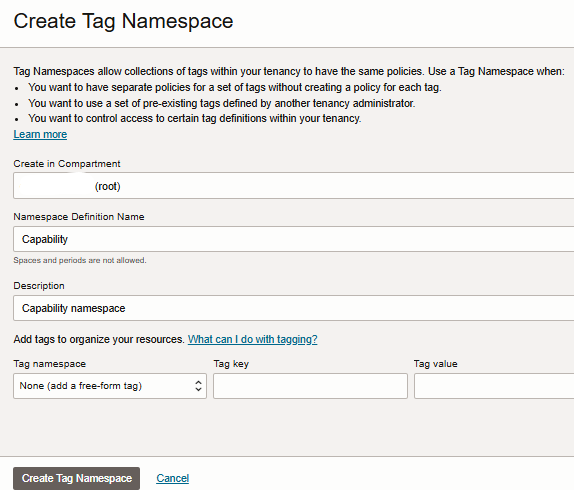
In the Create Tag Namespace page, enter the following information.
- Create in Compartment: Select the compartment in which you want to create the namespace definition.
- Namespace Definition Name: Enter a unique name for this set of tags. The name must be unique within your tenancy. Tag namespace is case insensitive. You cannot change this value later. Avoid entering confidential information.
- Description: Enter a friendly description. You can change this value later if you want to.
-
Click Create Tag Namespace.
Task 2.2: Create Tag Key Definition
-
In the Tag Namespaces page, click the tag namespace you want to add the tag key definition to.
-
In the Tag Namespace Details page, click Create Tag Key Definition.
-
In the Create Tag Key Definition page, enter the following information.
- Tag Key: Enter the key. Value should be one of api_keys, console_password, auth_tokens, customer_secret_keys, db_credentials, o_auth2_client_credentials and smtp_credentials.
- Description: Enter a friendly description.
- Cost-tracking: Select to enable this tag for cost tracking. You can use upto 10 cost-tracking tags in your tenancy.
-
In Tag Value Type, select A List of Values and enter Yes in Values where these capabilities are needed otherwise they will be disabled for a user.
-
Click Create Tag Key Definition.

Task 2.3: Add Tags to the User
-
Add tags to the existing user.
-
Go to the OCI Console, navigate to Identity & Security, Identity and click Domains.
-
A list of the domains in your current compartment is displayed. Select the domain and click Users. Find and click the user you want to add the tag.
-
From the More Actions drop-down menu, click Add Tags.
-
In the Add Tags page, enter the following information.
- Select Tag Namespace.
- Select Tag Key.
- In Value, select one from the list.
- To apply another tag, click Add Tag.
-
When finished adding tags, click Add Tags.
-
-
Add to the new user. Add tags from the Show advance options while creating a new user.
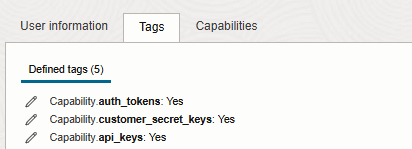
Note: Add tags for all capabilities which you want enabled.
Task 3: Develop and Deploy OCI Functions
The function will read the tags on the users and take action on the capability. To achieve that, it performs the following operations:
-
Read the tag namespace (
tag_namespace) from the function configuration. -
Read the capabilities to manage (
manage_capability) from the function configuration. -
Read the function feature input (
function_feature) from the function configuration. -
Read the target domains (
domain_ocids) from the function configuration (in case of bulk mode). -
Check the tags on the users.
-
Disable or enable the capability for user as per the missing tags.
Download the function code from GitHub, customize the code, and deploy it.
-
Download the GitHub repository from here: iam-user-capability-management.
-
Follow the instructions mentioned in the Create and deploy OCI function.
For more information, see Creating functions.
Task 4: Create Schedule in OCI Resource Scheduler
-
Go to the OCI Console, navigate to Governance & Administration, Resource Scheduler and click Schedules.
-
Click Create a Schedule.
-
In Basic information, enter schedule name, schedule description and action to be executed as start and click Next.
-
In Resources, select your function compartment and function and click Next.
-
In Schedule, select Daily and configure other parameters as per your requirement.
-
Repeat every: Enter how often you would like the schedule to run or use the menu to select an interval. The minimum value is 1. The maximum value is 99.
-
Start Time: Enter the time in hours and minutes in 24-hour format.
-
-
Click Next and review the information. Click Create Schedule.
This will run your function on a scheduled interval. For more information, see Creating Schedules.
Task 5: Set up Events Rule in OCI Events Service
-
Go to the OCI Console, navigate to Observability & Management, Events Service and click Rules.
-
Select the root compartment and click Create Rule.
-
Enter Display Name and Description.
-
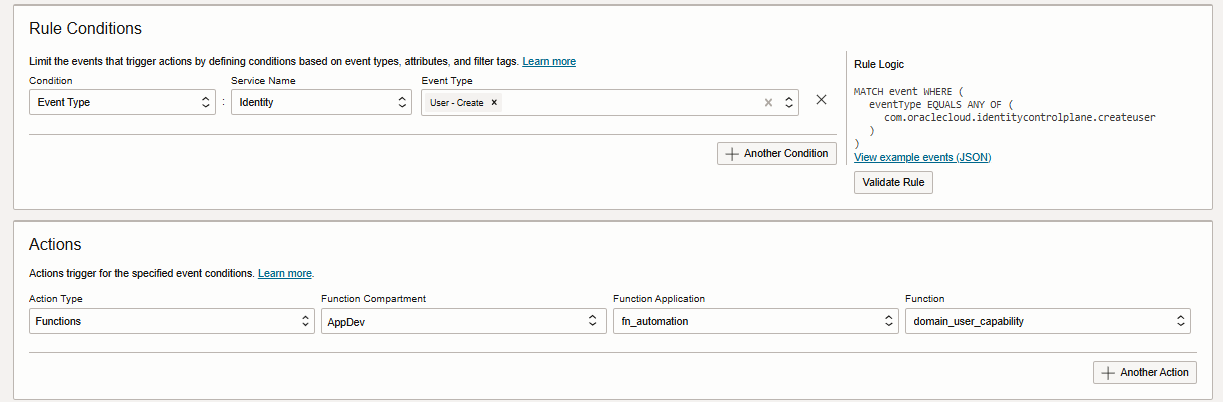
In the Rule Conditions section, enter the following information.
- Condition: Select Event Type.
- Service Name: Select Identity.
- Event Type: Select User-Create.
-
In the Actions section, enter the following information.
- Action Type: Select Functions.
- Select Function Application and Function.
-
Click Create Rule.
This will invoke the function when any new user gets created. For more information, see Creating an Events Rule.
Note: Enabling logs for events rules and function applications will give additional monitoring capabilities.
Related Links
-
Enable credential expiry notification for OCI Identity and Access Management
-
Enable Auto Rotation of Oracle Cloud Infrastructure Identity and Access Management Credentials
Acknowledgments
- Author - Bhanu Prakash Lohumi
More Learning Resources
Explore other labs on docs.oracle.com/learn or access more free learning content on the Oracle Learning YouTube channel. Additionally, visit education.oracle.com/learning-explorer to become an Oracle Learning Explorer.
For product documentation, visit Oracle Help Center.
Automate OCI IAM Identity Domain Users Capability Management using Tags and OCI Functions
G24370-01
January 2025