Set Up MUD Projects
In the fictional company example, the MUD administrator for Eden Corporation, Adam Straight, now handles the next few steps to create the projects and get them ready for checkout.
Adam Straight creates the MUD directory,RPD_main, where the master Oracle BI repository is stored. This master Oracle BI repository contains the superset of content for the developers. The users check their projects out of the master, and merge their project back into the master when they want to share their changes. Sally copies her started Oracle BI repository to the master folder so that Adam can create the first two projects, ProjRevenue and ProjQuota.
Adam opens the master Oracle BI repository in the Model Administration Tool and selects Projects. Then, in the Project Manager, he selects New Project. Adam names the project ProjRevenue and proceeds to pick the logical fact tables at the center of the project. The top object in the list expands to show the logical fact tables, but he has a choice of seeing them grouped by the Business Model to which they belong, or by Subject Area.
The image shows the different ways Adam can view the logical fact tables.
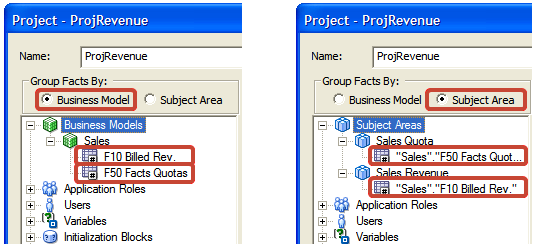
Adam decides to group facts by Business Model for convenience, although he could've used the Subject Area grouping to select the same fact table. He adds the fact table, plus the default application roles and subject areas specified for this project. Because there are no custom-defined application roles, users, variables, or initialization blocks yet, he can't yet add them to the project. Adam repeats this process for ProjQuota, the second project.
Some of the explicit objects are the same in both projects, because both projects share application roles. Similarly, many of the implicit project objects are shared, particularly dimension tables in both the logical and physical models. Projects are a convenience for creating small subsets that are easy to work with. Project aren't for security. It's critical in the governance process that the owner of each top-level object is assigned and documented for the whole team, because this enables the developers to avoid conflicts.
Adam included the logical fact table F10 Bill Rev in the project, even though it's owned by Sally Andre, not by Scott Baker, the owner of this project. He did this because Scott needs to create a measure that derives from measures in both fact tables, Sales percent of quota. Again, the point is to provide the user with the subset of content they need to implement their requirements, not just the objects they own.
Adam saves the master Oracle BI repository to the shared drive, RPD_Main, as sales.rpd. It's now ready for users to check out projects and begin working in parallel.