1 Introduction to the SAP Concur Connector
Oracle Identity Governance is a centralized identity management solution that provides self-service, compliance and provisioning services for applications residing on-premises or on the Cloud. Oracle Identity Governance connectors are used to integrate Oracle identity Governance with the external identity-aware applications.
The SAP Concur Connector lets you create and onboard SAP Concur applications in Oracle Identity Governance.
Note:
In this guide, the connector that is deployed using the Applications option on the Manage tab of Identity Self Service is referred to as an AOB application.
From Oracle Identity Governance release 12.2.1.3.0 onward, connector deployment is handled using the application onboarding capability of Oracle Identity Self Service. This capability lets business users to onboard applications with minimum details and effort. The connector installation package includes a collection of predefined templates (XML files) that contain all the information required for provisioning and reconciling data from a given application or target system. These templates also include basic connectivity and configuration details specific to your target system. The connector uses information from these predefined templates allowing you to onboard your applications quickly and easily using only a single and simplified UI.
Application onboarding is the process of registering or associating an application with Oracle Identity Governance and making that application available for provisioning and reconciliation of user information.
The following topics provide a high-level overview of the SAP Concur connector:
1.1 Certified Components
These are the software components and their versions required for installing and using the SAP Concur connector.
Table 1-1 Certified Components
| Component | Requirement for AOB Application |
|---|---|
|
Oracle Identity Manager or Oracle Identity Governance |
You can use one of the following releases of Oracle Identity Manager or Oracle Identity Governance:
|
|
Oracle Identity Governance or Oracle Identity Manager JDK |
JDK 1.8 or later |
|
Target system |
SAP Concur |
|
Target API Version |
v4 |
|
Connector Server |
12.2.1.3.1 or 12.2.1.3.0 |
|
Connector Server JDK |
|
1.2 Usage Recommendation
If you are using Oracle Identity Governance release 14c (14.1.2.1.0) or 12c (12.2.1.3.0) or later, then use the latest 12.2.1.x version of this connector. Deploy the connector using the Applications option on the Manage tab of Identity Self Service.
1.3 Certified Languages
The connector supports the following languages:
-
Arabic
-
Chinese (Simplified)
-
Chinese (Traditional)
-
Czech
-
Danish
-
Dutch
-
English (US)
-
Finnish
-
French
-
French (Canadian)
-
German
-
Greek
-
Hebrew
-
Hungarian
-
Italian
-
Japanese
-
Korean
-
Norwegian
-
Polish
-
Portuguese
-
Portuguese (Brazilian)
-
Romanian
-
Russian
-
Slovak
-
Spanish
-
Swedish
-
Thai
-
Turkish
1.4 Supported Connector Operations
These are the list of operations that the connector supports for your target system.
Table 1-2 Supported Connector Operations
| Operation | Supported? |
|---|---|
|
User Management |
|
|
Create User |
Yes |
|
Update User |
Yes |
|
Enable User |
Yes |
|
Disable User |
Yes |
|
Grant Management |
|
|
Assign and Revoke Spend Role |
Yes |
|
Assign and Revoke Custom Data |
Yes |
1.5 Connector Architecture
The SAP Concur is implemented by using the Identity Connector Framework (ICF).
The ICF is a component that is required in order to use Identity Connector. ICF provides basic reconciliation and provisioning operations that are common to all Oracle Identity Governance connectors. In addition, ICF provides common features that developers would otherwise need to implement on their own, such as, buffering, time outs, and filtering. ICF is distributed together with Oracle Identity Governance. Therefore, you do not need to configure or modify ICF.
The following figure shows the architecture of the SAP Concur:
Figure 1-1 Architecture of the SAP Concur Connector
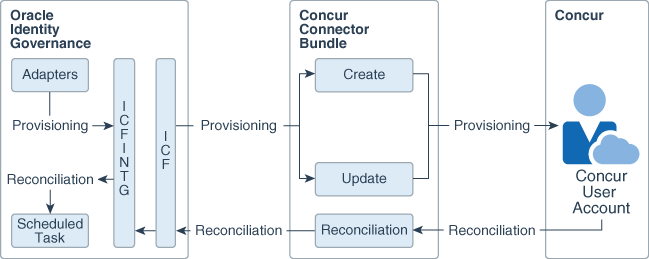
Description of "Figure 1-1 Architecture of the SAP Concur Connector"
The connector is configured to run in one of the following modes:
- Account management
Account management is also known as target resource management. In this mode, the target system is used as a target resource and the connector enables the following operations.
-
Provisioning
Provisioning involves creating, updating, or deleting users on the target system through Oracle Identity Governance. During provisioning, the Adapters invoke ICF operation, ICF in turn invokes create operation on the SAP Concur Identity Connector Bundle and then the bundle calls the OAuth API. The OAuth API uses OAuth method (Native Flow) to connect to SAP Concur. SAP Concur accepts provisioning data from the bundle, carries out the operation, and returns the response back to the bundle. The bundle then passes it to the adapters.
-
Target resource reconciliation
During reconciliation, a scheduled task invokes an ICF operation. ICF in turn invokes a search operation on the SAP Concur Bundle and then the bundle calls SAP Concur API for Reconciliation operation. The API extracts user records that match the reconciliation criteria and hands them over through the bundle and ICF back to the scheduled task, which brings the records to Oracle Identity Governance.
Each record fetched from the target system is compared with SAP Concur resources that are already provisioned to OIM Users. If a match is found, then the update made to the SAP Concur record from the target system is copied to the SAP Concur resource in Oracle Identity Governance. If no match is found, then the Name of the record is compared with the User Login of each OIM User. If a match is found, then data in the target system record is used to provision a SAP Concur resource to the OIM User.
The SAP Concur Identity Connector Bundle connects to the OAuth API using the OAuth 2.0 security protocol (Native Flow). The SAP Concur OAuth API enables programmatic access to SAP Concur Connector via the SAP Concur REST API endpoint. Applications can leverage the REST API to create, read, and update directory data and objects, including user records
See also:
Understanding the Identity Connector Framework in Oracle Fusion Middleware Developing and Customizing Applications for Oracle Identity Governance for more information about ICF.
1.6 Supported Use Cases
The SAP Concur is used to integrate Oracle Identity Governance with SAP Concur to ensure that all SAP Concur accounts are created and updated on an integrated cycle with the rest of the identity-aware applications in your enterprise.
The SAP Concur supports management of identities for Cloud Identity, Synchronized Identity, and Federated Identity models of SAP Concur. In a typical IT scenario, an organization using Oracle Identity Governance wants to manage accounts across SAP Concur Cloud Service.
SAP Concur User Management is the most common scenario for this connector.
An organization using SAP Concur wants to integrate with Oracle Identity Governance to manage identities. The organization wants to manage its user identities by creating them in the target system using Oracle Identity Governance. The organization also wants to synchronize user identity changes performed directly in the target system with Oracle Identity Governance. In such a scenario, a quick and easy way is to install the SAP Concur connector and configure it with your target system by providing connection information.
To create a new user in the target system, fill in and submit the OIM process form to trigger the provisioning operation. The connector executes the CreateOp operation against your target system and the user is created on successful execution of the operation. Similarly, operations like update can be performed.
To search or retrieve the user identities, you must run a scheduled task from Oracle Identity Governance. The connector will run the corresponding SearchOp against the user identities in the target system and fetch all the changes to Oracle Identity Governance
1.7 Connector Features
The features of the connector include support for connector server, user provisioning, full reconciliation, and limited reconciliation.
The following table provides the list of features supported by the AOB application.
Table 1-3 Supported Connector Features Matrix
| Feature | AOB Application |
|---|---|
| User Provisioning | Yes |
| Full reconciliation | Yes |
| Limited (Filtered) reconciliation | Yes |
| Delete reconciliation | No |
| Use connector server | Yes |
| Transformation and validation of account data | Yes |
| Perform connector operations in multiple domains | Yes |
| Provide secure communication to the target system through SSL | Yes |
| Clone applications or create new application instances | Yes |
| Support for paging | Yes |
| Test connection | Yes |
The following topics provide more information on the features of the AOB application:
1.7.1 User Provisioning
User provisioning involves creating or modifying the account data on the target system through Oracle Identity Governance.
1.7.2 Full Reconciliation
You can perform full reconciliation to bring all existing user data from the target system to Oracle Identity Governance. You can perform a full reconciliation run at any time. .
You can perform a full reconciliation run at any time. See Performing Full Reconciliation.
1.7.3 Limited (Filtered) Reconciliation
You can reconcile records from the target system based on a specified filter criterion.
To limit or filter the records that are fetched into Oracle Identity Governance during a reconciliation run, you can specify the subset of added or modified target system records that must be reconciled.
1.7.4 Transformation and Validation of Account Data
You can configure transformation and validation of account data that is brought into or sent from Oracle Identity Governance during reconciliation and provisioning operations by writing Groovy scripts while creating your application.
See Validation and Transformation of Provisioning and Reconciliation Attributes in Oracle Fusion Middleware Performing Self Service Tasks with Oracle Identity Governance.
1.7.5 Support for the Connector Server
Connector Server is one of the features provided by ICF. By using one or more connector servers, the connector architecture permits your application to communicate with externally deployed bundles.
A Java connector server is useful when you do not wish to execute a Java connector bundle in the same VM as your application. It can be beneficial to run a Java connector on a different host for performance improvements if the bundle works faster when deployed on the same host as the native managed resource.
See Using an Identity Connector Server in Oracle Fusion Middleware Developing and Customizing Applications for Oracle Identity Governance for information about installing, configuring, and running the Connector Server, and then installing the connector in a Connector Server.
1.7.6 Support for Cloning Applications and Creating Instance Applications
You can configure this connector for multiple installations of the target system by cloning applications or by creating instance applications.
When you clone an application, all the configurations of the base application are copied into the cloned application. When you create an instance application, it shares all configurations as the base application.
For more information about these configurations, see Cloning Applications and Creating Instance Applications in Oracle Fusion Middleware Performing Self Service Tasks with Oracle Identity Governance.
1.7.7 Secure Communication to the Target System
Configure SSL to secure data communication between Oracle Identity Governance and the SAP Concur target system.
You can configure SSL to secure communication between Oracle Identity Governance and the target system.
For more information see Configuring SSL.
1.8 Third-Party Products and Details
Locate third-party products and details for Oracle Identity Manager Connector - SAP Concur.
For information about third-party products, open source software, and separately licensed software used with this connector, see Third-Party Products and Details for Oracle Identity Manager Connector - SAP Concur in Oracle Fusion Middleware Licensing Information User Manual.