3 Configuring the Connector
While creating a target application, you must configure connection-related parameters that the connector uses to connect to Oracle Identity Governance with your target system and perform connector operations. In addition, you can view and edit attribute mappings between the process form fields in Oracle Identity Governance and target system columns, predefined correlation rules, situations and responses, and reconciliation jobs.
3.1 Basic Configuration Parameters
These are the connection-related parameters that Oracle Identity Governance requires to connect to a Siebel application.
Note:
Unless specified, do not modify entries in the below table.Table 3-1 Parameters in the Basic Configuration
| Parameter | Mandatory ? | Description |
|---|---|---|
| keyFieldName | Yes |
Enter the search attribute in the Siebel Business Component that must be treated as the unique identifier for an account. The format of this parameter is as follows: ATTRIBUTE_TYPE;ATTRIBUTE_NAME Default Value: common;Login Name |
| userBusComp | Yes |
Business Component of 'User' userTypeDefault value: User |
| password | Yes |
Password of the target system user account that you want to use for connector operations Sample value: password |
| objectManager | Yes |
Name of the object manager You can specify any one of the following: For English: For Brazilian Portuguese: For French: For German: For Italian: For Japanese: For Korean: For Simplified Chinese: For Spanish: For Traditional Chinese: |
|
encryption |
No |
The type of encryption for secure communication If encryption is required, then specify RSA. Otherwise, specify None. Note: The value of this parameter is case-sensitive.Default value: None. |
| employeeBusObj | Yes |
The business object of Employee userType. Default value: Employee |
| Connector Server Name | No |
The name of the IT resource of the type "Connector Server." Note: Enter a value for this parameter only if you have deployed the Siebel User Management connector in the Connector Server. |
| userName | Yes |
The User ID of the target system user account that you want to use for connector operations Sample value: johnsmith |
| Configuration Lookup | No |
Name of the lookup definition that holds connector configuration entries used during reconciliation and provisioning If you have configured your target system as a target resource, then the default value is If you have configured your target system as a trusted source, then the default value is |
| gatewayServerPort | No |
Listening port number for Siebel Connection Broker (SCBroker). Sample value : 2321 |
|
userBusObj |
Yes |
Business Object of the 'User' userType Default value: Users. |
|
siebelServer |
Yes |
Name of the target system server Sample value: |
|
gatewayServer |
Yes |
Name of the Gateway server A Gateway server is a Windows service or UNIX daemon process that stores component definitions and assignments, operational parameters, and connectivity information. Sample value:
|
|
Version |
Yes |
The version of the target system supported by this connector. Sample value: 15.5 Note: If the target system version that you are using is Siebel 7.5.x or 7.5.x.x then enter 7.5 only as the value of this parameter. For example, if you are using Siebel 7.5.3.7 as the target system, then enter 7.5. |
|
ssoFlag |
Yes |
Enter True to specify that the target system is configured to use a SSO solution for authentication. Otherwise, enter False. Default value: false |
|
trustedToken |
No |
Enter the trusted token value that you specify while configuring the target system to communicate with the SSO system. If you have not configured SSO authentication, then enter No. Sample value: no |
|
enterpriseServer |
Yes |
Name of the Enterprise server. An Enterprise is a logical collection of Siebel servers that access a single database server and file system. Sample value: siebel |
|
Language |
Yes |
Language in which the text on UI is displayed. You can specify any one of the following:
|
|
employeeBusComp |
Yes |
Business Component of Employee userType Default value: Employee |
3.2 Advanced Settings Parameters
These are the configuration-related entries that the connector uses during reconciliation and provisioning operations.
Note:
-
Unless specified, do not modify entries in the below table.
-
All parameters in the below table are mandatory.
Table 3-2 Advanced Settings Parameters
| Parameter | Description |
|---|---|
| Bundle Name |
This entry holds the name of the connector bundle. Default value: |
| Bundle Version |
This entry holds the version of the connector bundle. Default value: 12.3.0 |
| Connector Name |
This entry holds the name of the connector class. Default value: |
3.3 Attribute Mappings
The following topic provides the attribute mappings details.
3.3.1 Attribute Mappings for the Target Application
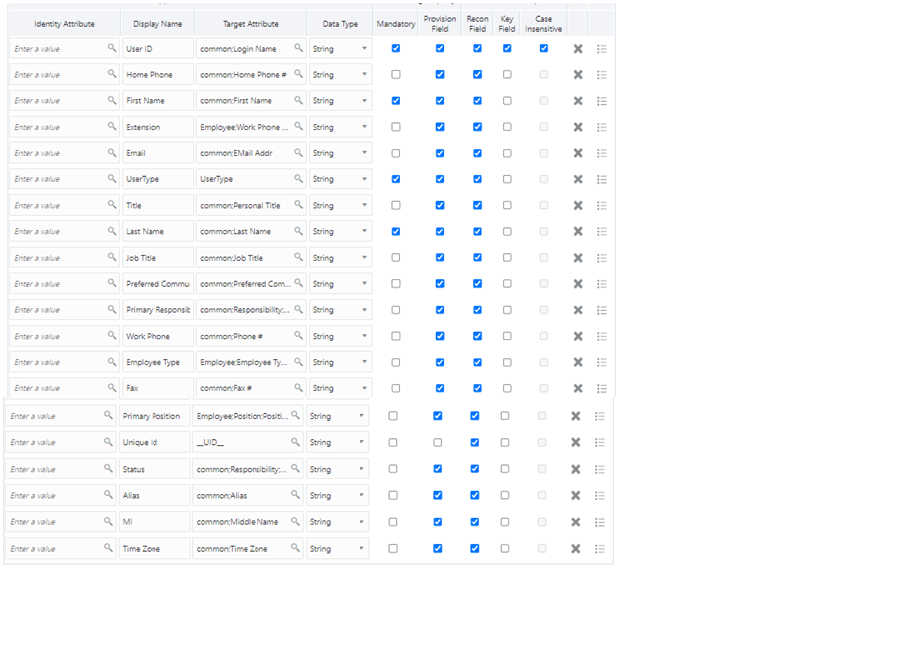
The Schema page for a target application displays the default schema (provided by the connector) that maps Oracle Identity Governance attributes to target system attributes. The connector uses these mappings during reconciliation and provisioning operations.
Table 3-3 lists the user-specific attribute mappings between the process form fields in Oracle Identity Governance and Siebel target application attributes. The table also lists whether a specific attribute is used during provisioning or reconciliation and whether it is a matching key field for fetching records during reconciliation.
If required, you can edit the default attribute mappings by adding new attributes or deleting existing attributes as described in Creating a Target Application Creating a Target Application in Oracle Fusion Middleware Performing Self Service Tasks with Oracle Identity Governance.Table 3-3 Default Attributes for Siebel Target Application
| Display Name | Target Attribute | Data Type | Mandatory Provisioning Property? | Provision Field? | Recon Field? | Key Field? | Case Insensitive? |
|---|---|---|---|---|---|---|---|
| User Id | common;Login Name | String | Yes | Yes | Yes | Yes | Yes |
| Home Phone | common;Home Phone # | String | No | Yes | Yes | No | Not applicable |
| First Name | common;First Name | String | Yes | Yes | Yes | No | Not applicable |
| Extension | Employee;Work Phone Extension | String | No | Yes | Yes | No | Not applicable |
| common;EMail Addr | String | No | Yes | Yes | No | Not applicable | |
| UserType | UserType | String | Yes | Yes | Yes | No | Not applicable |
| Title | common;Personal Title | String | No | Yes | Yes | No | Not applicable |
| Last Name | common;Last Name | String | Yes | Yes | Yes | No | Not applicable |
| Job Title | common;Job Title | String | No | Yes | Yes | No | Not applicable |
| Preferred Communications | common;Preferred Communications | String | No | Yes | Yes | No | Not applicable |
| Primary Responsibility | common;Responsibility;Name;true | String | No | Yes | Yes | No | Not applicable |
| Work Phone | common;Phone # | String | No | Yes | Yes | No | Not applicable |
| Employee Type | Employee;Employee Type Code | String | No | Yes | Yes | No | Not applicable |
| Fax | common;Fax # | String | No | Yes | Yes | No | Not applicable |
| Primary Position | Employee;Position;Position Id;true | String | No | Yes | Yes | No | Not applicable |
| Unique Id | __UID__ | String | No | No | Yes | No | Not applicable |
| Status | common;Responsibility;Name;true;[WRITEBACK] | String | No | Yes | Yes | No | Not applicable |
| Alias | common;Alias | String | No | Yes | Yes | No | Not applicable |
| MI | common;Middle Name | String | No | Yes | Yes | No | Not applicable |
| Time Zone | common;Time Zone | String | No | Yes | Yes | No | Not applicable |
Figure 3-1 shows the default User account attribute mappings.
Figure 3-1 Default Attribute Mappings for Siebel User Account
Siebel Position Entitlement
Table 3-4 lists the positions forms attribute mappings between the process form fields in Oracle Identity Governance and Siebel target application attributes. The table lists whether a given attribute is mandatory during provisioning. It also lists whether a given attribute is used during reconciliation and whether it is a matching key field for fetching records during reconciliation.
If required, you can edit the default attribute mappings by adding new attributes or deleting existing attributes as described in Creating a Target Application in Oracle Fusion Middleware Performing Self Service Tasks with Oracle Identity Governance.
Default Attribute Mappings for Positions
Table 3-4 shows the default attribute mappings for positions.
Table 3-4 Default Attribute Mappings for Positions
| Display Name | Target Attribute | Data Type | Mandatory Provisioning Property? | Recon Field? | Key Field? | Case Insensitive? |
|---|---|---|---|---|---|---|
| Position | Employee;Position;Position Id;false | String | Yes | Yes | Yes | No |
Figure 3-2 shows the default Positions Entitlement mapping.
Figure 3-2 Default Attribute Mappings for Siebel Positions

Siebel Responsibilities Entitlement
Table 3-5 lists the responsibility forms attribute mappings between the process form fields in Oracle Identity Governance and Siebel target application attributes. The table lists whether a given attribute is mandatory during provisioning. It also lists whether a given attribute is used during reconciliationand whether it is a matching key field for fetching records during reconciliation.
If required, you can edit the default attribute mappings by adding new attributes or deleting existing attributes as described in Creating a Target Application in Oracle Fusion Middleware Performing Self Service Tasks with Oracle Identity Governance.
Table 3-5 shows the default attribute mappings for responsibilities.
Table 3-5 Default Attribute Mappings for Responsibilities
| Display Name | Target Attribute | Data Type | Mandatory Provisioning Property? | Recon Field? | Key Field? | Case Insensitive? |
|---|---|---|---|---|---|---|
| Responsibility | common;Responsibility;Name;false | String | Yes | Yes | Yes | No |
Figure 3-3 shows the default attribute mappings for responsibilities.
Figure 3-3 Default Attribute Mappings for Responsibilities

3.3.2 Attribute Mappings for an Authoritative Application
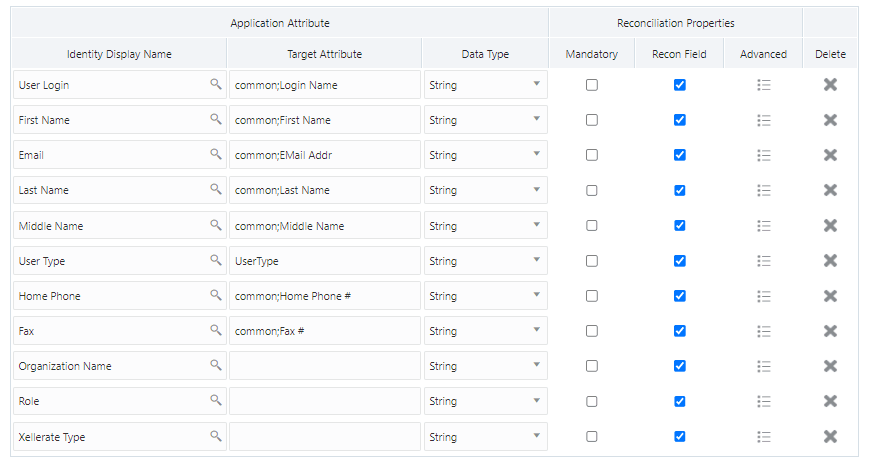
Schema page for an authoritative application displays the default schema (provided by the connector) that maps Oracle Identity Governance attributes to authoritative system attributes. The connector uses these mappings during reconciliation and provisioning operations.
Table 3-6 lists the user-specific attribute mappings between the process form fields in Oracle Identity Governance and Siebel Authoritative Application Attributes.
If required, you can edit these attributes mappings by adding new attributes or deleting existing attributes on the Schema page as described in Creating an Authoritative Application in Oracle Fusion Middleware Performing Self Service Tasks with Oracle Identity Governance.
You may use the default schema that has been set for you or update and change it before continuing to the next step.
The Organization Name, Xellerate Type, and Role identity attributes are mandatory fields on the OIG User form. They cannot be left blank during reconciliation. The target attribute mappings for these identity attributes are empty by default because there are no corresponding columns in the target system. Therefore, the connector provides default values (as listed in the “Default Value for Identity Display Name” column of Table 3-6) that it can use during reconciliation. For example, the default target attribute value for the Organization Name attribute is Xellerate Users. This implies that the connector reconciles all target system user accounts into the Xellerate Users organization in Oracle Identity Governance. Similarly, the default attribute value for Xellerate Type attribute is End-User, which implies that all reconciled user records are marked as end users.
Table 3-6 Default Attribute Mappings for Siebel Authoritative Application
| Identity Display Name | Target Attribute | Data Type | Mandatory Reconciliation Property? | Recon Field? | Advanced Flag Settings | Default Value for Identity Display Name |
|---|---|---|---|---|---|---|
|
User Login |
common;Login Name |
String |
No |
Yes |
Yes |
NA |
|
First Name |
common;First Name |
String |
No |
Yes |
Yes |
NA |
|
|
common;EMail Addr |
String |
No |
Yes |
Yes |
NA |
|
Last Name |
common;Last Name |
String |
No |
Yes |
Yes |
NA |
|
Middle Name |
common;Middle Name |
String |
No |
Yes |
Yes |
NA |
|
User Type |
UserType |
String |
No |
Yes |
Yes |
Employee |
|
Home Phone |
common;Home Phone # |
String |
No |
Yes |
Yes |
NA |
|
Fax |
common:Fax # |
String |
No |
Yes |
Yes |
NA |
|
Organization Name |
NA |
String |
No |
Yes |
Yes |
Xellerate Users |
|
Role |
NA |
String |
No |
Yes |
Yes |
Full-Time |
|
Xellerate Type |
NA |
String |
No |
Yes |
Yes |
End-User |
Figure 3-4 shows the default User account attribute mappings.
Figure 3-4 Default Attribute Mappings for Siebel Authoritative Application
3.4 Additional Configuration to Support the Enable/Disable Functionality
While onboarding an application in the schema page, add the following schema attribute or add it post configuring the application.
Table 3-7 Default Attributes for Siebel Target Application to Support the Enable/Disable Functionality
| Display Name | Target Attribute | Data Type | Mandatory Provisioning Property? | Provision Field? | Recon Field? | Key Field? | Case Insensitive? |
|---|---|---|---|---|---|---|---|
|
User Status |
__ENABLE__ |
String |
No |
Yes |
Yes |
No |
NA |
Figure 3-5 Default Attribute Mappings for Siebel Target Application to Support the Enable/Disable Functionality

Table 3-8 Default Attributes for Siebel Authoritative Application to Support the Enable/Disable Functionality
| Display Name | Target Attribute | Data Type | Mandatory Provisioning Property? | Recon Field? | Advanced Flag Settings | Default Value for Identity Display Name |
|---|---|---|---|---|---|---|
|
Status |
__ENABLE__ |
String |
No |
Yes |
Yes |
NA |
Figure 3-6 Default Attribute Mappings for Siebel Authoritative Application to support Enable/Disable functionality

3.5 Correlation Rules
Learn about the predefined rules, responses and situations for Target and Authoritative applications. The connector uses these rules and responses for performing reconciliation.
3.5.1 Correlation Rules for the Target Application
When you create a target application, the connector uses correlation rules to determine the identity to which Oracle Identity Governance must assign a resource.
Predefined Identity Correlation Rule for a Siebel Target Application
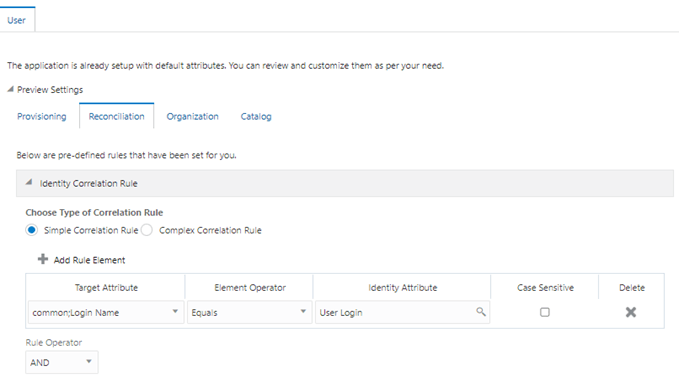
By default, the Siebel connector provides a simple correlation rule when you create a target application. The connector uses this correlation rule to compare the entries in Oracle Identity Governance repository and the target system repository, determine the difference between the two repositories, and apply the latest changes to Oracle Identity Governance.
Table 3-9 lists the default simple correlation rule for an Siebel connector. If required, you can edit the default correlation rule or add new rules. You can create complex correlation rules also. For more information about adding or editing simple or complex correlation rules, see Updating Identity Correlation Rule in Oracle Fusion Middleware Performing Self Service Tasks with Oracle Identity Governance.
Table 3-9 Predefined Identity Correlation Rule for a Siebel Target Application
| Target Attribute | Element Operator | Identity Attribute | Case Sensitive? |
|---|---|---|---|
|
common;Login Name |
Equals |
User Login |
No |
-
common;Login Name is a single-valued attribute on the target system that identifies the user account.
-
User Login is the field on the OIG User form.
- Rule operator : AND
Figure 3-7 shows the simple correlation rule for an Siebel target application.
Figure 3-7 Simple Correlation Rule for an Siebel Target Application
Predefined Situations and Responses
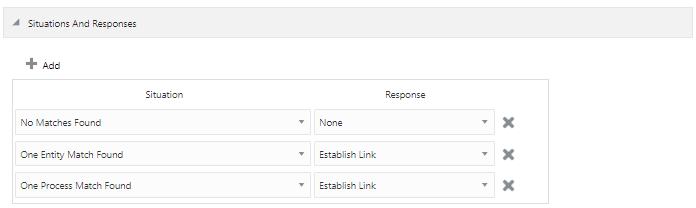
The Siebel connector provides a default set of situations and responses when you create a target application. These situations and responses specify the action that Oracle Identity Governance must take based on the result of a reconciliation event.
Table 3-10 lists the default situations and responses for an Siebel Target application. If required, you can edit these default situations and responses or add new ones. For more information about adding or editing situations and responses, see Updating Situations and Responses in Oracle Fusion Middleware Performing Self Service Tasks with Oracle Identity Governance
Table 3-10 Predefined Situations and Responses for an Siebel Target Application
| Situation | Response |
|---|---|
|
No Matches Found |
None |
|
One Entity Match Found |
Establish Link |
|
One Process Match Found |
Establish Link |
Figure 3-8 shows the situations and responses for an Siebel that the connector provides by default.
Figure 3-8 Predefined Situations and Responses for an Siebel Target Application
3.5.2 Correlation Rules for the Authoritative Application
When you create an authoritative application, the connector uses correlation rules to determine the identity that must be reconciled into Oracle Identity Governance.
Predefined Identity Correlation Rules
By default, the Siebel connector provides a simple correlation rule when you create an authoritative application. The connector uses this correlation rule to compare the entries in Oracle Identity Governance repository and the target system repository, determine the difference between the two repositories, and apply the latest changes to Oracle Identity Governance.
Table 3-11 lists the default simple correlation rule for an Siebel connector. If required, you can edit the default correlation rule or add new rules. You can create complex correlation rules also. For more information about adding or editing simple or complex correlation rules, see Updating Identity Correlation Rule in Oracle Fusion Middleware Performing Self Service Tasks with Oracle Identity Governance.
Table 3-11 Predefined Identity Correlation Rule for an Siebel Authoritative Application
| Authoritative Attribute | Element Operator | Identity Attribute | Case Sensitive? |
|---|---|---|---|
|
common;Login Name |
Equals |
User Login |
No |
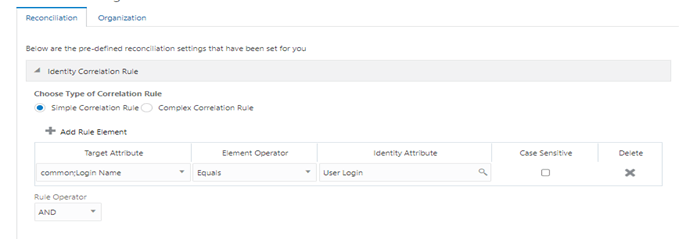
- common;Login Name is a single-valued attribute on the target system that identifies the user account.
-
User Login is the User ID field of the OIG User form.
- Rule operator: AND
Figure 3-9 shows the simple correlation rule for an Siebel Authoritative application.
Figure 3-9 Simple Correlation Rule for an Siebel Authoritative Application
Predefined Situations and Responses
The Siebel connector provides a default set of situations and responses when you create an Authoritative application. These situations and responses specify the action that Oracle Identity Governance must take based on the result of a reconciliation event.
Table 3-12 lists the default situations and responses for an Siebel Authoritative Application. If required, you can edit these default situations and responses or add new ones. For more information about adding or editing situations and responses, see Updating Situations and Responses in Oracle Fusion Middleware Performing Self Service Tasks with Oracle Identity Governance.
Table 3-12 Predefined Situations and Responses for an Siebel Authoritative Application
| Situation | Response |
|---|---|
|
No Matches Found |
Create User |
|
One Entity Match Found |
Establish Link |
|
Multiple Entity Matches Found |
Establish Link |
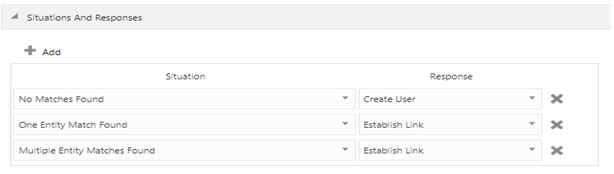
Figure 3-10 shows the situations and responses for an Siebel Authoritative application that the connector provides by default.
Figure 3-10 Predefined Situations and Responses for a Siebel Authoritative Application
3.6 Reconciliation Jobs
These are the reconciliation jobs that are automatically created in Oracle Identity Governance after you create the application.
User Reconciliation Jobs
You can either use these predefined jobs or edit them to meet your requirements. Alternatively,you can create custom reconciliation jobs.
For information about editing these predefined jobs or creating new ones, see Updating Reconciliation Jobs in Oracle Fusion Middleware Performing Self Service Tasks with Oracle Identity Governance.
- Siebel Full User Reconciliation: Use this reconciliation job to reconcile user data from a target applications.
- Siebel User Trusted Reconciliation: Use this reconciliation job to reconcile user data from an authoritative application.
Table 3-13 Parameters of the Siebel Full User Reconciliation Job
| Parameter | Description |
|---|---|
|
Application name |
Name of the AOB application with which the reconciliation job is associated. This value is the same as the value that you provided for the Application Name field while creating your target application. Donotchange the default value. |
|
Custom Recon Query |
Provide a value for this attribute if you want to reconcile the subset of added or modified target system records. Simple query with user attributes, for example:
Query based on positions and responsibilities, for example:
Complex queries, for example:
|
|
Object Type |
This parameter holds the name of the object type for the reconciliation run. Default value:User Donotchange the default value. |
|
Scheduled Task Name |
Name of the scheduled task used for reconciliation. Donotmodify the value of this parameter. |
|
Day Light Saving |
Enter the time, in minutes, that must be added to the time-stamp value stored in the LastExecution Timestamp attribute. Default value: 0 |
|
Incremental Recon Date Attribute |
This attribute holds the name of the target system that maintains the time stamp of target system records. Default value: Updated |
|
Latest Token |
This attribute holds the time stamp at which the last reconciliation run started. The reconciliation engine automatically enters a value in this attribute. Sample value: 23 May 2011 04:30:41 -0700 |
|
Time Zone |
Enter the time zone of the target system database. Default value: GMT-08:00 |
|
UserType |
Specify the type of user that must be reconciled from the target system. You can specify one of the following Siebel user types:
|
Table 3-14 Parameters of the Siebel User Trusted Reconciliation Job
| Parameter | Description |
|---|---|
|
Application name |
Name of the AOB application with which the reconciliation job is associated. This value is the same as the value that you provided for the Application Name field while creating your target application. Do not change the default value |
|
Custom Recon Query |
Provide a value for this attribute if you want to reconcile the subset of added or modified target system records. Simple query with user attributes, for example:
|
|
Object Type |
This parameter holds the name of the object type for the reconciliation run. Default value:User Do not change the default value. |
|
Scheduled Task Name |
Name of the scheduled task used for reconciliation. Donotmodify the value of this parameter. |
|
Day Light Saving |
Enter the time, in minutes, that must be added to the time-stamp value stored in the LastExecution Timestamp attribute. Day Light Saving Default value: 0 |
|
Incremental Recon Date Attribute |
This attribute holds the name of the target system that maintains the time stamp of target system records. Default value: Updated |
|
Latest Token |
This attribute holds the time stamp at which the last reconciliation run started. The reconciliation engine automatically enters a value in this attribute. Sample value: 23 May 2011 04:30:41 -0700 |
|
Time Zone |
Enter the time zone of the target system database. Default value: GMT-08:00 |
|
UserType |
Specify the type of user that must be reconciled from the target system. You can specify one of the following Siebel user types:
|
Target User Delete Reconciliation Job
The Siebel User Target Delete Recon job is used to reconcile data about deleted users from Siebel target application. During a reconciliation run, for each deleted user account on the target system, the Siebel resource is revoked for the corresponding OIM User.
Table 3-15 Parameters of the Siebel Target User Delete Reconciliation Job
| Parameter | Description |
|---|---|
|
Application Name |
Name of the application you created for your target system. This value is the same as the value that you provided for the Application Name field while creating your target application. Donotmodify this value. |
|
Object Type |
This parameter holds the type of object you want to reconcile. Default value:User Note: If you configure the connector to provision users to a custom class (for example, InetOrgPerson)then enter the value of the object class here. |
Trusted User Delete Reconciliation Job
The Siebel User Trusted Delete Recon job is used to reconcile data about deleted users from an Authoritative application. During a reconciliation run, for each deleted target system user account, the corresponding OIM User is deleted.
Table 3-16 Parameters of the Siebel Trusted User Delete Reconciliation Job
| Parameter | Description |
|---|---|
|
Application Name |
Name of the application you created for your target system. This value is the same as the value that you provided for the Application Name field while creating your target application. Donotmodify this value. |
|
Object Type |
This parameter holds the type of object you want to reconcile. Default value:User Note: If you configure the connector to provision users to a custom class (for example, InetOrgPerson)then enter the value of the object class here. |
Reconciliation Jobs for Entitlements
- Siebel Employee Type Code Lookup Reconciliation
- Siebel Personal Title Lookup Reconciliation
- Siebel Position Lookup Reconciliation
- Siebel Preferred Communications Lookup Reconciliation
- Siebel Responsibility Lookup Reconciliation
- Siebel Time Zone Lookup Reconciliation
The parameters for all the reconciliation jobs are the same.
Table 3-17 Parameters of the Reconciliation Jobs for Entitlements
| Parameter | Description |
|---|---|
|
Application Name |
Current AOB application name with which the reconciliation job is associated. Donotmodify this value. |
|
Code Key Attribute |
Name of the connector attribute that is used to populate the Code Key column of the lookup definition (specified as the value of the Lookup Name attribute).
|
|
Decode Attribute |
Name of the connector attribute that is used to populate the Decode column of the lookup definition (specified as the value of the Lookup Name attribute).
DCode Key attribute value: Standard Abbreviation" |
|
Lookup Name |
Enter the name of the lookup definition in Oracle Identity Governance that must be populated with values fetched from the target system. Depending on the Reconciliation job that you are using, the default values are as follows:
|
|
Object Type |
Enter the type of object you want to reconcile. Dependingon the reconciliation job that you are using, the default values are as follows:
Note:Do not change the value of this parameter |