38 Oracle AI Data PlatformのIAMポリシー
Oracle AI Data PlatformはOCIで管理され、提供されたIAMポリシーが必要です。

新しいAIデータ・プラットフォーム・インスタンスを作成するには、ユーザーはIAMポリシーで少なくともMANAGEを有効にする必要があります:
allow group <aidpAdminIdentityDomain>/<aidpAdminGroup> to manage ai-data-platforms in compartment id <aidpCompartmentId>AIデータ・プラットフォーム・インスタンスが作成されると、インスタンスにアクセスするすべてのユーザーにuse権限を付与できます。manageは、インスタンスを作成するユーザーにのみ必要です。
allow group <aidpAdminIdentityDomain>/<aidpAdminGroup> to use ai-data-platforms in compartment id <aidpCompartmentId>AIデータ・プラットフォームでは、ユーザーがインスタンスを設定するために選択できるポリシーの2つの異なる組合せを使用できます。
オプション1: テナンシ・レベルのポリシー(広範囲)
このオプションを使用すると、ポリシーはテナンシ(ルート)レベルで定義され、AI Data Platformインスタンスにコンパートメント間の広範なアクセスを付与します。
- 新しいワークロード、データ・ソースまたはコンパートメントを追加するたびに、新しいIAMポリシーを記述する必要性が最小限に抑えられます。
- 最も簡単なオンボーディング・エクスペリエンス。初期設定後は最小限の変更が必要です。
- ユーザーには幅広い権限があります。
- 規制環境では、厳密な最小権限要件を満たさない場合があります。
- AI Data PlatformサービスがOCI IAMリソースを表示して、AI Data Platform管理対象リソースのロールベースのアクセス制御を構成できるようにします:
allow any-user TO {AUTHENTICATION_INSPECT, DOMAIN_INSPECT, DOMAIN_READ, DYNAMIC_GROUP_INSPECT, GROUP_INSPECT, GROUP_MEMBERSHIP_INSPECT, USER_INSPECT, USER_READ} IN TENANCY where all {request.principal.type='aidataplatform'} - AIデータ・プラットフォーム・サービスでOCIロギング・ログ・グループを作成し、ユーザーにログを提供できるようにします:
allow any-user to manage log-groups in compartment id <aidpCompartmentId> where ALL { request.principal.type='aidataplatform' } allow any-user to read log-content in compartment id <aidpCompartmentId> where ALL { request.principal.type='aidataplatform' } - AIデータ・プラットフォーム・サービスがユーザーにメトリックを提供できるようにします:
allow any-user to use metrics in compartment id <aidpCompartmentId> where ALL {request.principal.type='aidataplatform', target.metrics.namespace='oracle_aidataplatform'} - マスター・カタログのワークスペースおよび管理対象データのOCIオブジェクト・ストア・バケットの作成および管理でAIデータ・プラットフォーム・サービスを許可します:
allow any-user to manage buckets in tenancy where all { request.principal.type='aidataplatform', any {request.permission = 'BUCKET_CREATE', request.permission = 'BUCKET_INSPECT', request.permission = 'BUCKET_READ', request.permission = 'BUCKET_UPDATE'}} - AIデータ・プラットフォーム・サービスで、AIデータ・プラットフォーム・インスタンス・レベルごとのアクセスが制限されたワークスペースおよびマスター・カタログのデータを管理/管理できるようにします:
allow any-user to {TAG_NAMESPACE_USE} in tenancy where all {request.principal.type = 'aidataplatform'} allow any-user to manage buckets in tenancy where all { request.principal.id=target.resource.tag.orcl-aidp.governingAidpId, any {request.permission = 'BUCKET_DELETE', request.permission = 'PAR_MANAGE', request.permission = 'RETENTION_RULE_LOCK', request.permission = 'RETENTION_RULE_MANAGE'} } allow any-user to read objectstorage-namespaces in tenancy where all { request.principal.type='aidataplatform', any {request.permission = 'OBJECTSTORAGE_NAMESPACE_READ'}} allow any-user to manage objects in tenancy where all { request.principal.id=target.bucket.system-tag.orcl-aidp.governingAidpId } - AI Data PlatformサービスがOCI GenAIサービスでホストされているLLMを呼び出すことを許可します:
ノート:
AI機能にアクセスするためにインスタンスをアップグレードする場合は、リストされた両方のポリシーを含めるか、インスタンスに関連するポリシーを選択できます。インスタンスのOCIDを検査することで、インスタンスに関連するプリンシパル・タイプ(datalakeまたはaidataplatform)を判別できます。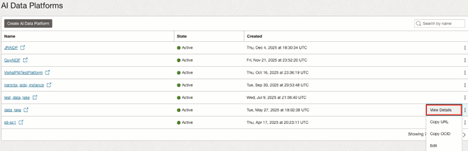
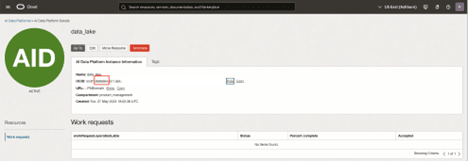
allow any-user to use generative-ai-family in tenancy where all { request.principal.type='aidataplatform'} allow any-user to use generative-ai-family in tenancy where all { request.principal.type='datalake'} - 異なるアイデンティティ・ドメインのフェデレーテッド・ユーザーが生成AIファミリ・リソースにアクセスできるようにします:
Allow group <your-domain>/<your-group> to use generative-ai-family in tenancy - AIデータ・プラットフォーム管理者グループが、特定のコンパートメント内のOracle Autonomous AI Lakehouseリソースを作成、更新および削除できるようにします:
allow group <aidpAdminGroup> to manage autonomous-databases in <aidp compartment>ノート:
AIデータ・プラットフォームでAI機能を有効にするには、Oracle Autonomous AI Lakehouseインスタンスが26ai以上である必要があります。 - AIデータ・プラットフォーム・サービスが、特定のコンパートメント内の既存のOracle Autonomous AI Lakehouseインスタンスにアクセスして使用できるようにします:
allow group <aidpAdminGroup> to use autonomous-databases in <aidp compartment>ノート:
AIデータ・プラットフォームでAI機能を有効にするには、Oracle Autonomous AI Lakehouseインスタンスが26ai以上である必要があります。 - AI Data Platformサービスに、プライベート・ネットワークのデータにアクセスするようにコンピュート・クラスタを構成することを許可します(オプション):
allow any-user to manage vnics in compartment id <aidpCompartmentId> where all { request.principal.type='aidataplatform'} allow any-user to use subnets in compartment id <aidpCompartmentId> where all { request.principal.type='aidataplatform'} allow any-user to use network-security-groups in compartment id <aidpCompartmentId> where all { request.principal.type='aidataplatform'} - オブジェクト・ストレージ・サービスがライフサイクル・アクション(恒久的な削除やアーカイブなど)をAI Data Platformワークスペース・データに自動的に適用できるようにすることで、手動メンテナンス作業を削減し、データ保持のベスト・プラクティスへの準拠をサポートします(オプション):
allow service objectstorage-<<region_identifier>> to manage object-family in compartment id <<aidp-compartment-ocid>>
オプション2: コンパートメント・レベルのポリシー(ファイングレイン・スコープ)
このオプションでは、ポリシーはコンパートメント・レベル(つまり、AI Data Platformインスタンスが作成されるコンパートメント)で定義されます。
- セキュリティ境界が厳しくなり、AIデータ・プラットフォームへのアクセスがデフォルトで単一のコンパートメントに制限されます。
- ワークフローが追加のコンパートメントにまたがる必要がある場合は、新しいコンパートメント・ポリシーを段階的に追加できます。
- AIデータ・プラットフォームで別のコンパートメントにアクセスする必要がある場合は、いつでも手動IAM更新を行う必要があります。
- 拡張時には、より多くの運用オーバーヘッドが必要です。
- AIデータ・プラットフォーム・サービスがOCI IAMリソースを表示して、AIデータ・プラットフォーム管理リソースのロールベースのアクセス制御を構成できるようにします:
allow any-user TO {AUTHENTICATION_INSPECT, DOMAIN_INSPECT, DOMAIN_READ, DYNAMIC_GROUP_INSPECT, GROUP_INSPECT, GROUP_MEMBERSHIP_INSPECT, USER_INSPECT, USER_READ} IN TENANCY where all {request.principal.type='aidataplatform'} - AIデータ・プラットフォーム・サービスでOCIロギング・ログ・グループを作成し、ユーザーにログを提供できるようにします:
allow any-user to manage log-groups in compartment id <aidpCompartmentId> where ALL { request.principal.type='aidataplatform' } allow any-user to read log-content in compartment id <aidpCompartmentId> where ALL { request.principal.type='aidataplatform' } - AIデータ・プラットフォーム・サービスがユーザーにメトリックを提供できるようにします:
allow any-user to use metrics in compartment id <aidpCompartmentId> where ALL {request.principal.type='aidataplatform', target.metrics.namespace='oracle_aidataplatform'} - マスター・カタログのワークスペースおよび管理対象データのOCIオブジェクト・ストア・バケットの作成および管理でAIデータ・プラットフォーム・サービスを許可します:
allow any-user to manage buckets in compartment id <aidpCompartmentId> where all { request.principal.type='aidataplatform', any {request.permission = 'BUCKET_CREATE', request.permission = 'BUCKET_INSPECT', request.permission = 'BUCKET_READ', request.permission = 'BUCKET_UPDATE'}} - AIデータ・プラットフォーム・サービスで、AIデータ・プラットフォーム・インスタンス・レベルごとのアクセスが制限されたワークスペースおよびマスター・カタログのデータを管理/管理できるようにします:
allow any-user to {TAG_NAMESPACE_USE} in tenancy where all {request.principal.type = 'aidataplatform'} allow any-user to manage buckets in compartment id <aidpCompartmentId> where all { request.principal.id=target.resource.tag.orcl-aidp.governingAidpId, any {request.permission = 'BUCKET_DELETE', request.permission = 'PAR_MANAGE', request.permission = 'RETENTION_RULE_LOCK', request.permission = 'RETENTION_RULE_MANAGE'} } allow any-user to read objectstorage-namespaces in compartment id <aidpCompartmentId> where all { request.principal.type='aidataplatform', any {request.permission = 'OBJECTSTORAGE_NAMESPACE_READ'}} allow any-user to manage objects in compartment id <aidpCompartmentId> where all { request.principal.id=target.bucket.system-tag.orcl-aidp.governingAidpId } - AI Data Platformサービスに、プライベート・ネットワークのデータにアクセスするようにコンピュート・クラスタを構成することを許可します(オプション):
allow any-user to manage vnics in compartment id <aidpCompartmentId> where all { request.principal.type='aidataplatform'} allow any-user to use subnets in compartment id <aidpCompartmentId> where all { request.principal.type='aidataplatform'} allow any-user to use network-security-groups in compartment id <aidpCompartmentId> where all { request.principal.type='aidataplatform'} - オブジェクト・ストレージ・サービスがライフサイクル・アクション(恒久的な削除やアーカイブなど)をAI Data Platformワークスペース・データに自動的に適用できるようにすることで、手動メンテナンス作業を削減し、データ保持のベスト・プラクティスへの準拠をサポートします(オプション):
allow service objectstorage-<<region_identifier>> to manage object-family in compartment id <<aidp-compartment-ocid>>
外部表の追加ポリシー
AIデータ・プラットフォーム・インスタンスが別のコンパートメントに格納されているデータにアクセスする必要がある場合は、その外部コンパートメントに追加ポリシーを付与する必要があります。これらのポリシーにより、AIデータ・プラットフォームは、外部コンパートメント内のバケットおよびオブジェクトを検査、読取りおよび管理して、AIデータ・プラットフォーム・ワークスペース内で使用できます。
allow any-user to manage buckets in compartment id <external-data-CompartmentId> where all { request.principal.type='aidataplatform', any {request.permission = 'BUCKET_INSPECT', request.permission = 'BUCKET_READ', request.permission = 'BUCKET_UPDATE'}}
allow any-user to manage buckets in compartment id <external-data-CompartmentId> where all { request.principal.id=target.resource.tag.orcl-aidp.governingAidpId, any {request.permission = 'PAR_MANAGE', request.permission = 'RETENTION_RULE_LOCK', request.permission = 'RETENTION_RULE_MANAGE'} }
allow any-user to manage objects in compartment id <external-data-CompartmentId> where all { request.principal.id=target.bucket.system-tag.orcl-aidp.governingAidpId }
allow service objectstorage-<<region_identifier>> to manage object-family in compartment id <external-data-CompartmentId>
ノート:
カスタム・アイデンティティ・ドメイン(デフォルト以外)を使用している場合は、IAMポリシーのドメイン名にグループ名の接頭辞を付ける必要があります。たとえば:allow group <aidpAdminIdentityDomain>/<aidpAdminGroup> to manage ai-data-platforms in compartment id <aidpCompartmentId>IAMポリシーの詳細は、IAMポリシーの概要を参照してください。
AIデータ・プラットフォームを表示してログインするには、そのAIデータ・プラットフォームの管理者によるアクセス権が付与されている必要があります。