-
Interface Summary Interface Description Control AControlobject is used to control some media processing functions.Controllable Player Playercontrols the rendering of time based media data.PlayerListener PlayerListeneris the interface for receiving asynchronous events generated byPlayers.TimeBase ATimeBaseis a constantly ticking source of time. -
Class Summary Class Description Manager Manageris the access point for obtaining system dependent resources such asPlayersfor multimedia processing. -
Exception Summary Exception Description MediaException AMediaExceptionindicates an unexpected error condition in a method.
Package javax.microedition.media Description
Description
The MEEP Media API is – like this has been handled in several JME profiles before like MIDP 2.1 and IMP-NG – a directly compatible building block of the Mobile Media API (JSR-135) specification. The use of this building block is intended for JME profiles aiming to include sound support in the specification, while maintaining upwards compatibility with the full Multimedia API. The development of these two interoperable APIs enables seamless sound and multimedia content creation across the JME range of devices using the same API principles. For MEEP 8, the Media API is completely optional. That means, an implementation can decide, whether it will implement the Media API or not. This takes into account, that embedded devices are used for a broad range of purposes, and it therefore makes no sense to force every MEEP 8 compatible device to implement the Media API, even if there is no necessity to handle any multimedia content.Introduction
To accommodate diverse configurations and multimedia processing capabilities, an API with a high level of abstraction is needed. The goal of the MMAPI Expert Group work has been to address this wide range of application areas, and the result of the work was a proposal of two API sets:- Mobile Media API (JSR 135)
- MIDP 2.0 Media API
Of course, implementers of MEEP 8 profile on embedded devices can feel free
to implement the
Mobile Media API (JSR-135) on a device. In this case, media
and media.control package are implemented as part of this JSR
and cannot be implemented as part of MEEP 8 at the same time (see the
Media section in the "Optionality and Dependencies" chapter
for details).
Background of the Media API
Some embedded devices are very resource constrained. For those devices it is not feasible feasible to support a full range of multimedia types, such as video - especially if the device does not have a display. As a consequence, not all devices are required to support the full feature set of a multimedia API, such as extensibility to support custom protocols and content types. The building block subset API has been designed to meet the above constraints. This building block fulfills the requirements for most embedded devices with the need of media support. These requirements include:- Low footprint audio playback
- Protocol and content format agnostic
- Supports tone generation
- Supports general media flow controls: start, stop, etc.
- Supports media-specific type controls: volume etc.
- Supports capability query
- It is audio-only. It excludes all Controls specific to video or graphics.
- It does not support custom protocols via custom Data Sources. The
javax.microedition.media.protocolpackage (Data Source) is excluded.
Basic Concepts
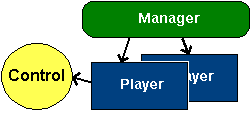
The audio building block system consists of three main parts: Manager, Player and Control.
The Manager is the top level controller of audio resources.
Applications use Manager to request Players and to
query properties, supported content types and supported protocols. The manager
also includes a method to play simple tones.
The Player plays the multimedia content. The application obtains
a Player by giving the locator string to Manager.
A Control is an interface that is used to implement all different
controls a Player might have. An application can query a
Player of controls it supports and then ask for a specific
Control e.g. VolumeControl
to control volume.
API Details
ThecreatePlayer method is the top-level entry point to the API:
Player Manager.createPlayer(String url) |
The url fully specifies the protocol and the content of the data:
<protocol>:<content location> |
The Manager parses the URL, recognizes the content
type and creates a Player to handle the presentation
of the data. The resulting Player is returned for use by the
application. Connections created by createPlayer follow the
Generic Connection framework rules and policies.
The Player provides general methods to control the data flow and
presentation, for example:
Player.realize()Player.prefetch()Player.start()
Player also provides type-specific controls with the
getControls and getControl methods:
Control[] Player.getControls()Control Player.getControl(int controlType)
Player, the getControls and
getControl methods can expose features that are unique to a
particular media type.
Security Aspects
Security issues may appear when this API is used. Those issues are related to
accessing resources either locally or over the network.
A Player can be initialized by a locatorA pointing
to a content that can reside on a network server or it could be on some local
storage. Reading data over the network requires use of the network connection
that may have security policy in place. An access to a local data storage may
have security policies in place as well.
Implementation of this package must follow the
security practices
(if supported by the implementation) that are in place for accessing those
resources. For example, when a Player is created to play content
on a HTTP server, the implementation must follow the security practices for
network access. When a locator is used to access media the implementation of
this package must throw a SecurityException under the same conditions
as would an access by the Generic Connection Framework.
Below is a list of methods which can throw a SecurityException
due to security violations.
| API call |
Manager.createPlayer(String locator) Manager.createPlayer(InputStream stream, String type) Player.realize() Player.prefetch() Player.start() |
When playback is started one of the methods Manager.createPlayer,
Player.realize, Player.prefetch and Player.start
must throw the SecurityException if there′s no permission
to open the connection. Because of the multi-stage initialization of
Players it is not possible to specify which method exactly must
do that.
Tone Generation
Tone generation is important for every application using audio. On very small embedded devices, it is particularly important since that is likely to be the only form of multimedia capabilities supported. In its simplest form, tone generation reduces to a single buzzer or some simple monophonic tone generation. TheManager class provides a top level method to handle this
simple form of single tone generation:
Manager.playTone(int note, int duration, int volume) |
The implementation of this method can be mapped directly to the device′s hardware tone generator to provide the most responsive sound generation.
In addition, the API also provides a way to create a specific type of
Player for synthesizing tone sequences:
Player p = Manager.createPlayer(Manager.TONE_DEVICE_LOCATOR) |
The Player created provides a special type of Control,
ToneControl, which can be used for
programming a tone sequence. This enables more sophisticated applications
written for slightly more powerful devices.
Usage Scenarios
In this section it is demonstrated how the API could be used in four common scenarios.Scenario 1: Single-Tone Generation
 try {
     Manager.playTone(ToneControl.C4, 5000 /* ms */, 100 /* max vol */);
 } catch (MediaException e) { }
|
Scenario 2: Simple Media Playback with Looping
Notice that in MEEP 8 the wav format is mandatory only in a case the device supports sampled audio.
 try {
      Player p = Manager.createPlayer("http://webserver/music.wav");
      p.setLoopCount(5);
      p.start();
 } catch (IOException ioe) {
 } catch (MediaException me) { }
|
Scenario 3: Playing Back from Media Stored in JAR
Notice that in MEEP 8 the wav format is mandatory only in a case the device supports sampled audio.
 try {
      InputStream is = getClass().getResourceAsStream("music.wav");
      Player p = Manager.createPlayer(is, "audio/X-wav");
      p.start();
 } catch (IOException ioe) {
 } catch (MediaException me) { }
|
Scenario 4: Tone Sequence Generation
 /**
  * "Mary Had A Little Lamb" has "ABAC" structure.
  * Use block to repeat "A" section.
  */
 byte tempo = 30; // set tempo to 120 bpm
 byte d = 8; // eighth-note
 byte C4 = ToneControl.C4;;
 byte D4 = (byte)(C4 + 2); // a whole step
 byte E4 = (byte)(C4 + 4); // a major third
 byte G4 = (byte)(C4 + 7); // a fifth
 byte rest = ToneControl.SILENCE; // rest
 byte[] mySequence = {
      ToneControl.VERSION, 1, // version 1
      ToneControl.TEMPO, tempo, // set tempo
      ToneControl.BLOCK_START, 0, // start define "A" section
      E4,d, D4,d, C4,d, E4,d, // content of "A" section
      E4,d, E4,d, E4,d, rest,d,
      ToneControl.BLOCK_END, 0, // end define "A" section
      ToneControl.PLAY_BLOCK, 0, // play "A" section
      D4,d, D4,d, D4,d, rest,d, // play "B" section
      E4,d, G4,d, G4,d, rest,d,
      ToneControl.PLAY_BLOCK, 0, // repeat "A" section
      D4,d, D4,d, E4,d, D4,d, C4,d // play "C" section
 };
 try{
      Player p = Manager.createPlayer(Manager.TONE_DEVICE_LOCATOR);
      p.realize();
      ToneControl c = (ToneControl)p.getControl("ToneControl");
      c.setSequence(mySequence);
      p.start();
 } catch (IOException ioe) {
 } catch (MediaException me) { }
|
- Since:
- IMP-NG