- java.lang.Object
-
- javafx.scene.Node
-
- javafx.scene.shape.Shape
-
- すべての実装されたインタフェース:
- Styleable、EventTarget
- 直系の既知のサブクラス:
- Arc、Circle、CubicCurve、Ellipse、Line、Path、Polygon、Polyline、QuadCurve、Rectangle、SVGPath、Text
public abstract class Shape
extends Node
Shapeクラスは、なんらかの形式の幾何学的な形状を表すオブジェクトの共通プロパティの定義を提供します。 次のようなプロパティがあります。- 図形の塗りつぶし可能な内部に適用される
Paint(setFillを参照)。 - 図形の輪郭のストロークに適用される
Paint(setStrokeを参照)。 - 次を含む、ストロークの装飾プロパティ。
- ボーダー・ストロークの幅。
- ボーダーが、図形の外部余白として描画されるか、ボーダーの内部に沿った内側のエッジとして描画されるか、ボーダーに沿って内側と外側に均等にまたがって続く幅広のパスとして描画されるか(
StrokeTypeを参照)。 - パス・セグメント間の結合および閉じていないパスの終端の装飾スタイル。
- 破線の属性。
座標系との相互作用
一般的に、ノードには整数平行移動のみが適用される傾向があり、また、ほとんどの場合は、整数座標を使用して定義されます。 この一般的な場合では、直線のエッジを持つ図形の塗りつぶしは、境界が鮮明であることが多く、これは、塗りつぶしが、整数デバイス座標で生じるピクセル間の隙間と揃うためで、そのため自然に全体のピクセルがカバーされることになります。一方、これらの同じ図形にストロークを適用すると、多くの場合、輪郭が不鮮明になります。これは、デフォルトのストローク属性では、デフォルトのストローク幅が1.0座標(多くの場合正確に1デバイス・ピクセルにマップされる)に指定され、かつ、ストロークが図形のボーダーをまたぎ、ボーダーの両側に半分ずつ分割されるように指定されるためです。 多くの一般的な図形のボーダーは整数座標上に配置される傾向があり、これらの整数座標は、通常、正確に整数のデバイス位置にマップされるため、ピクセル行や列が、図形のボーダーのいずれかの側で、ボーダーの100%ではなく50%をカバーする結果となります。 したがって、一般的に塗りつぶしは鮮明になりますが、ストロークは多くの場合不鮮明になります。
このように輪郭が不鮮明になることを回避する一般的な解決策は2つあり、1つはより多くのピクセルを完全にカバーする幅広のストロークを使用すること(スケール変換が有効でない場合、通常は幅2.0で実現可能)、もう1つは
StrokeType.INSIDEまたはStrokeType.OUTSIDEのストローク・スタイルを指定することによって、デフォルトの1単位ストロークが、図形のボーダーのすぐ内側または外側の、いずれかの行または列のピクセル全体に偏るようにすることです。- 導入されたバージョン:
- JavaFX 2.0
-
-
プロパティのサマリー
すべてのメソッド インスタンス・メソッド 具象メソッド Type プロパティと説明 ObjectProperty<Paint>fillPaintコンテキストの設定を使用してShapeの内部を塗りつぶすパラメータを定義します。BooleanPropertysmoothこのShapeにアンチエイリアシング・ヒントを使用するかどうかを定義します。DoublePropertystrokeDashOffset破線パターン内でのオフセットを表すユーザー空間で指定された距離を定義します。ObjectProperty<StrokeLineCap>strokeLineCap使用可能なエンド・キャップ・スタイルを定義する次の値のいずれかを使用するこのShapeのエンド・キャップ・スタイル:StrokeLineCap.BUTT、StrokeLineCap.ROUNDおよびStrokeLineCap.SQUARE。ObjectProperty<StrokeLineJoin>strokeLineJoin輪郭線セグメントの接合部の装飾を定義します。DoublePropertystrokeMiterLimitStrokeLineJoin.MITER線結合スタイルに対する制限を定義します。ObjectProperty<Paint>stroke指定されたPaintの設定を使用して、Shapeのアウトラインに描画されるストロークのパラメータを定義します。ObjectProperty<StrokeType>strokeTypestrokeWidthが図形の境界に適用される方向(内側、中央、外側)を定義します。DoublePropertystrokeWidth四角いペンの線の幅を定義します。-
クラスjavafx.scene.Nodeから継承されたプロパティ
accessibleHelp, accessibleRoleDescription, accessibleRole, accessibleText, blendMode, boundsInLocal, boundsInParent, cacheHint, cache, clip, cursor, depthTest, disabled, disable, effectiveNodeOrientation, effect, eventDispatcher, focused, focusTraversable, hover, id, inputMethodRequests, layoutBounds, layoutX, layoutY, localToParentTransform, localToSceneTransform, managed, mouseTransparent, nodeOrientation, onContextMenuRequested, onDragDetected, onDragDone, onDragDropped, onDragEntered, onDragExited, onDragOver, onInputMethodTextChanged, onKeyPressed, onKeyReleased, onKeyTyped, onMouseClicked, onMouseDragEntered, onMouseDragExited, onMouseDragged, onMouseDragOver, onMouseDragReleased, onMouseEntered, onMouseExited, onMouseMoved, onMousePressed, onMouseReleased, onRotate, onRotationFinished, onRotationStarted, onScrollFinished, onScroll, onScrollStarted, onSwipeDown, onSwipeLeft, onSwipeRight, onSwipeUp, onTouchMoved, onTouchPressed, onTouchReleased, onTouchStationary, onZoomFinished, onZoom, onZoomStarted, opacity, parent, pickOnBounds, pressed, rotate, rotationAxis, scaleX, scaleY, scaleZ, scene, style, translateX, translateY, translateZ, visible
-
-
フィールドのサマリー
-
クラスjavafx.scene.Nodeから継承されたフィールド
BASELINE_OFFSET_SAME_AS_HEIGHT
-
-
コンストラクタのサマリー
コンストラクタ コンストラクタと説明 Shape()
-
メソッドのサマリー
すべてのメソッド 静的メソッド インスタンス・メソッド 具象メソッド 修飾子と型 メソッドと説明 ObjectProperty<Paint>fillProperty()Paintコンテキストの設定を使用してShapeの内部を塗りつぶすパラメータを定義します。static List<CssMetaData<? extends Styleable,?>>getClassCssMetaData()List<CssMetaData<? extends Styleable,?>>getCssMetaData()NodeのCssMetaDataがリフレクションなしでアクセス可能になるように、このメソッドはNode.getClassCssMetaData()に委任する必要があります。PaintgetFill()プロパティfillの値を取得します。PaintgetStroke()プロパティstrokeの値を取得します。ObservableList<Double>getStrokeDashArray()破線セグメントの長さを表す配列を定義します。doublegetStrokeDashOffset()プロパティstrokeDashOffsetの値を取得します。StrokeLineCapgetStrokeLineCap()プロパティstrokeLineCapの値を取得します。StrokeLineJoingetStrokeLineJoin()プロパティstrokeLineJoinの値を取得します。doublegetStrokeMiterLimit()プロパティstrokeMiterLimitの値を取得します。StrokeTypegetStrokeType()プロパティstrokeTypeの値を取得します。doublegetStrokeWidth()プロパティstrokeWidthの値を取得します。static Shapeintersect(Shape shape1, Shape shape2)指定された入力図形の共通部分として作成された新しいShapeを返します。booleanisSmooth()プロパティsmoothの値を取得します。voidsetFill(Paint value)プロパティfillの値を設定します。voidsetSmooth(boolean value)プロパティsmoothの値を設定します。voidsetStroke(Paint value)プロパティstrokeの値を設定します。voidsetStrokeDashOffset(double value)プロパティstrokeDashOffsetの値を設定します。voidsetStrokeLineCap(StrokeLineCap value)プロパティstrokeLineCapの値を設定します。voidsetStrokeLineJoin(StrokeLineJoin value)プロパティstrokeLineJoinの値を設定します。voidsetStrokeMiterLimit(double value)プロパティstrokeMiterLimitの値を設定します。voidsetStrokeType(StrokeType value)プロパティstrokeTypeの値を設定します。voidsetStrokeWidth(double value)プロパティstrokeWidthの値を設定します。BooleanPropertysmoothProperty()このShapeにアンチエイリアシング・ヒントを使用するかどうかを定義します。DoublePropertystrokeDashOffsetProperty()破線パターン内でのオフセットを表すユーザー空間で指定された距離を定義します。ObjectProperty<StrokeLineCap>strokeLineCapProperty()使用可能なエンド・キャップ・スタイルを定義する次の値のいずれかを使用するこのShapeのエンド・キャップ・スタイル:StrokeLineCap.BUTT、StrokeLineCap.ROUNDおよびStrokeLineCap.SQUARE。ObjectProperty<StrokeLineJoin>strokeLineJoinProperty()輪郭線セグメントの接合部の装飾を定義します。DoublePropertystrokeMiterLimitProperty()StrokeLineJoin.MITER線結合スタイルに対する制限を定義します。ObjectProperty<Paint>strokeProperty()指定されたPaintの設定を使用して、Shapeのアウトラインに描画されるストロークのパラメータを定義します。ObjectProperty<StrokeType>strokeTypeProperty()strokeWidthが図形の境界に適用される方向(内側、中央、外側)を定義します。DoublePropertystrokeWidthProperty()四角いペンの線の幅を定義します。static Shapesubtract(Shape shape1, Shape shape2)最初の形状から指定された2番目の図形を引いて作成された新しいShapeを返します。static Shapeunion(Shape shape1, Shape shape2)指定された入力図形の集合和として作成された新しいShapeを返します。-
クラスjavafx.scene.Nodeから継承されたメソッド
accessibleHelpProperty, accessibleRoleDescriptionProperty, accessibleRoleProperty, accessibleTextProperty, addEventFilter, addEventHandler, applyCss, autosize, blendModeProperty, boundsInLocalProperty, boundsInParentProperty, buildEventDispatchChain, cacheHintProperty, cacheProperty, clipProperty, computeAreaInScreen, contains, contains, cursorProperty, depthTestProperty, disabledProperty, disableProperty, effectiveNodeOrientationProperty, effectProperty, eventDispatcherProperty, executeAccessibleAction, fireEvent, focusedProperty, focusTraversableProperty, getAccessibleHelp, getAccessibleRole, getAccessibleRoleDescription, getAccessibleText, getBaselineOffset, getBlendMode, getBoundsInLocal, getBoundsInParent, getCacheHint, getClip, getContentBias, getCursor, getDepthTest, getEffect, getEffectiveNodeOrientation, getEventDispatcher, getId, getInputMethodRequests, getLayoutBounds, getLayoutX, getLayoutY, getLocalToParentTransform, getLocalToSceneTransform, getNodeOrientation, getOnContextMenuRequested, getOnDragDetected, getOnDragDone, getOnDragDropped, getOnDragEntered, getOnDragExited, getOnDragOver, getOnInputMethodTextChanged, getOnKeyPressed, getOnKeyReleased, getOnKeyTyped, getOnMouseClicked, getOnMouseDragEntered, getOnMouseDragExited, getOnMouseDragged, getOnMouseDragOver, getOnMouseDragReleased, getOnMouseEntered, getOnMouseExited, getOnMouseMoved, getOnMousePressed, getOnMouseReleased, getOnRotate, getOnRotationFinished, getOnRotationStarted, getOnScroll, getOnScrollFinished, getOnScrollStarted, getOnSwipeDown, getOnSwipeLeft, getOnSwipeRight, getOnSwipeUp, getOnTouchMoved, getOnTouchPressed, getOnTouchReleased, getOnTouchStationary, getOnZoom, getOnZoomFinished, getOnZoomStarted, getOpacity, getParent, getProperties, getPseudoClassStates, getRotate, getRotationAxis, getScaleX, getScaleY, getScaleZ, getScene, getStyle, getStyleableParent, getStyleClass, getTransforms, getTranslateX, getTranslateY, getTranslateZ, getTypeSelector, getUserData, hasProperties, hoverProperty, idProperty, inputMethodRequestsProperty, intersects, intersects, isCache, isDisable, isDisabled, isFocused, isFocusTraversable, isHover, isManaged, isMouseTransparent, isPickOnBounds, isPressed, isResizable, isVisible, layoutBoundsProperty, layoutXProperty, layoutYProperty, localToParent, localToParent, localToParent, localToParent, localToParent, localToParentTransformProperty, localToScene, localToScene, localToScene, localToScene, localToScene, localToScene, localToScene, localToScene, localToScene, localToScene, localToSceneTransformProperty, localToScreen, localToScreen, localToScreen, localToScreen, localToScreen, lookup, lookupAll, managedProperty, maxHeight, maxWidth, minHeight, minWidth, mouseTransparentProperty, nodeOrientationProperty, notifyAccessibleAttributeChanged, onContextMenuRequestedProperty, onDragDetectedProperty, onDragDoneProperty, onDragDroppedProperty, onDragEnteredProperty, onDragExitedProperty, onDragOverProperty, onInputMethodTextChangedProperty, onKeyPressedProperty, onKeyReleasedProperty, onKeyTypedProperty, onMouseClickedProperty, onMouseDragEnteredProperty, onMouseDragExitedProperty, onMouseDraggedProperty, onMouseDragOverProperty, onMouseDragReleasedProperty, onMouseEnteredProperty, onMouseExitedProperty, onMouseMovedProperty, onMousePressedProperty, onMouseReleasedProperty, onRotateProperty, onRotationFinishedProperty, onRotationStartedProperty, onScrollFinishedProperty, onScrollProperty, onScrollStartedProperty, onSwipeDownProperty, onSwipeLeftProperty, onSwipeRightProperty, onSwipeUpProperty, onTouchMovedProperty, onTouchPressedProperty, onTouchReleasedProperty, onTouchStationaryProperty, onZoomFinishedProperty, onZoomProperty, onZoomStartedProperty, opacityProperty, parentProperty, parentToLocal, parentToLocal, parentToLocal, parentToLocal, parentToLocal, pickOnBoundsProperty, prefHeight, prefWidth, pressedProperty, pseudoClassStateChanged, queryAccessibleAttribute, relocate, removeEventFilter, removeEventHandler, requestFocus, resize, resizeRelocate, rotateProperty, rotationAxisProperty, scaleXProperty, scaleYProperty, scaleZProperty, sceneProperty, sceneToLocal, sceneToLocal, sceneToLocal, sceneToLocal, sceneToLocal, sceneToLocal, sceneToLocal, sceneToLocal, screenToLocal, screenToLocal, screenToLocal, setAccessibleHelp, setAccessibleRole, setAccessibleRoleDescription, setAccessibleText, setBlendMode, setCache, setCacheHint, setClip, setCursor, setDepthTest, setDisable, setDisabled, setEffect, setEventDispatcher, setEventHandler, setFocused, setFocusTraversable, setHover, setId, setInputMethodRequests, setLayoutX, setLayoutY, setManaged, setMouseTransparent, setNodeOrientation, setOnContextMenuRequested, setOnDragDetected, setOnDragDone, setOnDragDropped, setOnDragEntered, setOnDragExited, setOnDragOver, setOnInputMethodTextChanged, setOnKeyPressed, setOnKeyReleased, setOnKeyTyped, setOnMouseClicked, setOnMouseDragEntered, setOnMouseDragExited, setOnMouseDragged, setOnMouseDragOver, setOnMouseDragReleased, setOnMouseEntered, setOnMouseExited, setOnMouseMoved, setOnMousePressed, setOnMouseReleased, setOnRotate, setOnRotationFinished, setOnRotationStarted, setOnScroll, setOnScrollFinished, setOnScrollStarted, setOnSwipeDown, setOnSwipeLeft, setOnSwipeRight, setOnSwipeUp, setOnTouchMoved, setOnTouchPressed, setOnTouchReleased, setOnTouchStationary, setOnZoom, setOnZoomFinished, setOnZoomStarted, setOpacity, setPickOnBounds, setPressed, setRotate, setRotationAxis, setScaleX, setScaleY, setScaleZ, setStyle, setTranslateX, setTranslateY, setTranslateZ, setUserData, setVisible, snapshot, snapshot, startDragAndDrop, startFullDrag, styleProperty, toBack, toFront, toString, translateXProperty, translateYProperty, translateZProperty, usesMirroring, visibleProperty
-
-
-
-
プロパティの詳細
-
strokeType
public final ObjectProperty<StrokeType> strokeTypeProperty
strokeWidthが図形の境界に適用される方向(内側、中央、外側)を定義します。この図は、ストロークなしの図形と、太いストロークが、内側、中央および外側に適用された図形を示しています。

- デフォルト値:
- CENTERED
- 関連項目:
getStrokeType()、setStrokeType(StrokeType)
-
strokeWidth
public final DoubleProperty strokeWidthProperty
四角いペンの線の幅を定義します。 値0.0を指定すると、ヘアラインのストロークになります。 0.0より小さい値は0.0として扱われます。- デフォルト値:
- 1.0
- 関連項目:
getStrokeWidth()、setStrokeWidth(double)
-
strokeLineJoin
public final ObjectProperty<StrokeLineJoin> strokeLineJoinProperty
輪郭線セグメントの接合部の装飾を定義します。 値は、StrokeLineJoin.MITER、StrokeLineJoin.BEVELおよびStrokeLineJoin.ROUNDのいずれかである必要があります。 この図は、この順序で値を使用した図形を示しています。
- デフォルト値:
- MITER
- 関連項目:
getStrokeLineJoin()、setStrokeLineJoin(StrokeLineJoin)
-
strokeLineCap
public final ObjectProperty<StrokeLineCap> strokeLineCapProperty
使用可能なエンド・キャップ・スタイルを定義する次の値のいずれかを使用するこのShapeのエンド・キャップ・スタイル:StrokeLineCap.BUTT、StrokeLineCap.ROUNDおよびStrokeLineCap.SQUARE。 この図は、この順序で値を使用した線を示しています。
- デフォルト値:
- SQUARE
- 関連項目:
getStrokeLineCap()、setStrokeLineCap(StrokeLineCap)
-
strokeMiterLimit
public final DoubleProperty strokeMiterLimitProperty
StrokeLineJoin.MITER線結合スタイルに対する制限を定義します。 1.0未満の値は1.0として扱われます。図は、その動作を示しています。 接合の長さ(
A)は、接合部の最も内側の点から最も外側の点までの距離として計算され、ストロークの幅が単位として使用されます。 接合の長さが指定された接合制限値より大きい場合、接合は図形の端(B)で切り取られます。 この図の状況では、4.65未満の制限値に従い、Bで接合が切り取られることを意味します。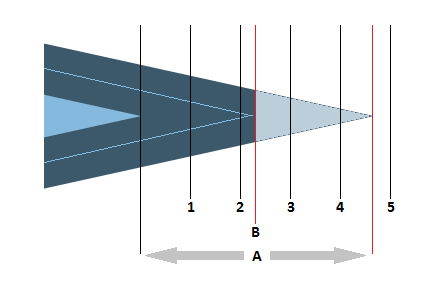
- デフォルト値:
- 10.0
- 関連項目:
getStrokeMiterLimit()、setStrokeMiterLimit(double)
-
strokeDashOffset
public final DoubleProperty strokeDashOffsetProperty
破線パターン内でのオフセットを表すユーザー空間で指定された距離を定義します。 つまり、破線フェーズは、ストロークの先頭に対応する破線パターン内の点を定義します。この図は、破線配列
[25, 20, 5, 20]のストローク、および同じパターンでオフセットが45であるストロークを示し、ここでは、最初の破線セグメントと後続スペースの長さだけパターンがシフトされています。
- デフォルト値:
- 0
- 関連項目:
getStrokeDashOffset()、setStrokeDashOffset(double)
-
fill
public final ObjectProperty<Paint> fillProperty
Paintコンテキストの設定を使用してShapeの内部を塗りつぶすパラメータを定義します。 すべての図形のデフォルト値はColor.BLACKですが、Line、PolylineおよびPathは除きます。 これらの図形のデフォルト値はnullです。- 関連項目:
getFill()、setFill(Paint)
-
stroke
public final ObjectProperty<Paint> strokeProperty
指定されたPaintの設定を使用して、Shapeのアウトラインに描画されるストロークのパラメータを定義します。 すべての図形のデフォルト値はnullですが、Line、PolylineおよびPathは除きます。 これらの図形のデフォルト値はColor.BLACKです。- 関連項目:
getStroke()、setStroke(Paint)
-
smooth
public final BooleanProperty smoothProperty
このShapeにアンチエイリアシング・ヒントを使用するかどうかを定義します。 値がtrueの場合、レンダリング・ヒントが適用されます。- デフォルト値:
- true
- 関連項目:
isSmooth()、setSmooth(boolean)
-
-
メソッドの詳細
-
setStrokeType
public final void setStrokeType(StrokeType value)
プロパティstrokeTypeの値を設定します。- プロパティの説明:
- strokeWidthが図形の境界に適用される方向(内側、中央、外側)を定義します。
この図は、ストロークなしの図形と、太いストロークが、内側、中央および外側に適用された図形を示しています。
- デフォルト値:
- CENTERED
-
getStrokeType
public final StrokeType getStrokeType()
プロパティstrokeTypeの値を取得します。- プロパティの説明:
- strokeWidthが図形の境界に適用される方向(内側、中央、外側)を定義します。
この図は、ストロークなしの図形と、太いストロークが、内側、中央および外側に適用された図形を示しています。
- デフォルト値:
- CENTERED
-
strokeTypeProperty
public final ObjectProperty<StrokeType> strokeTypeProperty()
strokeWidthが図形の境界に適用される方向(内側、中央、外側)を定義します。この図は、ストロークなしの図形と、太いストロークが、内側、中央および外側に適用された図形を示しています。
- デフォルト値:
- CENTERED
- 関連項目:
getStrokeType()、setStrokeType(StrokeType)
-
setStrokeWidth
public final void setStrokeWidth(double value)
プロパティstrokeWidthの値を設定します。- プロパティの説明:
- 四角いペンの線の幅を定義します。 値0.0を指定すると、ヘアラインのストロークになります。 0.0より小さい値は0.0として扱われます。
- デフォルト値:
- 1.0
-
getStrokeWidth
public final double getStrokeWidth()
プロパティstrokeWidthの値を取得します。- プロパティの説明:
- 四角いペンの線の幅を定義します。 値0.0を指定すると、ヘアラインのストロークになります。 0.0より小さい値は0.0として扱われます。
- デフォルト値:
- 1.0
-
strokeWidthProperty
public final DoubleProperty strokeWidthProperty()
四角いペンの線の幅を定義します。 値0.0を指定すると、ヘアラインのストロークになります。 0.0より小さい値は0.0として扱われます。- デフォルト値:
- 1.0
- 関連項目:
getStrokeWidth()、setStrokeWidth(double)
-
setStrokeLineJoin
public final void setStrokeLineJoin(StrokeLineJoin value)
プロパティstrokeLineJoinの値を設定します。- プロパティの説明:
- 輪郭線セグメントの接合部の装飾を定義します。 値は、
StrokeLineJoin.MITER、StrokeLineJoin.BEVELおよびStrokeLineJoin.ROUNDのいずれかである必要があります。 この図は、この順序で値を使用した図形を示しています。
- デフォルト値:
- MITER
-
getStrokeLineJoin
public final StrokeLineJoin getStrokeLineJoin()
プロパティstrokeLineJoinの値を取得します。- プロパティの説明:
- 輪郭線セグメントの接合部の装飾を定義します。 値は、
StrokeLineJoin.MITER、StrokeLineJoin.BEVELおよびStrokeLineJoin.ROUNDのいずれかである必要があります。 この図は、この順序で値を使用した図形を示しています。
- デフォルト値:
- MITER
-
strokeLineJoinProperty
public final ObjectProperty<StrokeLineJoin> strokeLineJoinProperty()
輪郭線セグメントの接合部の装飾を定義します。 値は、StrokeLineJoin.MITER、StrokeLineJoin.BEVELおよびStrokeLineJoin.ROUNDのいずれかである必要があります。 この図は、この順序で値を使用した図形を示しています。
- デフォルト値:
- MITER
- 関連項目:
getStrokeLineJoin()、setStrokeLineJoin(StrokeLineJoin)
-
setStrokeLineCap
public final void setStrokeLineCap(StrokeLineCap value)
プロパティstrokeLineCapの値を設定します。- プロパティの説明:
- 使用可能なエンド・キャップ・スタイルを定義する次の値のいずれかを使用するこの
Shapeのエンド・キャップ・スタイル:StrokeLineCap.BUTT、StrokeLineCap.ROUNDおよびStrokeLineCap.SQUARE。 この図は、この順序で値を使用した線を示しています。
- デフォルト値:
- SQUARE
-
getStrokeLineCap
public final StrokeLineCap getStrokeLineCap()
プロパティstrokeLineCapの値を取得します。- プロパティの説明:
- 使用可能なエンド・キャップ・スタイルを定義する次の値のいずれかを使用するこの
Shapeのエンド・キャップ・スタイル:StrokeLineCap.BUTT、StrokeLineCap.ROUNDおよびStrokeLineCap.SQUARE。 この図は、この順序で値を使用した線を示しています。
- デフォルト値:
- SQUARE
-
strokeLineCapProperty
public final ObjectProperty<StrokeLineCap> strokeLineCapProperty()
使用可能なエンド・キャップ・スタイルを定義する次の値のいずれかを使用するこのShapeのエンド・キャップ・スタイル:StrokeLineCap.BUTT、StrokeLineCap.ROUNDおよびStrokeLineCap.SQUARE。 この図は、この順序で値を使用した線を示しています。
- デフォルト値:
- SQUARE
- 関連項目:
getStrokeLineCap()、setStrokeLineCap(StrokeLineCap)
-
setStrokeMiterLimit
public final void setStrokeMiterLimit(double value)
プロパティstrokeMiterLimitの値を設定します。- プロパティの説明:
StrokeLineJoin.MITER線結合スタイルに対する制限を定義します。 1.0未満の値は1.0として扱われます。図は、その動作を示しています。 接合の長さ(
A)は、接合部の最も内側の点から最も外側の点までの距離として計算され、ストロークの幅が単位として使用されます。 接合の長さが指定された接合制限値より大きい場合、接合は図形の端(B)で切り取られます。 この図の状況では、4.65未満の制限値に従い、Bで接合が切り取られることを意味します。
- デフォルト値:
- 10.0
-
getStrokeMiterLimit
public final double getStrokeMiterLimit()
プロパティstrokeMiterLimitの値を取得します。- プロパティの説明:
StrokeLineJoin.MITER線結合スタイルに対する制限を定義します。 1.0未満の値は1.0として扱われます。図は、その動作を示しています。 接合の長さ(
A)は、接合部の最も内側の点から最も外側の点までの距離として計算され、ストロークの幅が単位として使用されます。 接合の長さが指定された接合制限値より大きい場合、接合は図形の端(B)で切り取られます。 この図の状況では、4.65未満の制限値に従い、Bで接合が切り取られることを意味します。
- デフォルト値:
- 10.0
-
strokeMiterLimitProperty
public final DoubleProperty strokeMiterLimitProperty()
StrokeLineJoin.MITER線結合スタイルに対する制限を定義します。 1.0未満の値は1.0として扱われます。図は、その動作を示しています。 接合の長さ(
A)は、接合部の最も内側の点から最も外側の点までの距離として計算され、ストロークの幅が単位として使用されます。 接合の長さが指定された接合制限値より大きい場合、接合は図形の端(B)で切り取られます。 この図の状況では、4.65未満の制限値に従い、Bで接合が切り取られることを意味します。
- デフォルト値:
- 10.0
- 関連項目:
getStrokeMiterLimit()、setStrokeMiterLimit(double)
-
setStrokeDashOffset
public final void setStrokeDashOffset(double value)
プロパティstrokeDashOffsetの値を設定します。- プロパティの説明:
- 破線パターン内でのオフセットを表すユーザー空間で指定された距離を定義します。 つまり、破線フェーズは、ストロークの先頭に対応する破線パターン内の点を定義します。
この図は、破線配列
[25, 20, 5, 20]のストローク、および同じパターンでオフセットが45であるストロークを示し、ここでは、最初の破線セグメントと後続スペースの長さだけパターンがシフトされています。
- デフォルト値:
- 0
-
getStrokeDashOffset
public final double getStrokeDashOffset()
プロパティstrokeDashOffsetの値を取得します。- プロパティの説明:
- 破線パターン内でのオフセットを表すユーザー空間で指定された距離を定義します。 つまり、破線フェーズは、ストロークの先頭に対応する破線パターン内の点を定義します。
この図は、破線配列
[25, 20, 5, 20]のストローク、および同じパターンでオフセットが45であるストロークを示し、ここでは、最初の破線セグメントと後続スペースの長さだけパターンがシフトされています。
- デフォルト値:
- 0
-
strokeDashOffsetProperty
public final DoubleProperty strokeDashOffsetProperty()
破線パターン内でのオフセットを表すユーザー空間で指定された距離を定義します。 つまり、破線フェーズは、ストロークの先頭に対応する破線パターン内の点を定義します。この図は、破線配列
[25, 20, 5, 20]のストローク、および同じパターンでオフセットが45であるストロークを示し、ここでは、最初の破線セグメントと後続スペースの長さだけパターンがシフトされています。
- デフォルト値:
- 0
- 関連項目:
getStrokeDashOffset()、setStrokeDashOffset(double)
-
getStrokeDashArray
public final ObservableList<Double> getStrokeDashArray()
破線セグメントの長さを表す配列を定義します。 配列内のエントリが、破線の不透明セグメントと透明セグメントのユーザー空間での長さを交互に表します。 ストロークで描画されるShapeの輪郭に沿ってペンが移動するにつれて、ペンが移動するユーザー空間の距離が累積されます。 距離の値は、破線配列のインデックスに使用されます。 現在の累積距離が破線配列の偶数番目(0からカウント)の要素にマッピングされる場合、ペンは不透明になり、奇数番目の要素にマッピングされる場合は透明になります。空のstrokeDashArrayはスペースがない実線を示します。 奇数長のstrokeDashArrayは、示された奇数長配列を暗黙的に2回連続して繰り返すことによって構成された偶数長配列と同じように動作します(
[20, 5, 15]は、[20, 5, 15, 20, 5, 15]であるかのように動作します)。各破線セグメントは、現在のストローク線の終端処理で指定されている装飾で終端処理されます。
この図は、ストローク破線配列
[25, 20, 5, 20]の、3つの異なるストローク線終端処理StrokeLineCap.BUTT、StrokeLineCap.SQUARE(デフォルト)およびStrokeLineCap.ROUNDの図形を示しています。
- デフォルト値:
- 空
-
setFill
public final void setFill(Paint value)
プロパティfillの値を設定します。- プロパティの説明:
Paintコンテキストの設定を使用してShapeの内部を塗りつぶすパラメータを定義します。 すべての図形のデフォルト値はColor.BLACKですが、Line、PolylineおよびPathは除きます。 これらの図形のデフォルト値はnullです。
-
getFill
public final Paint getFill()
プロパティfillの値を取得します。- プロパティの説明:
Paintコンテキストの設定を使用してShapeの内部を塗りつぶすパラメータを定義します。 すべての図形のデフォルト値はColor.BLACKですが、Line、PolylineおよびPathは除きます。 これらの図形のデフォルト値はnullです。
-
fillProperty
public final ObjectProperty<Paint> fillProperty()
Paintコンテキストの設定を使用してShapeの内部を塗りつぶすパラメータを定義します。 すべての図形のデフォルト値はColor.BLACKですが、Line、PolylineおよびPathは除きます。 これらの図形のデフォルト値はnullです。- 関連項目:
getFill()、setFill(Paint)
-
setStroke
public final void setStroke(Paint value)
プロパティstrokeの値を設定します。- プロパティの説明:
- 指定された
Paintの設定を使用して、Shapeのアウトラインに描画されるストロークのパラメータを定義します。 すべての図形のデフォルト値はnullですが、Line、PolylineおよびPathは除きます。 これらの図形のデフォルト値はColor.BLACKです。
-
getStroke
public final Paint getStroke()
プロパティstrokeの値を取得します。- プロパティの説明:
- 指定された
Paintの設定を使用して、Shapeのアウトラインに描画されるストロークのパラメータを定義します。 すべての図形のデフォルト値はnullですが、Line、PolylineおよびPathは除きます。 これらの図形のデフォルト値はColor.BLACKです。
-
strokeProperty
public final ObjectProperty<Paint> strokeProperty()
指定されたPaintの設定を使用して、Shapeのアウトラインに描画されるストロークのパラメータを定義します。 すべての図形のデフォルト値はnullですが、Line、PolylineおよびPathは除きます。 これらの図形のデフォルト値はColor.BLACKです。- 関連項目:
getStroke()、setStroke(Paint)
-
setSmooth
public final void setSmooth(boolean value)
プロパティsmoothの値を設定します。- プロパティの説明:
- この
Shapeにアンチエイリアシング・ヒントを使用するかどうかを定義します。 値がtrueの場合、レンダリング・ヒントが適用されます。 - デフォルト値:
- true
-
isSmooth
public final boolean isSmooth()
プロパティsmoothの値を取得します。- プロパティの説明:
- この
Shapeにアンチエイリアシング・ヒントを使用するかどうかを定義します。 値がtrueの場合、レンダリング・ヒントが適用されます。 - デフォルト値:
- true
-
smoothProperty
public final BooleanProperty smoothProperty()
このShapeにアンチエイリアシング・ヒントを使用するかどうかを定義します。 値がtrueの場合、レンダリング・ヒントが適用されます。- デフォルト値:
- true
- 関連項目:
isSmooth()、setSmooth(boolean)
-
getClassCssMetaData
public static List<CssMetaData<? extends Styleable,?>> getClassCssMetaData()
- 戻り値:
- このクラスに関連付けられているCssMetaData (このクラスのスーパー・クラスのCssMetaDataが含まれる場合があります)。
- 導入されたバージョン:
- JavaFX 8.0
-
getCssMetaData
public List<CssMetaData<? extends Styleable,?>> getCssMetaData()
NodeのCssMetaDataがリフレクションなしでアクセス可能になるように、このメソッドはNode.getClassCssMetaData()に委任する必要があります。- 定義:
getCssMetaData、インタフェースStyleable- オーバーライド:
getCssMetaData、クラスNode- 戻り値:
- このノードに関連付けられているCssMetaData (このノードのスーパー・クラスのCssMetaDataが含まれる場合があります)。
- 導入されたバージョン:
- JavaFX 8.0
-
union
public static Shape union(Shape shape1,
                          Shape shape2)
指定された入力図形の集合和として作成された新しいShapeを返します。演算は、入力図形が占める幾何学的領域を使用して行われます。 単一の
Shapeの場合、このような領域には塗りつぶしにより占められた領域(図形にnull以外の塗りつぶしがある場合)およびストロークにより占められた領域(図形にnull以外のストロークがある場合)が含まれます。 したがって、ストロークがnullで塗りつぶしがnullの図形の場合、この領域は空です。 演算によって考慮される入力図形の領域は、塗りつぶしまたはストロークに使用されるペイントのタイプおよび構成には依存しません。 最終的な演算の前に、入力図形の領域はそれぞれの最上位親ノードの親座標空間に変換されます。結果の図形には、入力図形に含まれるすべての領域が含まれます。
shape1 + shape2 = result +----------------+ +----------------+ +----------------+ |################| |################| |################| |############## | | ##############| |################| |############ | | ############| |################| |########## | | ##########| |################| |######## | | ########| |################| |###### | | ######| |###### ######| |#### | | ####| |#### ####| |## | | ##| |## ##| +----------------+ +----------------+ +----------------+- パラメータ:
shape1- 最初の図形shape2- 2番目の図形- 戻り値:
- 作成された
Shape
-
subtract
public static Shape subtract(Shape shape1,
                             Shape shape2)
最初の形状から指定された2番目の図形を引いて作成された新しいShapeを返します。演算は、入力図形が占める幾何学的領域を使用して行われます。 単一の
Shapeの場合、このような領域には塗りつぶしにより占められた領域(図形にnull以外の塗りつぶしがある場合)およびストロークにより占められた領域(図形にnull以外のストロークがある場合)が含まれます。 したがって、ストロークがnullで塗りつぶしがnullの図形の場合、この領域は空です。 演算によって考慮される入力図形の領域は、塗りつぶしまたはストロークに使用されるペイントのタイプおよび構成には依存しません。 最終的な演算の前に、入力図形の領域はそれぞれの最上位親ノードの親座標空間に変換されます。結果の図形には、最初の図形に含まれ、2番目の図形には含まれない領域のみが含まれます。
shape1 - shape2 = result +----------------+ +----------------+ +----------------+ |################| |################| | | |############## | | ##############| |## | |############ | | ############| |#### | |########## | | ##########| |###### | |######## | | ########| |######## | |###### | | ######| |###### | |#### | | ####| |#### | |## | | ##| |## | +----------------+ +----------------+ +----------------+- パラメータ:
shape1- 最初の図形shape2- 2番目の図形- 戻り値:
- 作成された
Shape
-
intersect
public static Shape intersect(Shape shape1,
                              Shape shape2)
指定された入力図形の共通部分として作成された新しいShapeを返します。演算は、入力図形が占める幾何学的領域を使用して行われます。 単一の
Shapeの場合、このような領域には塗りつぶしにより占められた領域(図形にnull以外の塗りつぶしがある場合)およびストロークにより占められた領域(図形にnull以外のストロークがある場合)が含まれます。 したがって、ストロークがnullで塗りつぶしがnullの図形の場合、この領域は空です。 演算によって考慮される入力図形の領域は、塗りつぶしまたはストロークに使用されるペイントのタイプおよび構成には依存しません。 最終的な演算の前に、入力図形の領域はそれぞれの最上位親ノードの親座標空間に変換されます。結果の図形には、両方の入力図形に含まれる領域のみが含まれます。
shape1 + shape2 = result +----------------+ +----------------+ +----------------+ |################| |################| |################| |############## | | ##############| | ############ | |############ | | ############| | ######## | |########## | | ##########| | #### | |######## | | ########| | | |###### | | ######| | | |#### | | ####| | | |## | | ##| | | +----------------+ +----------------+ +----------------+- パラメータ:
shape1- 最初の図形shape2- 2番目の図形- 戻り値:
- 作成された
Shape
-
-