Using Oracle JET Messaging
You can use the Oracle JET messaging framework to notify an Oracle JET application of a component's messages and validity as well as notify an Oracle JET component of a business validation failure.
Topics:
Tracking Validity of a Group of Editable Components Using Knockout
You can track the validity of a group of editable components by using the invalidComponentTracker binding attribute. This attribute is automatically available on all editable components.
In the markup below, username and password components bind to the same Knockout observable, tracker, allowing for validation to be tracked as a group.
<div id="example">
  <input id="username" type="text" autocomplete="off" name="username" required
    data-bind="ojComponent: {component: 'ojInputText', value: userName,
      validators: [{type: 'regExp', options: {pattern: '[a-zA-Z0-9]{3,}',
        'messageDetail': 'You must enter at least 3 letters or numbers'}}],
      invalidComponentTracker: tracker}">

  <input id="password" type="password" name="password" required
    data-bind="ojComponent: {component: 'ojInputPassword', value: password,
      validators: [{type: 'regExp', options : {pattern: '(?=.*\\d)(?=.*[a-z])(?=.*[A-Z]).{6,}',
        label: 'Password',
        messageSummary : '\'{label}\' too Weak',
        messageDetail: 'You must enter a password that meets our security requirements.'}}],
      invalidComponentTracker: tracker}"/>

  <button data-bind="ojComponent: {component: 'ojButton', label: 'Create',
    disabled: shouldDisableCreate()}></button>
</div>
The example also uses a Create button whose disabled option is bound to the shouldDisableCreate() method so that it is disabled on a validation error.
The code that defines the MemberViewModel(), which includes the definition for the tracker observable, is shown below.
function MemberViewModel()
{
  var self = this;
  self.tracker = ko.observable();

  // USERNAME
  self.userName = ko.observable();
  self.password = ko.observable();

  self.shouldDisableCreate = function()
  {
    // see below
  };
}
ko.applybindings(new MemberViewModel(), document.getElementById("example");
The shouldDisableCreate() function uses the invalidShown property, exposed on the tracker object, to enable the button conditionally on the page.
/**
 * Determines when the Create button will be enabled.
 * - if there are invalid components, currently showing messages, return true.
 * - if we have invalid components, that deferred showing messages, end-user doesn't know
 *   these have errors so return false.
 * - if there are no invalid components return false.
 */
 self.shouldDisableCreate = function()
 {
   var trackerObj = ko.utils.unwrapObservable(self.tracker),
   hasInvalidComponents = ko.utils.unwrapObservable(trackerObj["invalidShown"]);
   return  hasInvalidComponents;
 };
Note:
The invalidComponentTracker attribute depends upon the ojs/ojknockout-validation module, and you must add the module to your RequireJS bootstrap file. For additional information about the ojs/ojknockout-validation module, see Oracle JET Module Organization. For details about using RequireJS in your application, see Using RequireJS in an Oracle JET Application.
For an example showing the invalidComponentTracker used for cross-field validation, see Cross-Field Validation. For information about using invalidComponentTracker for form validation, see Applying Form Validation Best Practices.
Notifying an Oracle JET Application of a Component's Messages and Validity
You can notify your Oracle JET application of an Oracle JET component's messages and validity using an event listener or the invalidComponentTracker binding attribute.
Topics:
Using the optionChange Event
When there are errors during conversion or validation, the component updates the messagesShown or messagesHidden messages option and triggers an optionChange event. You can register an event listener or callback to be notified of a component's validity.
The following code sample shows how you could add a callback to an ojInputText component for the optionChange event. The callback will log a message to the console showing the previous and current values for the messagesShown and messagesHidden options.
<input id="username"
  data-bind="ojComponent: {component: 'ojInputText', 'value': 'abc',
    'optionChange' : function(event, ui) {usernameMessagesChange( event, ui);}}"/>

<script>
  usernameMessagesChange = function(event, ui)
  {
    if (ui.option && (ui.option === "messagesShown" || ui.option === "messagesHidden"))
      window.console.log("option '"+ ui.option +"' changed from "+ ui.previousValue +" to "+ ui.value);
  };
</script>
Using a Component's invalidComponentTracker Binding Attribute
When this attribute is set on the component, the Oracle JET binding framework registers a custom listener for the optionChange event. This enables the oj.InvalidComponentTracker object to update its state for the components it tracks when their messages options change.
Page authors can use the properties exposed on the tracker object to be notified of changes. For details, see Tracking Validity of a Group of Editable Components Using Knockout.
Notifying an Oracle JET Editable Component of Business Validation Errors
You can notify Oracle JET editable components of business validation errors using the messagesCustom option and the showMessages() method.
Topics:
Using the messagesCustom Option
Your application can use this option to notify the Oracle JET framework components of new or updated messages. These could be a result of business validation that originates in the viewModel layer or on the server.
A common business validation is to perform cross field validation to compare the values in one observable against another.
In the example below, an instance of a cross-field custom validator is associated with the emailAddress observable, ensuring that its value is non-empty when the user chooses Email as their contact preference.
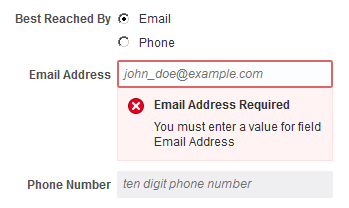
For the complete example and code used to create the custom validator, see Cross-Field Validation. The demo uses a custom validator to validate an observable value against another. When an error occurs, the code updates the messagesCustom option.
Using the showMessages() Method on Editable Components
Use this method to instruct the component to show its deferred messages. When this method is called, the Oracle JET editable component automatically moves all deferred messages in the messagesHidden option to the messagesShown option. This causes the component to display the deferred messages to the user.
The oj.InvalidComponentTracker object uses this method to show deferred messages. For an example, see App Level Validation.