 Cindy is a technical writer in the JavaFX group.
She has written tutorials, online help, and technical articles for Java and JavaFX technologies.
Cindy is a technical writer in the JavaFX group.
She has written tutorials, online help, and technical articles for Java and JavaFX technologies.  Yves is a member of the JavaFX Scene Builder development team. He enjoys creating tutorials to help users quickly learn and adopt developer tools, such as the JavaFX Scene Builder.
JavaFX Scene Builder User Guide
 |
 |
4 Using the Selection and Message Bar
This chapter describes the Selection and Message bar that is located just above the Content panel of the Scene Builder main window.
The Selection and Message bar is shown in Figure 4-1 and Figure 4-3. As the name indicates, it serves two purposes:
-
It displays the containment path of the selected UI element. It enables you to easily go to and place focus on a specific element by clicking that element's name in the containment path. When you hover the cursor over an element's name, it is underlined, as shown in Figure 4-1.
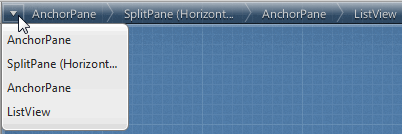
You can also select an element from the list that is displayed when you click the Path Selection button to the left of the containment path, as shown in Figure 4-2.
-
The same area that is used to display the containment path is also used to display feedback and error messages, as shown in Figure 4-3. After a message is displayed for a couple of seconds, the warning icon remains on the right end of the Message bar. Click the warning icon, circled in Figure 4-3, to view the list of messages. The number next to the icon indicates the number of messages that are displayed. You can clear one or all of the messages in the list view.


|
|