 Cindy is a technical writer in the JavaFX group.
She has written tutorials, online help, and technical articles for Java and JavaFX technologies.
Cindy is a technical writer in the JavaFX group.
She has written tutorials, online help, and technical articles for Java and JavaFX technologies.  Yves is a member of the JavaFX Scene Builder development team. He enjoys creating tutorials to help users quickly learn and adopt developer tools, such as the JavaFX Scene Builder.
JavaFX Scene Builder User Guide
 |
 |
10 Skinning with CSS and the CSS Analyzer
This chapter describes the Cascading Style Sheet (CSS) support and describes the CSS Analyzer feature that JavaFX Scene Builder provides.
The JavaFX UI controls used by Scene Builder are pre-styled with a default JavaFX look and feel. Scene Builder immediately renders this predefined JavaFX style when you drag the UI control from the Library panel to the Content or Hierarchy panel. You can customize the style used in your application by changing the component's properties via the Properties section of the Inspector panel or by defining your own styling rules in a CSS file.
Scene Builder currently does not generate CSS files, but enables you to use your local CSS editor to create and modify your CSS file. The changes you save in the CSS file that is used by the current FXML layout displayed in the Content panel is immediately rendered by Scene Builder.
You can add the CSS rules at the Scene level, within a given container, or by an inline styling at the Node level. By using the Stylesheets list view in the JavaFX CSS subsection of the Properties section of the Inspector panel, you can assign a CSS file to use on a selected UI element in your FXML layout if that UI element is either a container or a UI control. You can attach a style sheet to any part of your FXML layout, from the topmost parent UI element to the lowest.
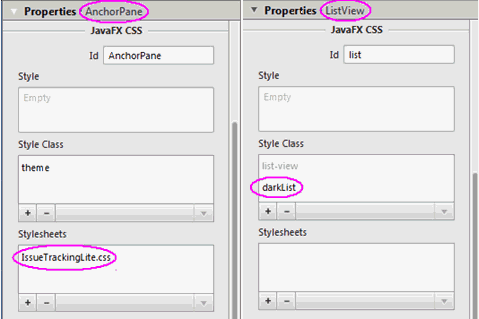
The left side of Figure 10-1 shows the Properties section of the Inspector panel with the IssueTracking.css file assigned to the topmost Anchor Pane used in the layout. The right side of the figure shows the darkList style class assigned to the ListView element. The darkList style class is defined in the IssueTracking.css style sheet and inherited by the ListView element from its container parent, the topmost AnchorPane container.
Figure 10-1 Properties Section with Style Class and Style Sheet List Views Displayed
Description of "Figure 10-1 Properties Section with Style Class and Style Sheet List Views Displayed"
CSS rules that are defined on a parent element can be used to style the parent UI element itself and all of its children elements. You can define the specific style class to use with a UI element by adding it to the Style Class list view in the Properties section of the Inspector panel. The CSS files referenced from the Stylesheets properties are referenced from within the FXML file and so they are deployed with the FXML file.
In Scene Builder, you can simulate the attachment of a style sheet to an application Scene by selecting Preview, then Scene Style Sheets, and finally choosing Add a Style Sheet or Open a Style Sheet option. This Preview command is useful when the “root” style class is defined in the style sheet. In this case, once the style sheet is attached to the Scene, the styles defined in the “root” class are applied to the layout in the Content panel.
You can edit an existing CSS file with your system editor by using the following steps:
-
In the Stylesheets list view of the Properties section of the Inspector panel, click on the CSS file you want to edit.
-
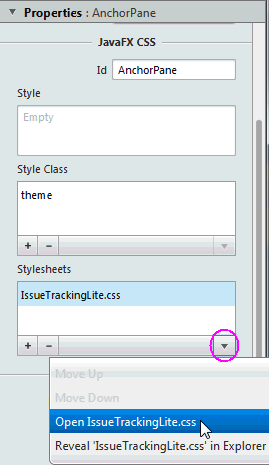
Click the drop-down arrow on the bottom right of the list view, as shown in Figure 10-2.
-
Select the Open command for the CSS file you want to edit.
You can also reveal the CSS file's location in your system using the Reveal command that is also available in the drop-down menu. You can also navigate to the CSS file via the CSS Analyzer panel, as explained later in Using the CSS Analyzer Panel.
Figure 10-2 Open CSS File From the Properties Section of the Inspector Panel
Description of "Figure 10-2 Open CSS File From the Properties Section of the Inspector Panel"
Using the CSS Analyzer Panel
The CSS Analyzer Panel enables you to understand how various possible CSS rules can affect aspects of a currently selected UI element. It displays a synoptic view of all the possible sources for the property values. Each CSS property value assigned to a certain aspect of the selected UI element may originate from either the API or predefined CSS rules. The sources are listed in prioritized order, which enables you to understand why a given source takes precedence over another. The panel also provides a means for you to navigate to the source of CSS property value to help you develop and troubleshoot CSS stylesheets.
The CSS Analyzer panel is not displayed by default. To display the panel, select View from the Main menu and then Show CSS Analyzer, as shown in Figure 10-3.

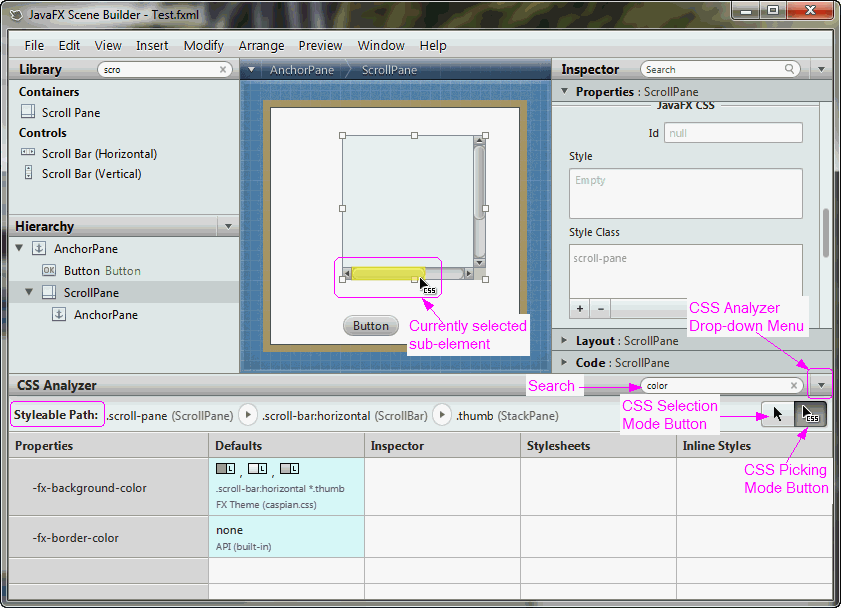
The CSS Analyzer panel appears at the bottom of the Main window, similar to what is shown in Figure 10-4.
Figure 10-4 CSS Analyzer Panel Displayed (Click image to enlarge.)
Description of "Figure 10-4 CSS Analyzer Panel Displayed (Click image to enlarge.)"
The panel includes the following sections, most of which are highlighted in Figure 10-4.
-
Search text field: Located at the top right corner of the panel. It enables you to isolate the specific properties that you want to view.
-
CSS Analyzer Menu: Located to the right of the Search text field. Click on the drop-down arrow to see the menu of available commands, as shown in Figure 10-5.
-
View As: Enables you to choose the display format for the style properties. The default is Table view. The Rules view mode displays the properties in CSS rules formatting. The Text view mode displays the properties in text styling.
-
Copy Styleable Path: Enables you to copy the current value in the Styleable Path text field and you can paste it into your CSS file to modify the style of the currently selected component or its sub-element.
-
Hide Properties with Default Values: Removes from view all the properties that only have default values assigned to them. Properties that have non-default values, such as Stylesheets and Inline Styles, continue to be displayed. The Show Properties with Default Values shows all the properties for the component.
-
Split Defaults: Refreshes the view of the properties to include two columns for the default values of the style properties: API Defaults and the FX Theme Defaults. The Join Defaults command displays the combined default values into a single column, which is the default.
-
-
Styleable Path text field: Located on the top left corner of the panel. It enables you to discover the sub-elements when you click on the arrows in the path. You can copy that path using the CSS Analyzer menu and paste the path in your CSS file to assign a new style value.
-
CSS Picking Mode button: Located below the Search text field. This is the default mode when CSS Analyzer is opened. It allows you to select a sub-element of the currently selected component. In Figure 10-4, the CSS Picking Mode button is selected. This allowed you to select the bottom horizontal scrollbar of the ScrollPane component in the Content panel. The scrollbar is highlighted in yellow to indicate that it is the currently selected sub-element of the ScrollPane. Correspondingly, the Styleable Path shows the complete path to the currently selected element. This feature shows how skins can be styled.
-
CSS Selection Mode button: Located next to the CSS Picking Mode button. It is the standard selection mode and allows you to select a component.
-
Properties column: First column in the table. Displays all of the available style properties that is available for the currently selected element.
-
Default column: Displays the default values, both from the API and the JavaFX theme, that are delivered for the style property.
-
Inspector column: Displays the property value that has been set using the Inspector panel. Some properties appear in both the Properties section of the Inspector panel and the CSS Analyzer panel. To edit these properties, hover the mouse cursor in the corresponding cell of the CSS Analyzer panel and click the cog icon in the top right corner to select Reveal in Inspector. The corresponding property is highlighted with a blue ring in the Properties section of the Inspector panel.
-
Stylesheets column: Displays the value that is defined for the property via the CSS file set in the Stylesheets text view in the Properties section of the Inspector panel. The name of the CSS file the value is derived from is included in the column. You can also click on the cog icon on the upper right corner of the cell and select the Open command to open your CSS file in your default CSS editor.
-
Inline Styles column: Displays the inline style value that is defined for the property via the Style text view in the JavaFX CSS subsection of the Properties section of the Inspector panel. You can select the Reveal in Inspector command using the cell's cog icon on the upper right corner of the table cell to display the Style text view in the Inspector panel.

You can modify the properties values from your CSS file. Alternatively, you can use the JavaFX CSS subsection of the Properties section of the Inspector panel to either edit a CSS property or use the Style property to override any CSS property.
When a CSS property value is assigned to a currently selected UI component, the new style is immediately rendered in the Content panel.
To learn more about the CSS Analyzer's functionalities, use the following steps to customize the Button component to have rounded edges and use that style for all buttons that are subsequently added to your FXML layout.
-
Drag a Button from the Library to the Content panel.
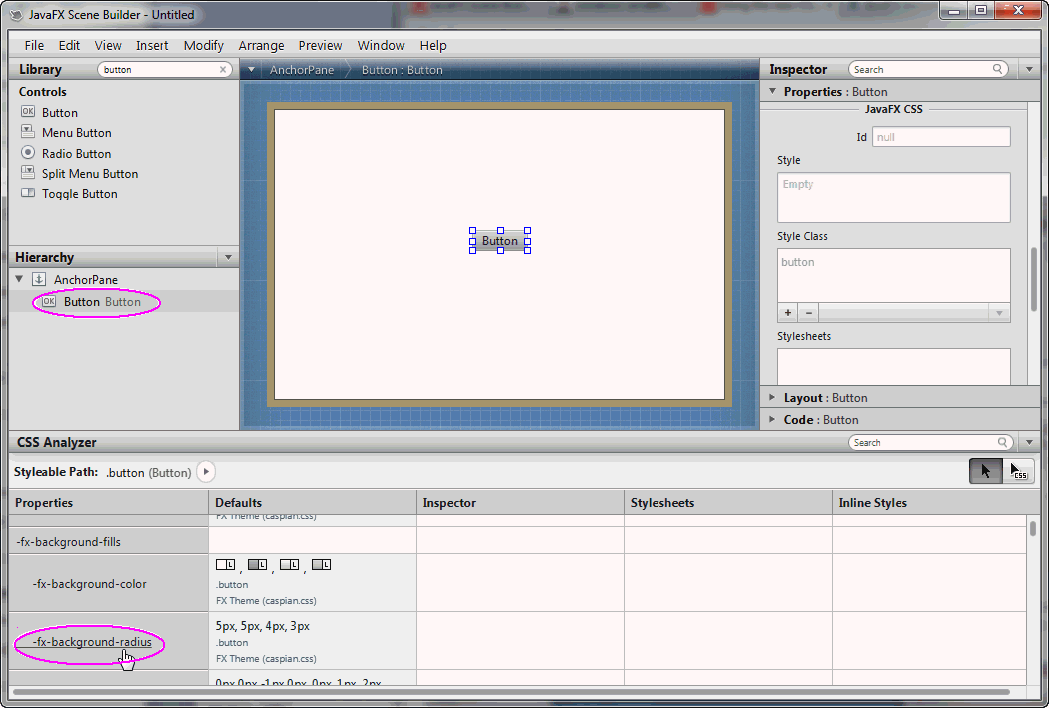
You will see the CSS Analyzer displays the value of -fx -background-radius, shown in Figure 10-6, as one of the CSS properties for the button.
Figure 10-6 A Button's Properties Displayed in CSS Analyzer (Click image to enlarge.)

Description of "Figure 10-6 A Button's Properties Displayed in CSS Analyzer (Click image to enlarge.)"
-
Click the -fx -background-radius property name in the Properties column and you are taken to the corresponding online API documentation in the
JavaFX CSS Reference Guide, which provides the syntax you can use with each property's value. -
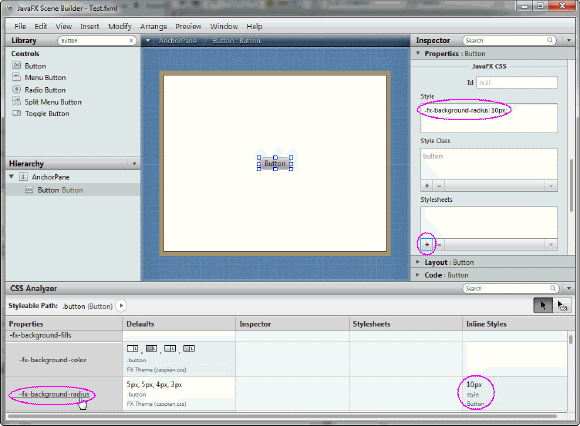
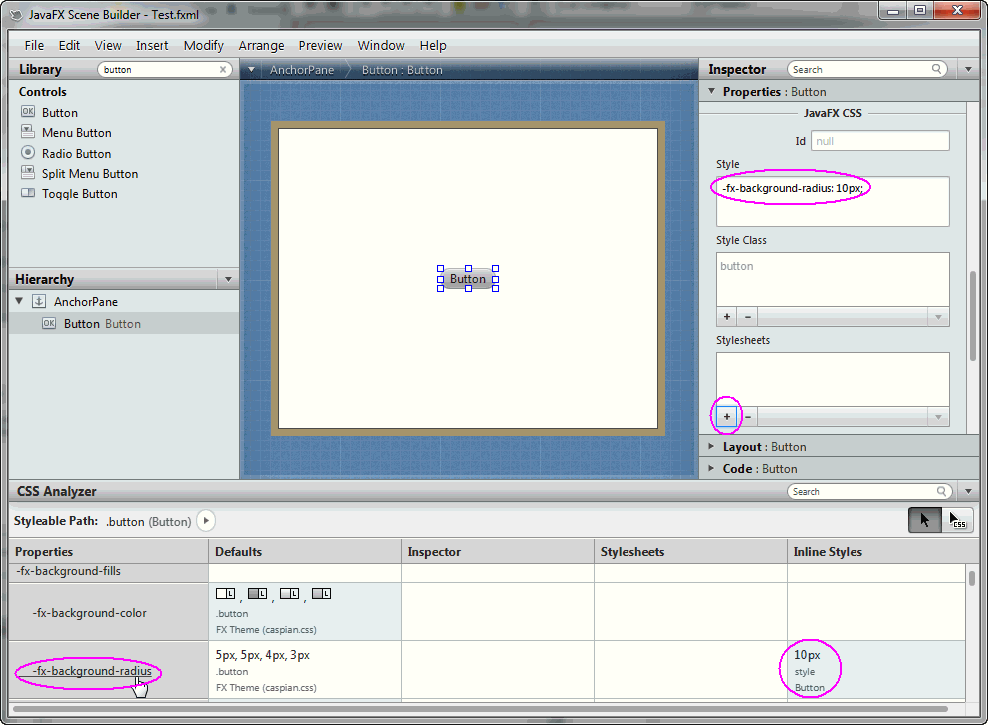
In the Scene Builder window, click on the Properties section of the Inspector panel. Enter -fx-background-radius: 10px in the Style text field of the JavaFX CSS subsection, as shown in Figure 10-7.
Notice that the Button component in the Content panel is now rounded around the corners. Also, in the CSS Analyzer panel, you'll see that the row for the -fx-background-radius property now has two values: the default and the inline style value of 10px that you just entered in the Style property, as shown in Figure 10-7. That cell's background color also changed to blue, which indicates that the value is now the current value being rendered on the currently selected component.Figure 10-7 Making a Button Rounded (Click image to enlarge.)
Description of "Figure 10-7 Making a Button Rounded (Click image to enlarge.)"
-
Create a CSS rule so that you can apply the new button style to all of the buttons you add to your current FXML layout.
-
Using your system's command, create am empty CSS file, e.g. test.css, in the same directory that contains your current FXML layout.
-
In the Properties section of the Inspector panel, click the + button in the Stylesheets list view, as indicated in Figure 10-7.
-
In the Add Style Sheet dialog, navigate to the test.css file location, select it, and click Open to add it to the Stylesheets property.
You'll see the test.css file added in the Stylesheets list view. -
Edit the test.css file by clicking on the pull-down arrow in Stylesheets property and select Open test.css.
-
Add the following CSS rule to test.css and save the file.
-
Select the button again in the Content panel. Notice that in the CSS Analyzer panel, the button is now inheriting the CSS rule from the test.css file because the button is a child of the AnchorPane component. Since it still has the inline style value assigned to it, that value has precedence and is the style rendered in the Content panel. If you do not have a need to change the style for this particular button, you can remove that style value from the Properties section of the Inspector panel.
-
|
|