WebLogic Integration's (WLI's) business process management (BPM) functionality enables the integration of diverse applications and human participants. The WebLogic Integration Worklist system enables people to collaborate in business processes—including assigning tasks, tracking the status of tasks, handling approvals, and so on.
This tutorial provides a tour of the features available to design the interaction of people with business processes in the WebLogic IDE. It describes how to the BEA Worklist feature to orchestrate the resolution of a loan approval process in a fictitious financial institution's (Acme Financial Group) loan approval tracking system.
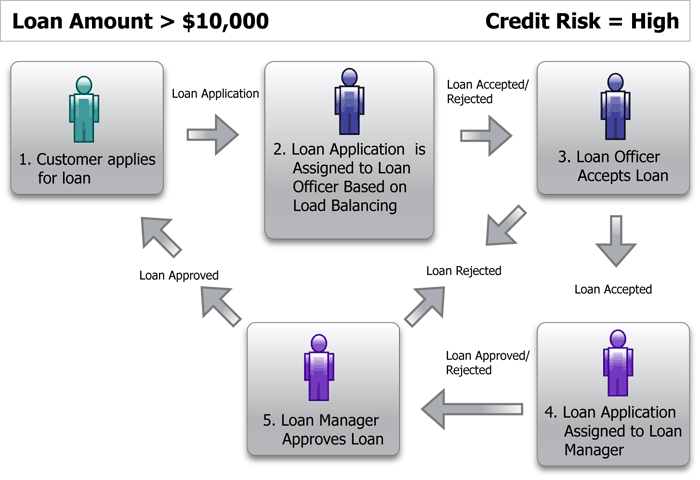
The tutorial scenario is based on a portion of the life cycle of a loan approval at a fictitious financial institution. The following figure and sequence of events outlines the path of a loan approval through Acme Financial Group and the actors in the scenario:
Figure 1-1 Loan Approval Process
A customer submits a loan request in the amount of $10,000.
The loan request is assigned to a group of Loan Officers.
One of the Loan Officers (John) logs into the system, reviews the loan request, and claims it as his assignment.
Loan Officer John assesses the loan request and decides to Accept it. The loan request is now routed to a Loan Manager (Mary).
Because the customer applying for the loan has a High credit risk, Loan Manager Mary rejects the loan request.
Upon rejection of the loan request, the Task is considered complete and an event is generated from the Worklist system back to the system that initiated this flow. The rejected loan request is routed back to the customer with a message explaining why it was rejected.
Loan Request Status
The loan request traverses through a lifecycle of different business steps, from being newly requested to being accepted, approved or rejected. At each step, different business users or groups are assigned to work on the loan request. The following are the various lifecycle statuses in which the loan request can reside:
New—A new customer loan request is received.
Accepted—A Loan Officer has the authority to accept a loan request. Upon his acceptance, it is either routed back to the customer or to the Loan Manager for further approval (depending on the loan amount and the assessed credit risk of the customer).
Rejected—A Loan Officer or a Loan Manager can reject the loan request.
Approved—A Loan Manager has the authority to approve a loan request, which has been routed to her for further approval following Loan Officer acceptance.
Business Hours
The handling of loan requests by loan officers depends on the business hours of the group. For the purposes of this tutorial, Acme Financial Group's business hours are:
Monday through Friday 8AM to 6PM
Saturdays from 8AM to 12PM
Users and Groups
The following two groups are defined for Acme Financial Group:
Loan Officers
Loan Managers
Each user (for example, Loan Officer John and Loan Manager Mary) is a member of one of these groups.
Steps in This Tutorial
In this scenario, a customer submits a loan request to the Acme Financial Group. Next, the task of Accepting or Rejecting the loan request is assigned to a Loan Officer. Upon Acceptance by the Loan Officer, it is determined by the system that the loan request requires further approval by a Loan Manager (due to the amount of the loan and assessed customer credit risk). The Loan Manager has the ability to Approve or Reject the loan request. In this scenario, she Approves it. At this point, a message is sent to the customer indicating that the loan request has been Approved. The task is complete.
Learn how to create a business calendar for Acme Financial Group. Also learn how to set up the actors in the tutorial. That is, learn how to set up the users (John and Mary) and groups (Loan Officers and Loan Managers) required to complete the tasks that you create.
Step 2. Defining the Worklist Task Type
Learn how to create the Worklist task type, and its subsequent steps and actions.
Learn how to generate the loan request Task Type Web Service (which generates the JWS and WSDL files, making the Task Type available to other systems. Also learn how to build and deploy your Task Type project.
In this step, the loan request is delivered to the Acme Financial Group. A loan officer logs into the Acme Financial Group loan request user interface to claim and work on tasks.
Terms and Definitions
The following are some important terms and their definitions. These will be used throughout this tutorial. It is important that you familiarize yourself with them.
Task—unit of work requiring one or more human participants to assist in its completion.
Task Type—description of the steps, properties, task assignment rules, and so on that are common to a class of tasks for a given purpose.
Task Instance—instance created from a task type. This document uses the terms task and task instance interchangeably. See Task.
Step—phase in the overall completion of a task. The steps for a task are defined by the task type for the task. Task assignment can occur at any step in a task.
Action—discrete operation that can alter the properties of a task and causes a transition to another step defined for the task.
Property—named/typed data value associated with a task type. A task type can have any number of properties to hold data that is required or appropriate to define the state of a task. All steps in a task type share access to the same set of properties.
Actor—human user or group of users who have been designated as candidates to work on a task or tasks of a given type.