 Demand Scheduling Overview
This chapter provides and overview and discusses:
JD Edwards EnterpriseOne Demand Scheduling overview.
JD Edwards EnterpriseOne Demand Scheduling business processes.
JD Edwards EnterpriseOne Demand Scheduling implementation.
Demand Scheduling OverviewYou use the JD Edwards EnterpriseOne Demand Scheduling system (40R) to manage requirements for shipment and production schedules between customers and suppliers. Firm or planned demand requirements enable you to receive, interpret, or validate, net order information for shipments, and to automatically communicate shipment details to the supplier or customer.
The system interprets and receives information using Electronic Data Interchange (EDI) documents that are transmitted from customers to suppliers, and then populates the appropriate demand scheduling tables to create records within sales orders, and forecasts. You set up the demand scheduling system to manage all of this information.
Typically, forecasted schedules are transmitted from the manufacturer or distributor to the supplier to cover a future period of time and are formatted as a series of year-to-date cumulative totals. You can use this information for forecasting and planning when ordering parts and materials in high volume supply chains.
JD Edwards EnterpriseOne Demand Scheduling Business ProcessesThis process flow illustrates the Demand Scheduling business processes:
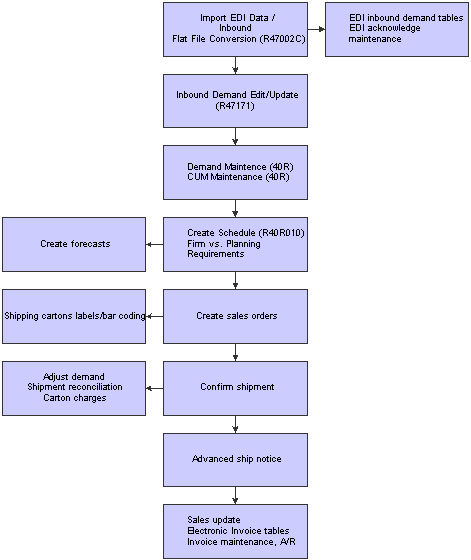
Demand Scheduling process flow
JD Edwards EnterpriseOne Demand Scheduling Execution IntegrationsThe JD Edwards EnterpriseOne Demand Scheduling system integrates with these JD Edwards EnterpriseOne systems from Oracle:
JD Edwards EnterpriseOne Data Interface for Electronic Data Interchange
JD Edwards EnterpriseOne Sales Order Management
JD Edwards EnterpriseOne Warehouse Management
JD Edwards EnterpriseOne Transportation Management
JD Edwards EnterpriseOne Inventory Management
JD Edwards EnterpriseOne Accounts Receivable
We discuss integration considerations in the implementation chapters in this implementation guide. Supplemental information about third-party application integrations is located on the Customer Connection web site.
JD Edwards EnterpriseOne Data Interface for Electronic Data Interchange
Demand scheduling focuses on capturing the raw EDI demand requirements sent by customers to suppliers. Typically, you send and receive information using the JD Edwards EnterpriseOne Electronic Data Interchange system (47). This demand scheduling information includes cumulative quantities and supplier release scheduling. You can determine which transactions and messages are sent to the supplier, and how to use them.
JD Edwards EnterpriseOne Sales Order Management
You can enhance customer service by using the JD Edwards EnterpriseOne Sales Order Management system to create order templates, standing or blanket orders. Also, this system provides additional customer service support through online displays that provide:
Pertinent order, inventory, transportation, and financial information.
Net profitability of a product line when promotions, discounts, and allowances are applied.
JD Edwards EnterpriseOne Warehouse Management
The JD Edwards EnterpriseOne Warehouse Management system works in conjunction with other JD Edwards EnterpriseOne systems to manage the inventory and enable you to satisfy the customers' requirements through efficient storing, packing, and shipping.
JD Edwards EnterpriseOne Transportation Management
The transportation industry deals with a wide variety of shipping needs. To meet those needs, the company might need to set up a range of transportation scenarios. The JD Edwards EnterpriseOne Transportation Management system enables you to set up parcel shipments, less than truckload shipments, truckload shipments, and rail shipments.
JD Edwards EnterpriseOne Inventory Management
The JD Edwards EnterpriseOne Inventory Management system defines discreet inventory items, which enables you to manipulate inventory throughout the supply chain. Item identification and processing characteristics are the basic information elements that are specific to individual items across an entire company. You can further define this information by facility to provide geographic or market flexibility.
JD Edwards EnterpriseOne Accounts Receivable
The JD Edwards EnterpriseOne Accounts Receivable system helps you to manage the cash flow with the flexibility that you need for effective cash management. You can streamline the day-to-day functions of the entire accounts receivable department. You can simplify and accelerate the process of applying receipts.
JD Edwards EnterpriseOne Demand Scheduling Execution Implementation
This section provides an overview and discusses the steps that are required to implement the JD Edwards EnterpriseOne Demand Scheduling system.
In the planning phase of the implementation, take advantage of all JD Edwards EnterpriseOne sources of information, including the installation guides and troubleshooting information. A complete list of these resources appears in the preface in About This Documentation with information about where to find the most current version of each.
When determining which electronic software updates (ESUs) to install for JD Edwards EnterpriseOne Demand Scheduling Execution, use the EnterpriseOne and World Change Assistant. EnterpriseOne and World Change Assistant, a Java-based tool, reduces the time required to search and download ESUs by 75 percent or more and enables you to install multiple ESUs at one time.
See JD Edwards EnterpriseOne Tools 8.98 Software Update Guide.
 Global Implementation Steps
This table lists the implementation steps for the JD Edwards EnterpriseOne Demand Scheduling system:
|
Step |
Reference |
|
1. Set up global user-defined codes. |
See JD Edwards EnterpriseOne Tools 8.98 Foundation Implementation Guide, user-defined Defined Codes |
|
2. Set up companies, fiscal date patterns, and business units. |
|
|
3. Set up next numbers. |
See JD Edwards EnterpriseOne Tools 8.98 Foundation Implementation Guide, Setting Up Next Numbers |
|
4. Set up accounts and the chart of accounts. |
|
|
5. Set up General Accounting constants. |
|
|
6. Set up multi-currency processing, including currency codes and exchange rates. |
|
|
7. Set up ledger type rules. |
|
|
8. Enter address book records. |
|
|
9. Set up inventory information, such as branch/plant constants, default locations and printers, manufacturing and distribution automatic accounting instructions (AAIs), and document types. |
|
|
10. Set up shop floor calendars. |
|
|
11. Set up manufacturing constants. |
Demand Scheduling Implementation Steps
This table lists the implementation steps for the JD Edwards EnterpriseOne Demand Scheduling system.
|
Step |
Reference |
|
1. Activate Demand Scheduling Execution |
|
|
2. Set up advanced preferences. |