 JD Edwards EnterpriseOne Contract and Service Billing Overview
This chapter provides an overview of JD Edwards EnterpriseOne Contract and Service Billing and discusses:
JD Edwards EnterpriseOne Contract Billing business processes.
JD Edwards EnterpriseOne Service Billing business processes.
JD Edwards EnterpriseOne Contract and Service Billing integrations.
JD Edwards EnterpriseOne Contract and Service Billing implementation.
JD Edwards EnterpriseOne Contract and Service Billing Overview
You use JD Edwards EnterpriseOne Contract and Service Billing from Oracle to bill customers for services and goods rendered. JD Edwards Contract and Service Billing offers a suite of features to accommodate the intricacies of both interdivisional and customer billing.
JD Edwards EnterpriseOne Service Billing
Every service billing process begins with an agreement between a customer and a provider. The customer requests a product or service. Your company, as the provider, bills the customer for the product or services that you provide.
You use the JD Edwards EnterpriseOne Service Billing system to:
Account for the costs of goods and services.
Mark up the costs to account for profit.
Bill for the services and goods that you provide.
Provide written proof that justifies the charges.
Create accounting entries for the services and goods.
JD Edwards EnterpriseOne Contract Billing
Every contract billing process begins with an agreement, or contract, between two parties, a customer and a provider (contractor). The customer, who is the owner of the job or project, requests a product or service. Your company, as the provider, bills the customer for the product or services that you deliver under the contract. The contract specifies the billing terms for the job and is the basis of the invoices that you send to the customer for payment. The agreement can be amended over time as the needs of your customer change.
The JD Edwards EnterpriseOne Contract Billing system enables you to create invoices according to the terms and conditions of your contractual agreements. The JD Edwards EnterpriseOne Contract Billing system also supports concurrent billing over multiple change orders (revisions) to the original contract.
Each agreement includes:
The billing terms of the contract, such as:
The type of billing, such as time and material (T and M), lump sum, and unit price.
The amount to bill on a schedule of values.
Amendments, or change orders, to the original contract.
The currency in which to bill.
Information about the customer you are billing, such as:
Who to bill
Payment terms
Discount terms
You can use the JD Edwards EnterpriseOne Contract Billing system to:
Account for the costs related to T and M of goods and services.
Mark up the costs to account for profit.
Calculate fees.
Bill according to the terms of a contract.
Provide written proof that justifies the charges.
Create accounting entries for the contract billing amounts.
Choosing Between Contract Billing and Service Billing
Service Billing is typically used for short-term agreements and high-volume, small jobs. Service Billing provides:
Generation of invoices for time and material (T and M) costs.
Generation of invoices for Service Management transactions.
Contract Billing uses many of the same processes and tables that Service Billing uses, but provides additional features through processes and tables that are not available in Service Billing.
Contract Billing is typically used for long-term agreements and long projects, and provides:
Generation of invoices for non-T and M costs.
Billing of recurring fixed amounts.
Billing limits.
Minimum billing amounts.
JD Edwards EnterpriseOne Contract Billing Business Processes
This flow chart illustrates the JD Edwards EnterpriseOne Contract Billing business processes:
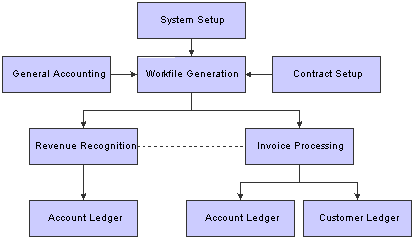
Contract Billing process flow
We discuss these business processes in the business process chapters in this implementation guide.
JD Edwards EnterpriseOne Service Billing Business Processes
This flow chart illustrates the JD Edwards EnterpriseOne Service Billing business processes:
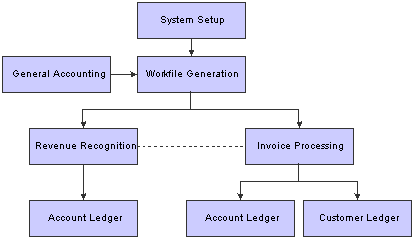
Service Billing process flow
Note. In addition, JD Edwards EnterpriseOne Service Billing provides voucher processing for JD Edwards EnterpriseOne Service Management transactions.
We discuss these business processes in the business process chapters in this implementation guide.
JD Edwards EnterpriseOne Contract and Service Billing Integrations
This diagram illustrates the JD Edwards EnterpriseOne systems that integrate with JD Edwards EnterpriseOne Contract Billing:
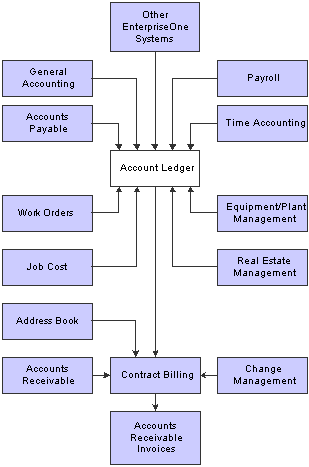
JD Edwards EnterpriseOne Contract Billing integrations
This diagram illustrates the JD Edwards EnterpriseOne systems that integrate with JD Edwards EnterpriseOne Service Billing:
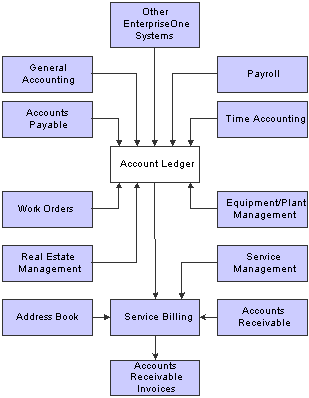
JD Edwards EnterpriseOne Service Billing integrations
JD Edwards EnterpriseOne General Accounting
The billing system uses the information in the Account Master table (F0901) and the transactions in the Account Ledger table (F0911) to determine whether a transaction is eligible for processing in the billing system.
The system assigns eligibility codes to workfile transactions based on the Billable (Y/N) field in the Account Master table and the mode that you have selected for the Journal Generation Control option in the Billing Constants program (P48091).
JD Edwards EnterpriseOne Accounts Payable
The billing system accumulates cost transactions that you record in the JD Edwards EnterpriseOne Accounts Payable system. The billing system uses the information from accounts payable transactions in the Account Ledger table (F0911) to identify:
Supplier numbers
Supplier invoice numbers
Supplier service dates
Actual amounts
Responsible business units
Work order numbers
JD Edwards EnterpriseOne Contract and Service Billing also integrates with JD Edwards EnterpriseOne Accounts Payable to support the pay-when-paid process.
See Processing Pay When Paid Transactions.
JD Edwards EnterpriseOne Accounts Receivable
The billing system uses the Customer Master table (F0301) to identify:
Payment terms.
Tax explanation, rate, and area.
G/L class.
After you generate a billing, you post the invoice information to the Customer Ledger table (F03B11). When you receive the customer's payments, you apply them to the customer's receivable account.
JD Edwards EnterpriseOne Contract and Service Billing also integrates with JD Edwards EnterpriseOne Accounts Receivable to support the pay-when-paid process.
See Processing Pay When Paid Transactions.
JD Edwards EnterpriseOne Payroll and Time Accounting
Payroll-based costs can include:
The actual amount of the employee's pay before deductions and actual hours worked.
Actual or flat (estimated) labor burden amounts.
The marked-up labor billing distribution amount for the employee and the related hours.
The actual hours that the employee uses the equipment and the billing rate for the equipment.
The account numbers for labor and equipment distribution.
You can process payroll information daily or based on the payroll cycle. The JD Edwards EnterpriseOne Payroll system updates these tables:
Employee Transaction Detail File (F06116).
Employee Transaction History (F0618).
Burden Distribution File (F0724 and F07241).
Account Ledger (F0911).
The billing system processes the transactions in the Account Ledger table and then retrieves payroll information from the Employee Transaction History table and the Employee Transaction Detail File table. It then creates corresponding workfile transactions in the Billing Detail Workfile table (F4812). The system retrieves transactions that are identified by these document types:
T2 – Payroll labor distribution.
T3 – Labor burden distribution.
T4 – Labor billing distribution.
T5 – Equipment distribution.
Labor burden distribution transactions (T3) are always linked to corresponding payroll labor distribution transactions (T2). Labor burden is the cost over and above wages or salaries that a company incurs as a result of employing people. These costs can include taxes and insurance. Depending on how you set the constants for the billing system, these burden transactions can be processed in conjunction with the related labor transactions in the Billing Detail Workfile table.
You can calculate labor burden using:
The actual labor burden rate and percentage with the employee's actual hours and pay rate.
A flat (estimated) labor burden percentage.
During the normal payroll cycle, the system can calculate flat and actual labor burden amounts. If you process payroll journal entries on a daily basis without completing the payroll cycle, the system calculates only flat labor burden.
After the billing system processes payroll information, it updates the transactions in the Payroll Transaction History table or Employee Transaction Detail File table, and the Account Ledger table.
JD Edwards EnterpriseOne Work Orders
You use work orders to itemize the costs for projects. Work order information exists when the transaction in the Account Ledger table (F0911) contains a subledger number with subledger type W. Information from a billable work order can affect the markup, tax, and accounting rules for the T and M transactions when the status of the work order is billable.
JD Edwards EnterpriseOne Equipment/Plant Management
Jobs, projects, and work orders often involve equipment. For example, a security guard uses a company-owned truck to patrol the grounds of an office building. The agreement between the security agency and building management contains a provision to bill an hourly rate for the time that the guard uses the truck.
In another example, a crane is used to move heavy materials on a job site. The agreement between the provider and the customer contains a provision to bill an hourly rate for the time that the crane is used for the project.
The billing system processes these types of transactions with document type TE from the JD Edwards Equipment/Plant Management system. To process equipment transactions, the billing system uses the:
Equipment number to identify the equipment for the billing.
Number of hours that the employee used the equipment.
JD Edwards EnterpriseOne Real Estate Management
The JD Edwards Real Estate Management system enables you to enter work orders to manage leasehold improvements as requested by tenants. These tenant work orders identify lease, building, and unit information that you use to track the completion of tasks. Any billable costs in the Account Ledger table (F0911) that reference the tenant work order as the subledger can be processed to the JD Edwards EnterpriseOne Accounts Receivable system through the Billing system.
JD Edwards EnterpriseOne Service Management
The JD Edwards EnterpriseOne Service Management system writes workfile transactions to provide for the generation and printing of invoices for service contracts and service orders. This enables you to combine on one invoice billable services from JD Edwards Service Management with standard billable services within the Service Billing product.
JD Edwards Service Management also writes workfile transactions to support the creation of vouchers in the JD Edwards EnterpriseOne Accounts Payable system. These vouchers represent claims to be paid to the service providers that performed the work outside of your organization.
JD Edwards EnterpriseOne Address Book
The JD Edwards EnterpriseOne Contract Billing system uses the address book number from the contract to identify:
The name of a person, company, or branch to bill.
The mailing addresses for the billing.
JD Edwards EnterpriseOne Project and Government Contract Accounting
Many of the programs within JD Edwards EnterpriseOne Contract Billing support processes within JD Edwards EnterpriseOne Project and Government Contract Accounting (PGCA), such as those used to set up billing lines, recognize revenue, and process invoices.
JD Edwards EnterpriseOne Contract and Service Billing Implementation
This section provides an overview of the steps that are required to implement the JD Edwards EnterpriseOne Contract and Service Billing system.
In the planning phase of the implementation, take advantage of all JD Edwards EnterpriseOne sources of information, including the installation guides and troubleshooting information. A complete list of these resources appears in the preface in About This Documentation, with information about where to find the most current version of each.
See About This Documentation.
When determining which electronic software updates (ESUs) to install for JD Edwards EnterpriseOne Contract and Service Billing, use the EnterpriseOne and World Change Assistant. EnterpriseOne and World Change Assistant, a Java-based tool, reduces the time required to search for and download ESUs by 75 percent or more and enables you to install multiple ESUs at one time.
See JD Edwards EnterpriseOne Tools 8.98 Software Update Guide
 Global Implementation Steps
This table lists the suggested global implementation steps for JD Edwards EnterpriseOne Contract and Service Billing:
|
Step |
Reference |
|
1. Set up fiscal date patterns, companies, and business units. |
|
|
2. Set up accounts. |
|
|
3. Set up General Accounting constants. |
|
|
4. Set up multicurrency processing, including currency codes and exchange rates. |
|
|
5. Set up ledger type rules. |
|
|
6. Enter address book records. |
Contract and Service Billing Implementation Steps
This table lists the suggested application-specific implementation steps for JD Edwards EnterpriseOne Contract and Service Billing:
|
Step |
Reference |
|
1. Set up billing constants and UDCs for the billing system. |
See Setting Up JD Edwards EnterpriseOne Contract Billing and Service Billing. |
|
2. Set up billing rate and markup rules, tax derivation rules, G/L offset and retainage rules, automatic accounting instructions (AAIs) for the billing system, and component rules. |
|
|
3. Set up burdening (optional). |
See Setting Up Burdening. |
|
4. Set up sequence and summarization rules, invoice print version cross-references, and invoice formats. |