Oracle® Insurance Rules Palette 9.4.0.0 E18894_01
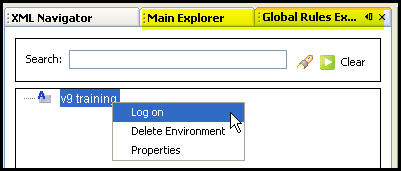
After creating an environment connection you will be able to log into the Rules Palette. To log-on, right-click on the appropriate environment alias name in either the Global Rules Explorer or Main Explorer tab and select Log-on. You will need to enter your user ID and password. The log-in information is case sensitive.
Right-click Option to Log On an Environment
After logging-on, you will see four window tabs: Main Explorer, Global Rules Explorer, Admin Explorer and the XML Navigator. If the tabs are not visible, click Window on the menu bar and select the tab/window to open it.
Once all the rules are loaded into the Rules Palette, you will be able to expand the Environment and access the folders in the navigation structure. The Palette will load rules on an as-needed basis. As you select folders, additional information is loaded. This is done to reduce load-time.
If you try to expand a folder in the navigation tree and the folder appears to be empty, then check the bottom right corner of the screen to see if the rules have been fully loaded. Wait until the loading message is not visible in the bottom right corner and then try to access the folder. The global rules must finish loading before you can expand and access folders.
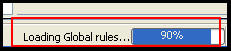
Loading Message for Global Rules
Copyright © 2009, 2011, Oracle and/or its affiliates. All rights reserved. Legal Notices