Oracle® Insurance Rules Palette 9.4.0.0 E18894_01
Plan rules are used to organize and capture data needed to administer polices. Fields are configured to capture the data a company needs in order to administer a specific type of plan.
Note: If the Plan Rules folder is empty there is a possibility that the XML Schemas are null in the business rules table. In this case, upload schemas using the Upload Schema function on the tool bar. Please refer to the section on Upload XML Schemas for more information.
When a new plan is created, the following plan rules are automatically attached to the plan.
Allocation Screen: Defines the allocations that are assigned for the plan and policy.
EligibleTransactionByPolicyStatus: Controls the transactions that are available to the OIPA user depending on the status of the policy and whether in that status the transaction will be initiated by the user or by the system.
Policy Screen: Defines the foundation of the contract, such as the issue date, premium mode, and free look end date.
Plan Screen: Defines the plan structure, such as maximum face amount, maximum age or grace to lapse days.
PolicyValues: Used to display valuation on a policy and allows the user to configure other fields to run at the time valuation is executed in a transaction
Segment Screen: Defines the display of the columns in the segment summary, which displays above the segment detail information. This is also where the ability to add new segments can be disabled, unless the segment is added by a transaction.
Values Screen: Defines the formatting of non-fixed fields on the Values screen.
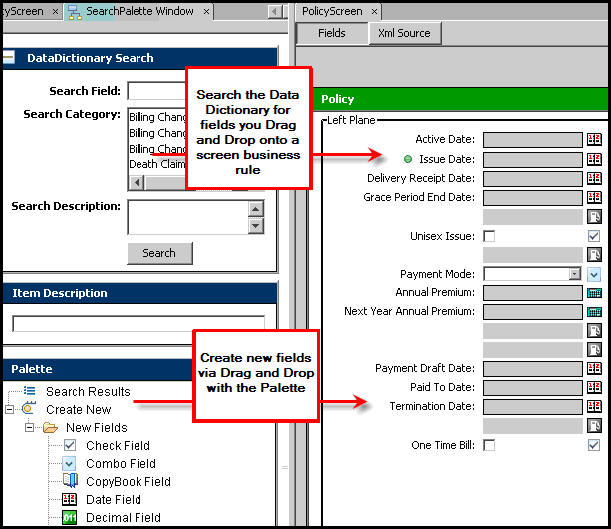
When configuring any of these screen business rules, a comprehensive visual editor for field entry is available in the Rules Palette. The visual editor provides drag and drop functionality and allows the user to see the screen while editing. However, if XML is preferred, configuration can still be done in XML via the XML Source pane. Configuration for the additional screen tags must still be done through the XML Source pane.
The DataDictionary or the Palette, which are located in the SearchPalette window, can be used to drag and drop items into the Configuration Area.
SearchPalette Window
Copyright © 2009, 2011, Oracle and/or its affiliates. All rights reserved. Legal Notices