
 To Configure Source Table Properties
-
Open the collaboration you want to edit.
-
Right-click the source table you want to configure, and then click Properties.
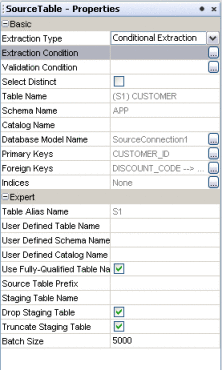
The Source Table – Properties panel appears.
-
Modify any of the editable properties described in the table below.
Property
Description
Extraction Type
The type of data extraction to perform for the table. Select Conditional Extraction if you will define conditions. Select Full Extraction to extract all data.
Extraction Condition
The extraction condition defined for the source table. You can create or edit a extraction condition by clicking the ellipsis button to the right of the property.
Validation Condition
The validation condition defined for the source table. You can create or edit a validation condition by clicking the ellipsis button to the right of the property.
Select Distinct
An indicator of whether to only select unique records from the source table or to select all records regardless of duplication.
Table Name
The name of the source table.
Schema Name
The name of the database schema that contains the source table.
Catalog Name
The name of the database catalog containing the schema being used.
Database Model Name
A name given by Data Integrator to each source table.
Primary Keys
Any primary key columns contained in the table.
Foreign Keys
Any foreign key columns contained in the table.
Table Alias Name
The alias given to the table for identification in SQL statements.
User Defined Table Name
A table name to be used during design time.
User Defined Schema Name
A schema name to be used during design time.
User Defined Catalog Name
A catalog name to be used during design time.
Use Fully-Qualified Table Name
An indicator of whether to use the fully qualified name for the table.
Source Table Prefix
A prefix to use for the source table.
Staging Table Name
The name of the table to use in the internal staging database. Data Integrator also supports dynamic staging table names. The staging table name can be generated in a business process and passed to the collaboration. The staging tables names must be unique.
Drop Staging Table
An indicator of whether to drop the internal staging table each time the collaboration is run.
Truncate Before Load
An indicator of whether to truncate the internal staging table each time the collaboration is run.
Batch Size
The number of records to extract for each batch.
- © 2010, Oracle Corporation and/or its affiliates