| Skip Navigation Links | |
| Exit Print View | |

|
Sun ZFS Storage 7x20 Appliance Customer Service Manual |


Power Distribution, Fan Module and Disk Components
Standalone Controller Configurations
7320 CPU and Memory Components
7320 Power Distribution and Fan Module Components
7320 Single and Cluster Controller Configurations
7420 Standalone and Cluster Controller Configurations
7720 Cluster Controller Configurations
7x20 and 7700 CRU Maintenance Procedures
Required Tools and Information
7x20 Controller Replacement Tasks
7x20 Cabinet Replacement Tasks
Disk Shelf Maintenance Procedures
Electrostatic Discharge Precautions
The figures below show steps to migrate a cluster from two to three HBAs.
NOTE: Diagrams below are not representative of proper slot location for HBAs.

fig.1 Cluster with two HBAs and chains of disk shelves

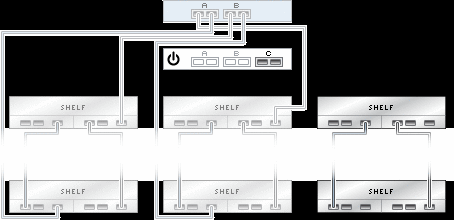
fig.2 Power down and remove all cabling from the first controller. Add and cable together the new chain of disk shelves, then power on shelves.
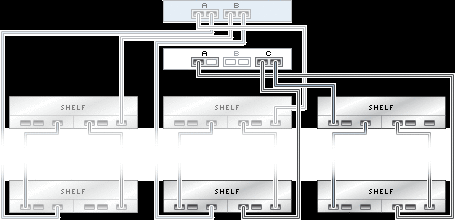
fig.3 Install new HBA according to the instructions on installing PCI cards, and connect the controller to the second and third chain as shown.
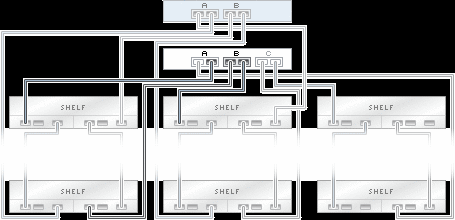
fig.4 Reconnect the two original HBAs as before to the first two chains. Power on the controller and wait for it to regain control of connected storage.
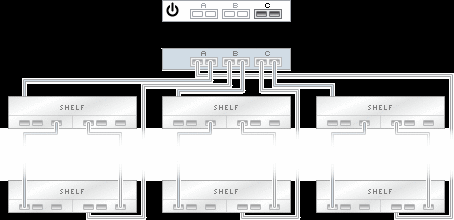
fig.5 Power down and remove all cabling from the second controller.
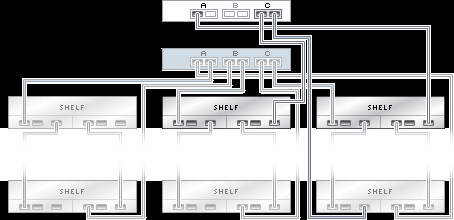
fig.6 Install new HBA according to the instructions on installing PCI cards, and connect the controller to the second and third chain as shown.
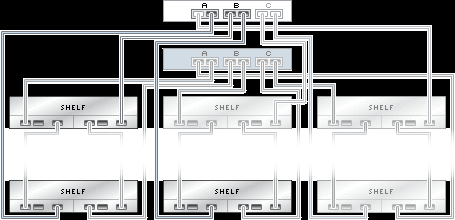
fig.7 Reconnect the two original HBAs as before to the first two chains. Power on the controller and wait for it to regain control of connected storage.
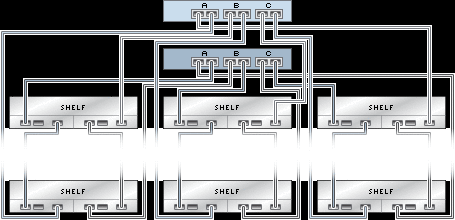
fig.8 Cluster with three HBAs


|