Defining Asset Attributes
To define asset attributes, use the following components:
To set up asset classes, use the Asset Class (ASSET_CLASS) component.
To set up lease payment schedules, use the Payment Schedule (PYMNT_SCHED_TBL) component.
To set up joint venture allocations, use the Joint Venture Allocation (JV_BUS_ALLOC) component.
To set up agencies, use the Agencies (AGENCY_DEFN) component.
To set up area definitions, use the Area Definition (AM_AREA_TBL) component.
To set up asset types, use the Asset Type Options (AM_TYPE_OPT) component
To set up asset subtypes, use the Asset Subtype (AM_SUBTYPE) component.
To set up maintenance types, use the Maintenance Types (MAINT_TYPE_DEFN) component.
To set up location definitions, use the Location (AM_LOCATION) component.
To set up hazardous-material codes, use the Hazardous Codes (ASSET_FSC_DEFN) component.
To set up insurance types, use the Insurance Types (INSURANCE_TYPE) component.
To set up units of production, use the Units of Production (UOP_DEFN) component.
To set up user-defined asset attributes, use the Asset Attribute (AM_UD_ATTR) component.
To set up asset property subclasses, use the Asset Property Subclass (AM_PROP_SUBTYPE) component.
To set up asset meter types, use the Meter Types (AM_METER_TYPE) component.
To set up asset warranties, use the Warranty Type (AM_STD_WRTY) component.
To set up warranty templates, use the Warranty Template (AM_WRTY_TMPL) component.
To set up equipment parts list, use the Equipment Parts List (AM_PART_LIST_TMPL) component.
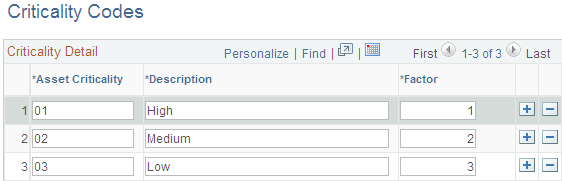
To set up criticality codes, use the Criticality Codes (AM_CRIT_LEVEL) component.
To access these components, select
Several procedures and options are available for establishing the core tables for PeopleSoft Asset Management. As previously noted, many of these tables are optional or conditional. Some are required before you can enter assets into the system; these tables are noted as such.
This topic discusses how to:
Set up asset classes.
Define lease payment schedules.
Define FERC codes.
Define joint venture allocations.
Define maintenance types.
Set up units of production.
Maintain indexes and units of production tables.
Define agencies.
Set up area definitions.
Define asset type options.
Define asset subtypes.
Define asset attributes.
Define property subclasses.
Set up hazardous codes.
Set up location codes.
Set up insurance types.
Set up asset physical definitions.
Set up asset meter types.
Set up asset warranties.
Set up equipment parts lists.
Set up criticality codes.
Note: You can also set up attribute groups.
See PeopleSoft Maintenance Management Integration with PeopleSoft Asset Management.
Pages Used to Define Asset Attributes
|
Page Name |
Definition Name |
Navigation |
Usage |
|---|---|---|---|
|
Asset Class |
ASSET_CLASS_DEFN |
|
Maintain asset classes. Asset classes are set up at the tableset level. |
|
VAT Defaults Setup (value-added tax defaults setup) |
VAT_DEFAULTS_DTL |
Click the VAT Default link on the Asset Class definition page. |
Specify VAT defaults setup. |
|
Payment Schedules |
LEASE_SCH_ID |
|
Add or modify payment schedules. When adding leased assets to your system, you must have at least one payment schedule defined. |
|
FERC Code |
FERC_CD_DEFN |
|
Establish FERC (Federal Energy Regulatory Commission) codes for asset categories that are used in regulatory reporting. |
|
Joint Venture Allocation |
JV_BUS_ALLOC |
|
Define the percentage of asset ownership to allocate to each joint venture participant. Use this page to set up the Joint Venture Allocation table. |
|
Maintenance Types |
MAINT_TYPE_DEFN |
|
Define maintenance types. |
|
Units of Production |
UOP_DEFN |
|
Set up units of production definitions. |
|
Load UOP and Index Tables |
RUN_AMIF2000 |
|
Load units of production and index tables. |
|
Agencies |
AGENCY_DEFN |
|
Create agency codes. Keep track of the registration and licenses of an asset by using the information that is set up in Agency tables. |
|
Area Definition |
AM_AREA_TBL |
|
Define an asset area within a location. |
|
Asset Type Options |
AM_TYPE_OPT |
|
Define physical asset types to be applied to individual assets. Oracle delivers ten asset types:Hardware, Software, Equipment, Property, Fleet, Machinery, Furniture, Facility, Intangible, Other. |
|
Define Asset Subtype |
AM_SUBTYPE |
|
Define asset subtypes as they relate to asset types. For example, if the asset type is Hardware, an asset subtype may be defined for a Laptop. |
|
Define Asset Attribute |
AM_UD_ATTR |
|
Define any asset physical attribute to be associated with an asset. |
|
Define Property Subclass |
AM_PROP_SUBCLASS |
|
Define property asset subclasses as they relate to asset property classes: Site, Building, Floor, Area, Space. |
|
Hazardous Codes |
ASSET_FSC_DEFN |
|
Define hazardous-asset codes. The PeopleSoft system is delivered with the Federal Supply Class (FSC) codes, which are U.S. federal codes that identify predominant and significant hazardous materials. You may add other classifications. |
|
Location Definition |
AM_LOCATION_TBL |
|
Set up locations. |
|
Detail |
MAINT_CONTRACT_01 |
|
Define the detail terms for maintenance contracts by entering the effective, expiration, and contract dates, and the contract cost and supplier information. |
|
Coverage |
MAINT_CONTRACT_02 |
|
Define the maintenance contract coverage, including contact information. |
|
Insurance Types |
INSURANCE_TYPE |
|
Enter different types of insurance, such as liability for automobiles or property. |
|
Transaction Information |
UOP_DEFN_WRK |
|
Generate open transactions. Each time new detail is added to this table, you can generate open transactions for each asset associated with it. |
|
Work Order Options for Components |
AM_WOM_OPT_SUBTYPE |
Click the Work Order Options for Components link on the Define Asset Subtype page. |
Define Work Management work order options. |
|
Meter Type Definition |
AM_METER_TYPE1 |
|
Define meter types. |
|
Meter Type Comments |
AM_METER_TYPE2 |
|
Add comments that are relevant to meter type definition. |
|
Standard Warranties |
AM_STD_WRTY |
|
Define standard warranties. |
|
Warranty Templates |
AM_WRTY_TMPL |
|
Set up templates for warranty types to apply to asset types. |
|
Equipment Parts List |
AM_PART_LIST_TMPL |
|
Define equipment parts lists to be associated with asset classes, groups, categories, types and subtypes, or other asset definitions. |
|
Criticality Codes |
AM_CRIT_LEVEL |
|
Establish levels of criticality. |
Asset Classes Page
Use the Asset Class page (ASSET_CLASS_DEFN) to maintain asset classes.
Asset classes are set up at the tableset level.
Image: Asset Classes page
This example illustrates the fields and controls on the Asset Classes page. You can find definitions for the fields and controls later on this page.
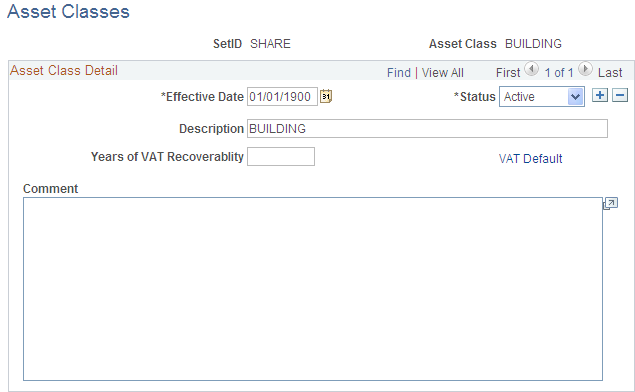
To add a new asset class, select the setID and enter the name of the asset class. Complete the fields on the Asset Classes page as appropriate.
Use asset class to classify assets for reporting purposes. It can be used in combination with the category code to refine asset classification. For example, an executive desk is categorized as furniture and fixtures for the balance sheet. Within the broad category of furniture and fixtures, you can use an asset class code to specifically identify the asset as a desk.
For defining asset classes, Oracle provides the option to define value-added tax (VAT) processing defaults as well.
Defining Asset Class as VAT Driver
Asset class is also used as a VAT driver. Create classifications of assets based on the VAT treatment. For example, treatment of assets such as automobiles may be different from that of assets such as buildings or leases. In this way, the asset class can be used to determine the VAT treatment.
VAT defaults are also set up at the business unit level.
Payment Schedules page
Use the Payment Schedules page (LEASE_SCH_ID) to add or modify payment schedules.
When adding leased assets to your system, you must have at least one payment schedule defined.
Image: Payment Schedule page
This example illustrates the fields and controls on the Payment Schedule page. You can find definitions for the fields and controls later on this page.
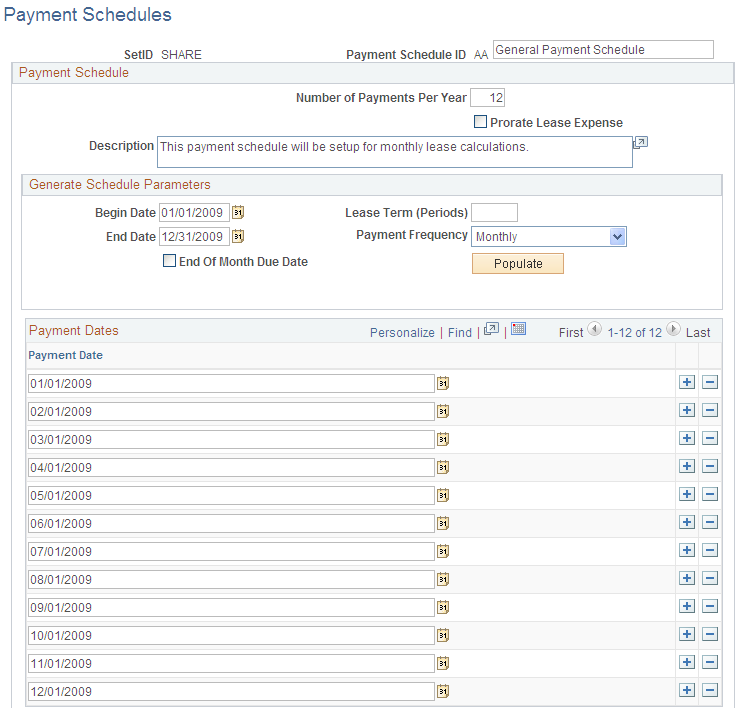
When working with leased assets, you must define payment schedules to be assigned to the leased assets.
You must have at least one payment schedule defined when working with leased assets. PeopleSoft Asset Management delivers four payment schedules in the SHARE tableset.
FERC Code Page
Use the FERC Code page (FERC_CD_DEFN) to establish FERC (Federal Energy Regulatory Commission) codes for asset categories that are used in regulatory reporting.
Image: FERC Code page
This example illustrates the fields and controls on the FERC Code page. You can find definitions for the fields and controls later on this page.
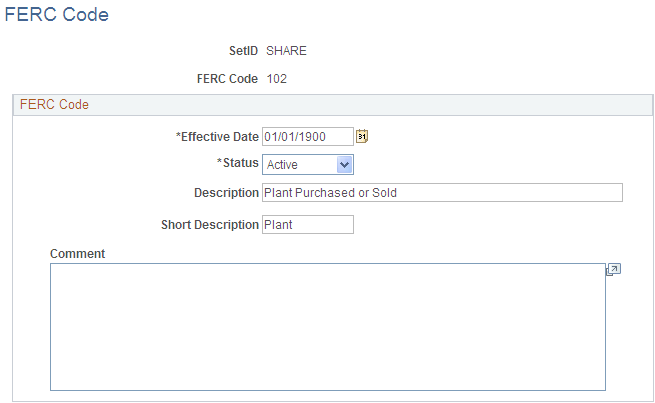
Add or update FERC codes in accordance with the U.S. Federal Energy Regulatory Commission. FERC codes are used to associate assets with the FERC Uniform System of Accounts for utilities. They are used for regulatory reporting and do not affect any calculations.
Joint Venture Allocation Page
Use the Joint Venture Allocation page (JV_BUS_ALLOC) to define the percentage of asset ownership to allocate to each joint venture participant.
Use this page to set up the Joint Venture Allocation table.
Enter each participating business unit and its allocated percentage of equity in the shared assets. The sum of these percentages must equal 100 percent.
The joint venture allocation table affects only newly added assets. Changes made to the allocation table will not affect existing assets. To change ownership percentages of existing assets, you must run a mass change using the template that is supplied for this purpose. These joint venture mass change templates enable you to:
Add a joint venture business unit.
Remove a joint venture business unit.
Change joint venture ownership allocations.
When you have changed the assets, change the allocation table to reflect the new equity percentages.
Note: The joint venture allocation as defined in the allocation table need not match the actual ownership percentages. For example, if two companies enter a joint venture on a 60/40 basis, one of them can sell the joint venture asset on a 70/30 basis—effectively giving one party a discount while the other pays a premium. In this case, you would first enter the asset at the joint venture business unit level, then change the cost apportionment by using mass change.
Maintenance Types Page
Use the Maintenance Types page (MAINT_TYPE_DEFN) to define maintenance types.
Image: Maintenance Types page
This example illustrates the fields and controls on the Maintenance Types page. You can find definitions for the fields and controls later on this page.
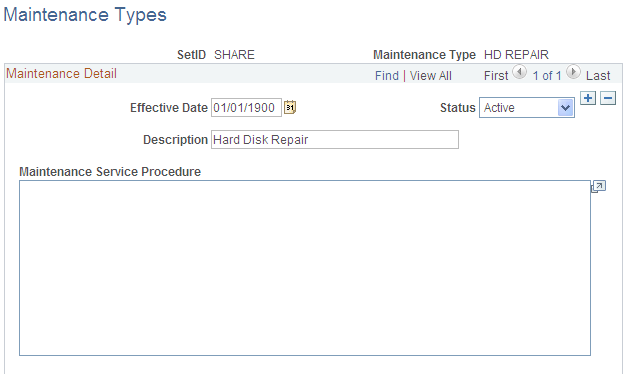
Maintenance types identify the type of maintenance and maintenance procedures to follow for a particular asset. For example, you might establish a Tune Up maintenance code that specifies routine maintenance for an automobile.
See Understanding Asset Maintenance, Repair, Warranties, and Insurance.
Units of Production Page
Use the Units of Production page (UOP_DEFN) to set up units of production definitions.
When you depreciate assets by using the units of production method, you must set up units of production definitions. This table defines the maximum units that an asset can produce and how many units have been posted for each period.
Adding and Adjusting Units of Production Detail Page
Access the Transaction Information page.
| Transaction Date |
Reflects the date on which you made the changes. |
| Accounting Date |
Reflects the date on which the entered changes will affect your general ledger. |
Both dates are used in recalculating depreciation. The difference between the transaction date and the accounting date determines whether production detail for this transaction will be posted as accumulated production.
The difference between the transaction date and the accounting date determines whether any prior period production needs to be posted. For example, consider a machine that was acquired and placed in service on March 15, 2008 but did not get entered in PeopleSoft Asset Management until August 1, 2008. All general ledger periods prior to August are closed. In this case, PeopleSoft Asset Management automatically posts any accumulated production to the general ledger in August.
Unlike accumulated depreciation, accumulated production is posted exactly the same as any other production detail. Nothing distinguishes it as accumulated production.
Accumulated production for a new units of production ID should be posted on a date that is before any assets associated with the units of production ID are added.
Maintaining Indexes and Units of Production Tables
You will periodically update the information in your Index and Units of Production tables when you receive new information. You can load or update the Index and Units of Production tables automatically using the AMIF2000. This process takes data in a fixed length format ASCII file and loads it into the appropriate table.
Files to be loaded into the Index table should be in this format:
|
Field |
Length |
|---|---|
|
SETID |
5 |
|
INDEX_NAME |
20 |
|
EFFDT |
8 (MM/DD/YY) |
|
DESCR |
30 |
|
INDEX_DETAIL_NAME |
35 |
|
INDEX_AMOUNT |
15 |
Files to be loaded into the Units of Production table should be in this format:
|
Field |
Length |
|---|---|
|
SETID |
5 |
|
UOP_ID |
10 |
|
DESCR |
30 |
|
UOP_IN_SERVICE_DT |
8 (MM/DD/YY) |
|
UOP_MAX_UNITS |
12 |
|
UNIT_OF_MEASURE |
3 |
|
UOP_POSTING_DT |
8 (MM/DD/YY) |
|
UOP_UNITS |
12 |
Defining Asset Physical Definitions
To define asset physical definitions, use the following components:
Agencies (AGENCY_DEFN)
Area Definition (AM_AREA_TBL)
Asset Type Options (AM_TYPE_OPT).
Asset Subtype (AM_SUBTYPE).
Asset Attribute (AM_UD_ATTR).
Asset Property Subclass (AM_PROP_SUBTYPE).
Hazardous Codes (ASSET_FSC_DEFN)
Asset Meter Types (AM_METER_TYPE)
Location Definition (AM_LOCATION)
To access these components, select
Agencies Page
Use the Agencies page (AGENCY_DEFN) to create agency codes.
Image: Agencies Page
This example illustrates the fields and controls on the Agencies Page. You can find definitions for the fields and controls later on this page.
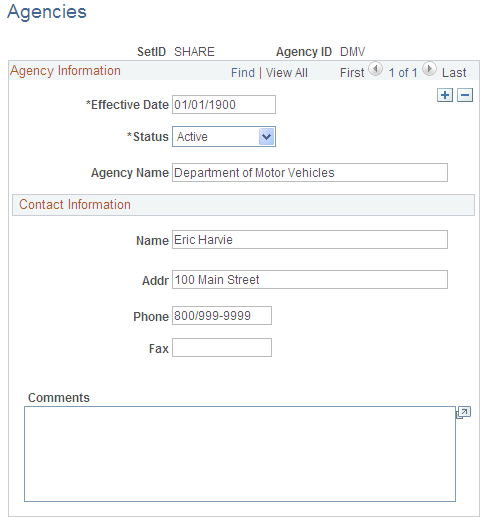
Keep track of the registration and licenses of an asset by using the information that is set up in Agency tables. Only agency IDs that are set up here can be entered on the Asset License/Registration page.
Area Definition Page
Use the Area Definition page (AM_AREA_TBL) to define an asset area within a location.
Image: Area Definition Page
This example illustrates the fields and controls on the Area Definition Page. You can find definitions for the fields and controls later on this page.
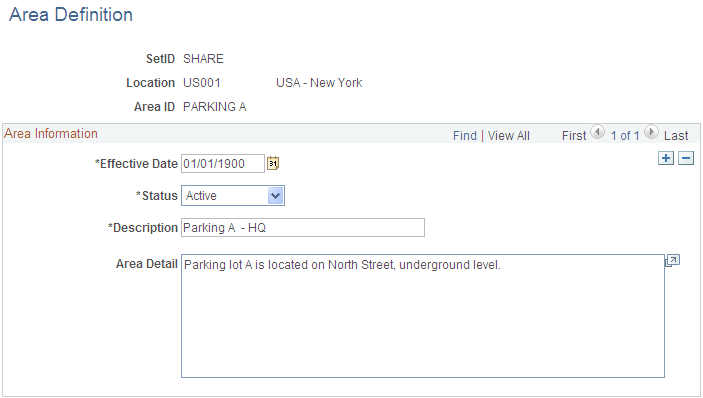
The Area Definition enables you to create a more granular level that further identifies the asset within a location. In PeopleSoft Asset Management, an asset can be physically located by region, location, and area.
Note: The system clears the area ID for an asset when you move that asset to a new location. You can then reassign new area IDs to the asset, as appropriate.
Asset Type Options Page
Use the Asset Type Options page (AM_TYPE_OPT) to define physical asset types to be applied to individual assets.
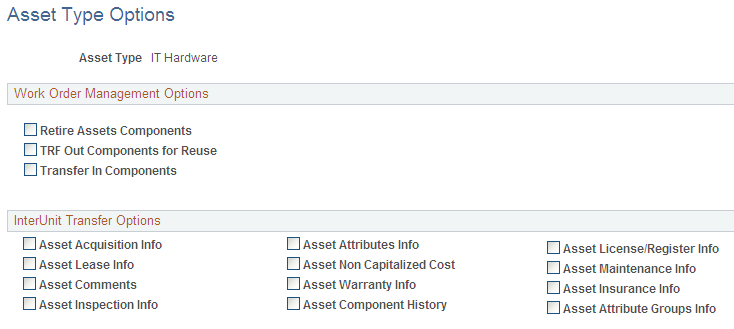
Oracle delivers ten asset types: Hardware, Software, Equipment, Property, Fleet, Machinery, Furniture, Facility, Intangible, Other.
You can assign the appropriate options that apply to each asset type for PeopleSoft Maintenance Management work orders and InterUnit Transfer Default values.
Image: Asset Type Options Page
This example illustrates the fields and controls on the Asset Type Options Page. You can find definitions for the fields and controls later on this page.
Define Asset Subtype Page
Use the Define Asset Subtype page (AM_SUBTYPE) to define asset subtypes as they relate to asset types.
For example, if the asset type is Hardware, an asset subtype may be defined for a Laptop.
Image: Define Asset Subtype Page
This example illustrates the fields and controls on the Define Asset Subtype Page. You can find definitions for the fields and controls later on this page.
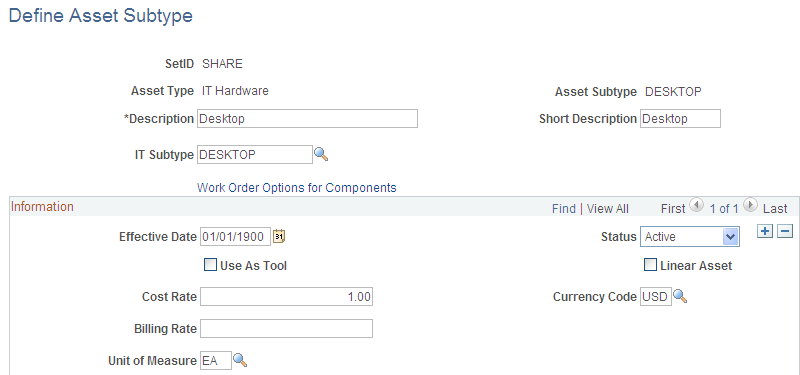
| IT Subtype |
Map the Asset Subtype to an IT Subtype to create the association between the two fields for tracking IT assets within the asset repository for PeopleSoft IT Asset Management. Note: The IT Subtype field appears only when PeopleSoft IT Asset Management is installed. See Assets, Asset Types, and Asset Subtypes. See IT Subtypes. |
| Use As Tool |
Check whether this subtype is used as a tool in support of another asset. When the asset specifies an asset subtype, the system applies the Use As Tool field value from the asset definition level. When defining an asset, you can associate it with a profile, such as Building or Automobile. If no profile is specified for the asset, the asset subtype value Use As Tool will apply when this subtype is selected for the asset. The following describes the system validation process: When working with assets in Add mode only, if no asset subtype is specified for the asset, the system checks the profile. From the profile definition, the system will populate the new asset with the asset type and asset subtype values. When the profile specifies an asset subtype, the system sets the Use As Tool field value to the same value of the asset subtype as defined in the associated profile. When the profile does not specify an asset subtype, no values are provided by default because the Use As Tool field value is blank on the profile and the newly added asset will follow suit. |
| Linear Asset |
Identify this asset subtype as one that has coordinates for its start and end points, for example, a train track, a pipeline, or a roadway. You can override this option from the basic component when adding or updating assets. |
| Cost Rate and Currency Code |
Enter the cost rate and currency to be used if a cost is applied for this asset subtype. |
| Billing Rate |
Enter the billing rate to be used if the use of the asset subtype is to be billed. |
| Unit of Measure |
Enter the units measured for cost and billing. |
Define Asset Attribute Page
Use the Define Asset Attribute page (AM_UD_ATTR) to define any asset physical attribute to be associated with an asset.
Image: Define Asset Attribute Page
This example illustrates the fields and controls on the Define Asset Attribute Page. You can find definitions for the fields and controls later on this page.
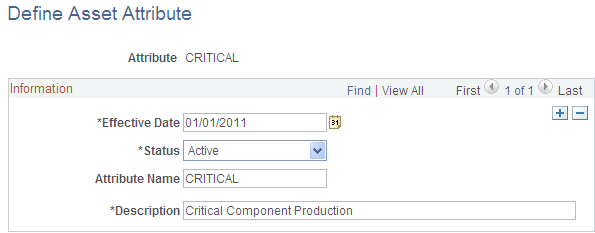
Enter user-defined asset attributes to assign to assets. For example, you can create asset attributes to specify a quality, aspect, version, or other characteristic that can be applied to an asset. Asset attributes are optional.
Note: Asset attributes should not be confused with attribute groups. Asset attributes are used widely within PeopleSoft Asset Management to characterize assets regardless of the type of asset. Attribute groups are logical records that store the specific attributes that are of a particular interest for a certain type of asset. The attributes that are part of the attribute group are defined on the Fields Summary page within PeopleSoft Maintenance Management, Supplemental Data
Define Property Subclass Page
Use the Define Property Subclass page (AM_PROP_SUBCLASS) to define property asset subclasses as they relate to asset property classes: Site, Building, Floor, Area, Space.
Image: Define Property Subclass Page
This example illustrates the fields and controls on the Define Property Subclass Page. You can find definitions for the fields and controls later on this page.
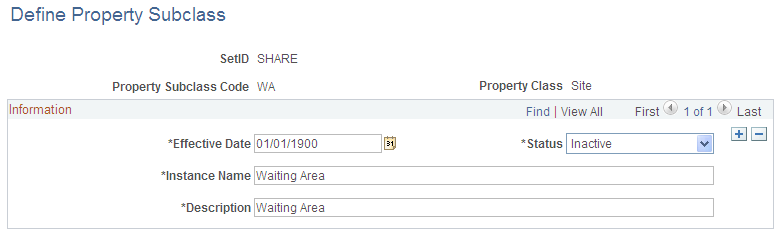
Define property subclass codes to apply to property asset classes: Site, Building, Floor, Area, Space. For example, you can define the corporate sites and further enter property subclasses for the buildings located on the site.
Hazardous Codes Page
Use the Hazardous Codes page (ASSET_FSC_DEFN) to define hazardous-asset codes.
The PeopleSoft system is delivered with the Federal Supply Class (FSC) codes, which are U.S. federal codes that identify predominant and significant hazardous materials. You may add other classifications.
When you manage assets that can be classified as hazardous material, you must maintain the Hazardous Material codes table. U.S. Federal Supply Class codes are delivered with PeopleSoft Asset Management, and you can add codes to supplement the list. Hazardous assets can be reported using asset search functions, and storage locations can be managed with specific building, room, floor, and longitudinal and latitudinal information added to the location page that is associated with the asset.
Note: Hazardous material and waste is solid, liquid, or gaseous waste, or a combination of these wastes, that because of its quantity or concentration, or its physical, chemical, or infectious characteristics, may cause a significant increase in mortality or an increase in serious irreversible or incapacitating illness, or pose a substantial present or potential hazard to human health or the environment when improperly treated, stored, transported, disposed of, or otherwise managed (according to the United States Environmental Protection Agency).
Meter Type Definition Page
Use the Meter Type Definition page (AM_METER_TYPE1) to define meter types.
Image: Meter Type Definition page
This example illustrates the fields and controls on the Meter Type Definition page. You can find definitions for the fields and controls later on this page.
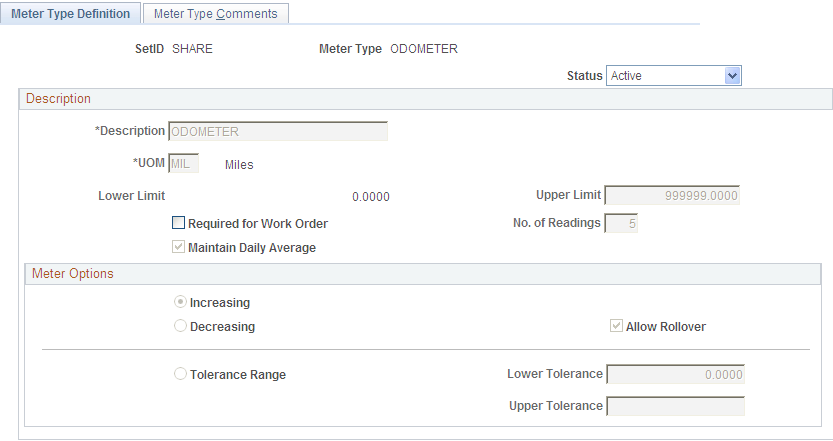
When you manage assets that use meters to track asset usage or that provide some other type of measurement associated with the asset, you need to define meter types.
Define meter types within setIDs.
| Status |
Set the meter status. Values are: Active: The meter is actively measuring. Inactive: The meter is not actively measuring but is available. |
Description
Meter Options
Setting Up Asset Warranties
This section provides an overview of warranties and discusses how to:
Set up standard warranties.
Set up warranty templates.
Understanding Warranties
For the system to automatically assign one or more warranties to each newly acquired asset, standard equipment warranties and equipment warranty defaults must be defined. Each asset that is added to the repository is available to have the appropriate warranties automatically attached to it. You can update a warranty for an asset at any time after the addition of the asset to the asset repository, including changing the terms of the warranty, renewing or voiding the warranty associated with the asset, or making other notable changes in coverages or terms.
A warranty is established as a standard warranty that is applied to a single asset. Or a generic warranty that can be applied to multiple assets can be defined as a warranty template. This is useful when the same terms of a general warranty apply to many assets, such as multiple computer workstations or truck tires for a fleet of trucks. It is also useful when you are applying multiple standard warranties to assets. For example, an asset may be delivered with a manufacturer's warranty and an additional extended warranty that is purchased separately and provides different coverages.
Standard Warranties Page
Use the Standard Warranties page (AM_STD_WRTY) to define standard warranties.
Image: Standard Warranties Page
This example illustrates the fields and controls on the Standard Warranties Page. You can find definitions for the fields and controls later on this page.
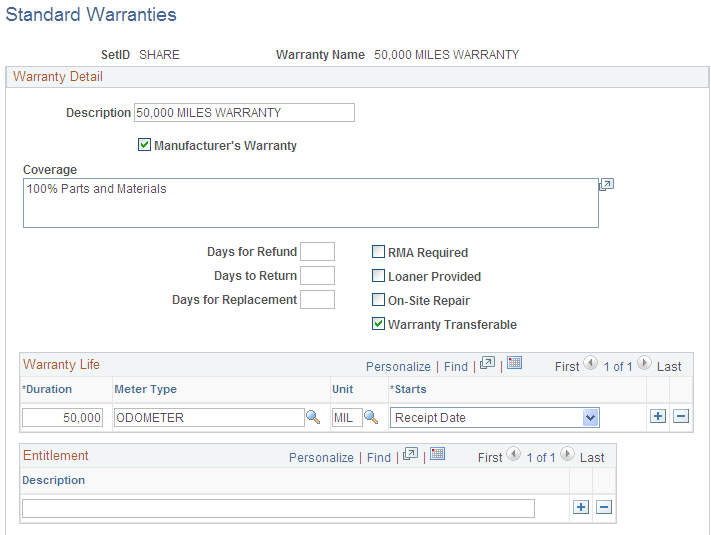
Enter the standard warranty information for an asset type, category, class, or other asset definition. Use the standard warranty to associate it with specific asset IDs.
Warranty Templates Page
Use the Warranty Templates page (AM_WRTY_TMPL) to set up templates for warranty types to apply to asset types.
Image: Warranty Templates Page
This example illustrates the fields and controls on the Warranty Templates Page. You can find definitions for the fields and controls later on this page.

Define warranty templates that can be applied to multiple assets at one time, such as assets defined by asset type, category, class or other asset definition.
Select all standard warranties that apply to the individual asset category, class, type, and so on.
Equipment Parts List Page
Use the Equipment Parts List page (AM_PART_LIST_TMPL) to define equipment parts lists to be associated with asset classes, groups, categories, types and subtypes, or other asset definitions.
Image: Equipment Parts List page
This example illustrates the fields and controls on the Equipment Parts List page. You can find definitions for the fields and controls later on this page.

Asset equipment parts lists (EPL) are maintained by setID. You can establish a parts list to correspond to asset classes, groups, categories, types, and subtypes, or to any asset definition. The EPL can then be associated with a specific asset ID.
Criticality Codes Page
Use the Criticality Codes page (AM_CRIT_LEVEL) to establish levels of criticality.
Image: Criticality Codes page
This example illustrates the fields and controls on the Criticality Codes page. You can find definitions for the fields and controls later on this page.