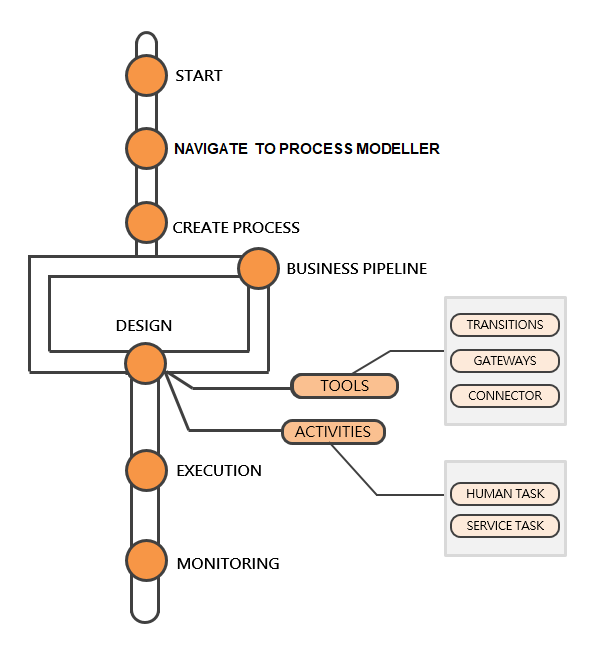
The Process Modelling Framework (PMF) is a design and execution framework that enables Process Pipeline developers to implement various Pipelines modeled by business analysts. Process Pipeline developers use the framework to orchestrate the Business Pipelines within services, and also to design the artifacts that participate in the Pipelines, in order to complete their implementation.
The Process Modelling Framework consists of Process Modelling components for modelling Pipelines and Process Monitor components to monitor instantiated Pipelines of Oracle Financial Services (OFS) Cloud services.
See the Process Flow for more information on how these tools fit into the Pipeline design and implementation.
The Process Modeller aids in representing the various artifacts required for modelling and provides implementation details of the OFS Cloud services process artifacts.
· Process Pipeline
· Process data (Data Fields)
· Implementation of various types of Human Tasks and Service Tasks
· Business Rules (Application Rules)
· Various external services implementations and other artifacts needed for complex implementations
· Configuring Tasks and Notifications
· Support for visual modelling of the pipelines.
· Support for registration of Process, Activity, and Transition Logic implementation, separated from the modelling itself.
· Published interface for the abstraction of task implementation.
· Reminder, Escalation, and Expiry of tasks.
· Process Monitoring Admin Tool to view the execution of Process Instances.
Description of the Process Pipeline Flow
The user role mapping and access rights for PMF are available in the Users and User Privileges Guide.
The PMF service consists of the following components:
To access the Process Modelling Framework, follow these steps:
1. From the OFS
Cloud Applications window, select the  Navigation
icon.
Navigation
icon.
2. Select one of the following from the Navigation Tree:
§ Transaction Monitoring Administration
§ Compliance Regulatory Reporting Administration
3. Select Process Modelling Framework from the menu to display the following submenu options:
§ Process Modeller
§ Process Monitor
4. Click Process Modeller to view the summary of available processes or Process Monitor to monitor currently running processes.