Search Images Using Natural Language or Uploaded Image
Users can now search for images using intuitive, natural language queries or upload an image to find similar ones. This feature makes searches easier by allowing users to search visually with an image instead of by typing keywords.
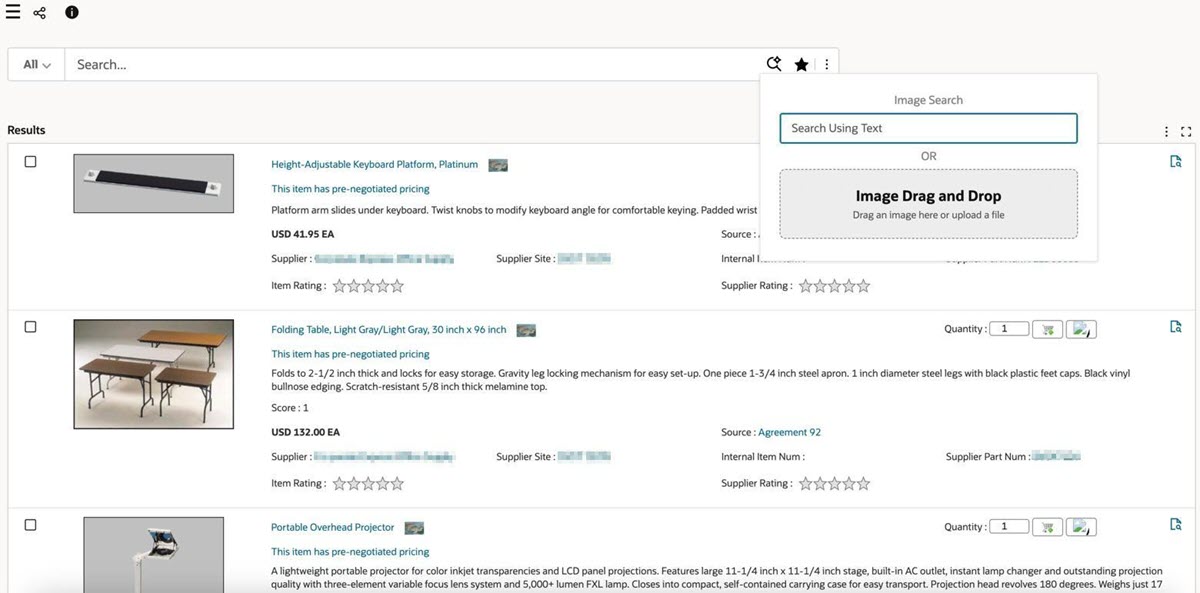
Example of Image Search
Steps to enable and configure
To enable image search:
- Select the relevant data set.
- Choose the appropriate transformation key for the specific attribute key.
- Enable image search within the Search Configuration panel.
For more information, see Search Box, Oracle E-Business Suite Extending Enterprise Command Centers.
Key resources
- Search, Oracle E-Business Suite User's Guide
- Search Box, Oracle E-Business Suite Extending Enterprise Command Centers