Identify and Access Drill-Down Metrics Using Visual Indicators
In Oracle Enterprise Command Center Framework V16, metrics that contain embedded hyperlinks now have a distinct "look and feel," making it easy to identify which values can be used for navigation. With this update, any metric item configured with a hyperlink action will feature clear visual cues, such as specific styling or underlining, to indicate interactivity. This change ensures that, whether a metric links to an external URL, a detailed drill-down page, or a related dashboard, users can quickly recognize the path forward at a glance.

Metric Drill Down
Business Benefits
-
Improved Feature Discoverability: Guides users toward deeper analysis by making hyperlinks obvious.
-
Faster Time-to-Insight: Streamlines the drill-down process, allowing business users to drill from high-level KPIs to granular data with confidence.
-
Reduced Training Overhead: New users can navigate complex dashboards more easily when the interface follows standard conventions for "clickable" content.
Steps to enable and configure
- Open the Summarization Bar Configuration panel and select Metric Item > Actions.
- Select Hyperlink from the action list.
- Add an action description.
- Select any options you want for this hyperlink. For example, you can select the Display in Drawer option and specify a drawer title.
- Add any hyperlink URL parameters.
- Optionally define conditional actional display.
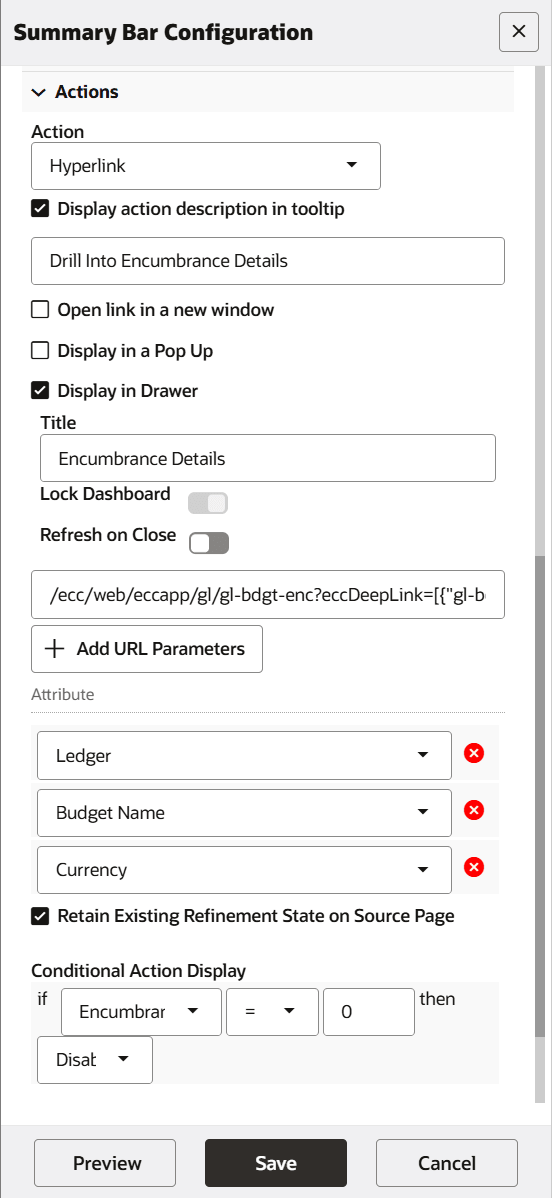
Hyperlink Configuration in Summary Bar Configuration Panel
For more details, see Action, Oracle E-Business Suite Extending Enterprise Command Centers.
Key resources
- Action, Oracle E-Business Suite Extending Enterprise Command Centers
- Summarization Bar, Oracle E-Business Suite User's Guide