Navigate Drill-Down Data in Drawers Using Breadcrumbs
As users explore different levels of detail within a drawer, the system now automatically generates and displays a clear navigation path.
This path is dynamically generated from the drawer titles at each level of the drill-down. Users no longer need to remember their previous steps or close the drawer to restart their analysis. Instead, they can easily see their current position within the hierarchy and move efficiently between different levels of information.
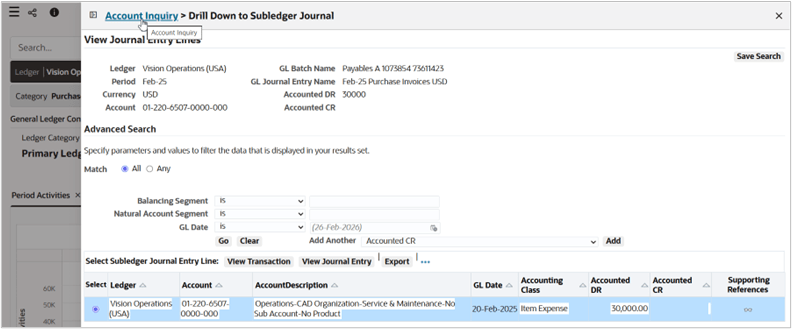
Drawer Breadcrumb
Business Benefits
-
Enhanced User Orientation: Prevents "navigation lostness" by providing constant context, which is critical when analyzing complex, multi-level data.
-
Streamlined Deep-Dive Analysis: Encourages more thorough data exploration by making it easier and faster to traverse deep information hierarchies.
-
Intuitive Interface: Leverages familiar breadcrumb-style logic to minimize the learning curve and improve the overall "flow" of data investigation.
Steps to enable and configure
You don't need to do anything to enable this feature.
Key resources
- ECC Drawer, Oracle E-Business Suite Extending Enterprise Command Centers
- ECC Drawer, Oracle E-Business Suite User’s Guide