Default Work Order Types for Work Orders Created from Work Requests Based on Work Request Type
Enhance traceability and consistency in maintenance workflows by defaulting Work Order Types based on Work Request Types. This new setup enables you to map specific Work Request Types to corresponding Work Order Types, ensuring that work orders created from work requests automatically inherit the appropriate type.
This feature can offer improved operational efficiency and data accuracy, reducing the risk of misclassification in maintenance processes.
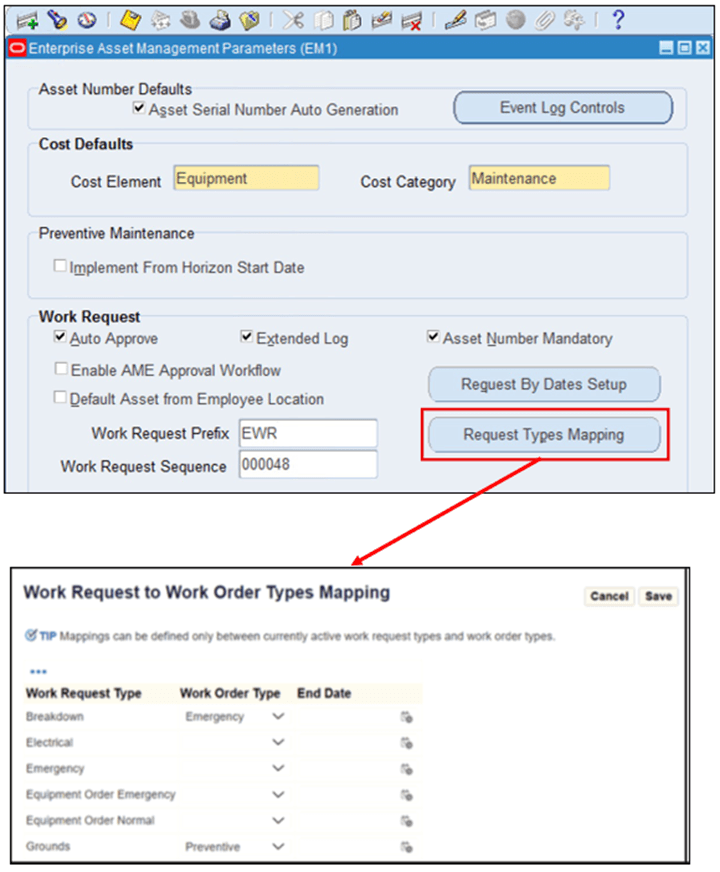
Work Request Mapping
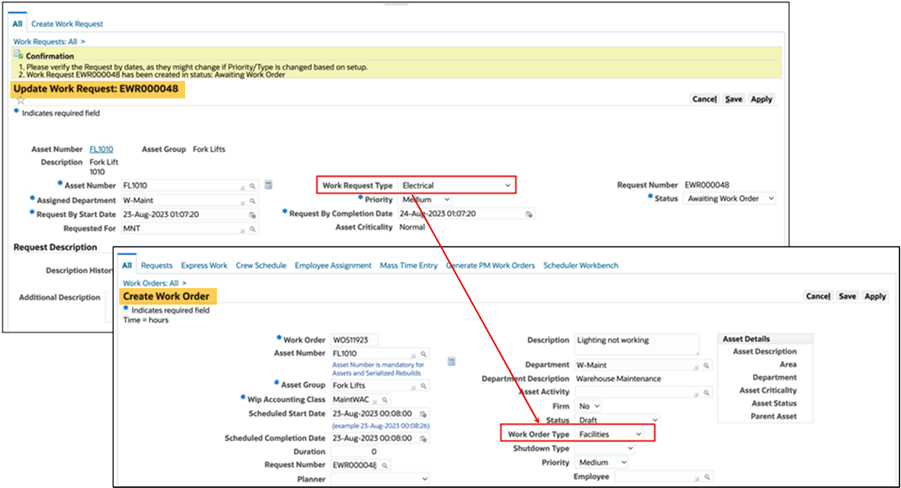
Example of Work Request Type Mapping to Work Order Type
Steps to enable and configure
- Navigate to the Enterprise Asset Management parameters setup screen.
- Configure the Request Mapping setup for Work Request Types to Work Order Types.
- Save the mappings to ensure that work orders created from work requests default to the specified Work Order Type.
Tips and considerations
- Review existing work request types and work rrder types to establish logical mappings that reflect business priorities.
- Test the mappings in a non-production environment to confirm correct defaulting behavior before applying in live systems.
- Regularly update mappings as organizational needs or maintenance strategies evolve.
Key resources
- Oracle Enterprise Asset Management Implementation Guide
- Setting Up
- Oracle Enterprise Asset Management User's Guide
- Self-Service Requests
- Maintenance Super User