Deploying PeopleSoft Campus Solutions Digital Assistant
Campus Solutions (CS) delivers a digital assistant (commonly known as a chatbot) equipped with various skills. Skills are individual chatbots, designed to interact with users to fulfill specific tasks using a combination of text messages and simple user interface (UI) elements. Users can interact with the digital assistant using natural language conversations.
To use the digital assistant, these are the minimum requirements:
-
PeopleTools 8.57 or higher
-
PeopleSoft Campus Solutions 9.2.015 or higher
Here's an overview of the digital assistant deployment process.
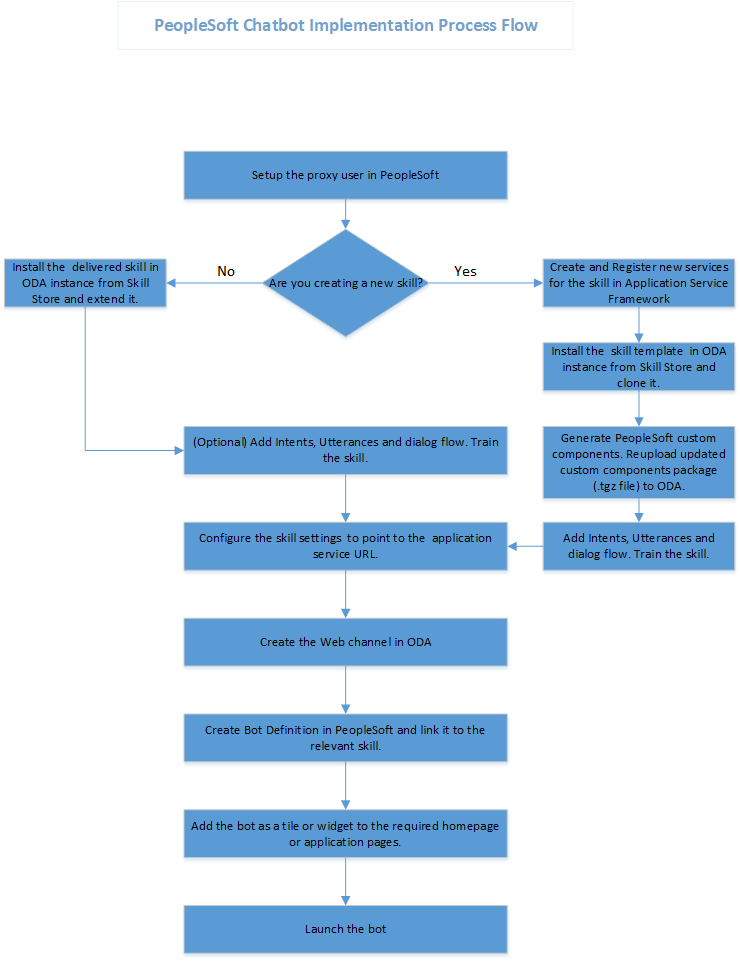
And here are a few things to note:
-
The basic digital assistant or skills you install from the Skill Store may not satisfy all your requirements, or you might want to modify them to align with your business processes. You can't modify an installed assistant or skill directly, but you can create an extension of it and then modify that extension.
-
If you want to add skills to the digital assistant in the future, you would need to install the skill, add the skill to the digital assistant, then extend the skill.
For information on fluid pages and controls, see the product documentation for PeopleSoft Enterprise Components: "Working With the PeopleSoft Fluid User Interface."
See also the product documentation for Oracle Digital Assistant (ODA).