Defining Variables for Criteria and Equations
To set up variables for criteria and equations, use the Equation Variables component (STDNT_EQUTN_VARS).
This section provides an overview of equation variables and discusses:
Understanding Equation Variables
Equation variables are user-defined variables that you can use to classify students when no standard system values are available. For example, you might need to calculate a fee for students involved in summer internship programs. You could define one or more variables to use to identify the students and calculate the appropriate fees.
Pages Used to Define Variables for Criteria and Equations
| Page Name | Definition Name | Navigation | Usage |
|---|---|---|---|
|
Char Variables (character variables) |
STDNT_EQUTIN_CHAR |
|
Define character variables. |
|
Num Variables (numeric variables) |
STDNT_EQUTN_NUM |
|
Define numeric variables. |
|
Y/N Flags (yes/no flags) |
STDNT_EQUTN_FLAG |
|
Define yes/no variables. |
Defining Character Variables
Access the Char Variables page ().
This example illustrates the fields and controls on the Char Variables page. You can find definitions for the fields and controls later on this page.
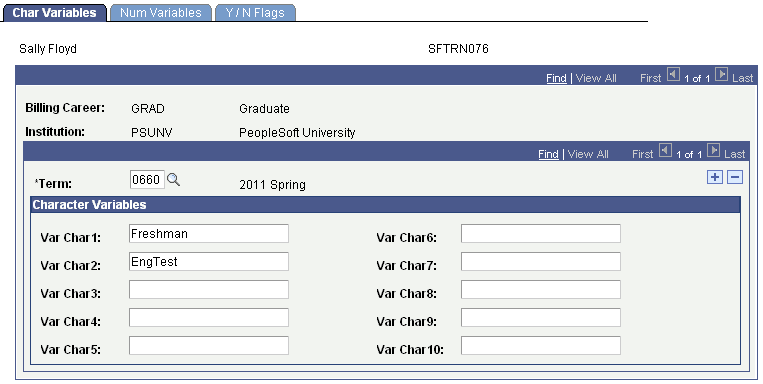
| Field or Control | Description |
|---|---|
|
Term |
Select the term for which you want the variables to apply. |
|
Var Char1 (variable characters 1) through Var Char10 (variable characters 10) |
You can attach up to 10 character variables to the student, using the Var Char1 through Var Char10 fields. Save the page, and the system links the character variables that you specified to the student. The character variables no longer apply when the term that you selected ends. |
Defining Numeric Variables
Access the Num Variables page ().
This example illustrates the fields and controls on the Num Variables page. You can find definitions for the fields and controls later on this page.
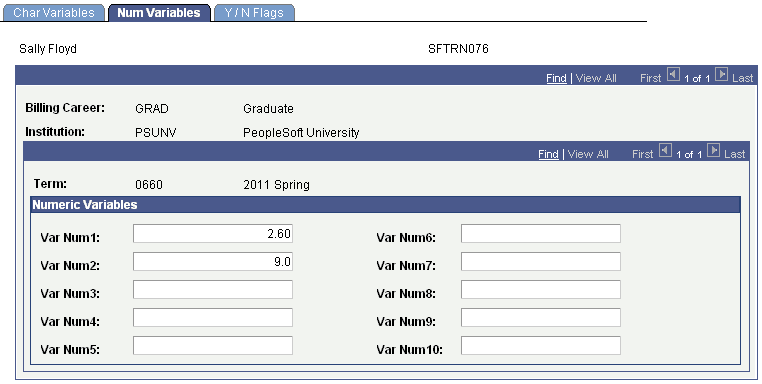
| Field or Control | Description |
|---|---|
|
Term |
Select the term for which you want the variables to apply. |
|
Var Num1 (variable number 1) through Var Num10 (variable number 10) |
Attach up to 10 numeric variables to the student, using these fields. Save the page, and the system links the variables that you specified to the student. The numeric variables no longer apply when the term that you selected ends. |
Defining Yes/No Flags
Access the Y/N Flags page ().
This example illustrates the fields and controls on the Y/N Flags page. You can find definitions for the fields and controls later on this page.
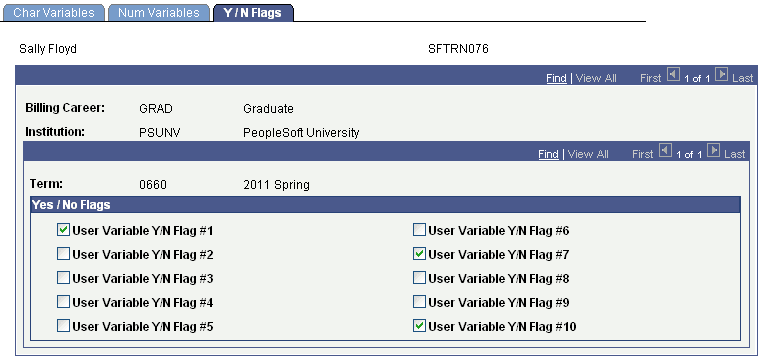
| Field or Control | Description |
|---|---|
|
Term |
Select the term for which you want the variables to apply. |
|
User Variable Y/N Flag #1 (user variable yes/no flag number 1) through User Variable Y/N Flag #10 (user variable yes/no flag number 10) |
You can select up to 10 Y/N flags per student, using the User Variable Y/N Flag #1 through User Variable Y/N Flag #10 check boxes. Save the page, and the system links the variables that you specified to the student. |