Setting Up the IHC Feature
This section discusses:
Pages Used to Set Up IHC
| Page Name | Definition Name | Navigation | Usage |
|---|---|---|---|
|
International Health Coverage Provider |
SSF_IHC_PROVIDER |
|
Enter or edit provider information. |
|
Provider Coverage and Rates |
SSF_IHC_PROV_COVER |
|
Enter or edit coverage and rate information. |
|
International Health Coverage Item Type Setup |
SSF_IHC_DEFAULTS |
|
Enter an item and account type for the business unit. |
|
International Health Coverage Institutional Contact Information |
SSF_IHC_CONTACT |
|
Enter contact information for the academic institution. |
Setting Up Provider Information
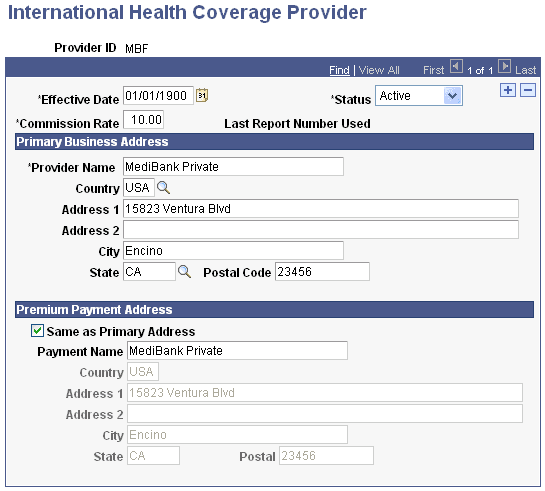
Access the International Health Coverage Provider page ().
This example illustrates the fields and controls on the International Health Coverage Provider page. You can find definitions for the fields and controls later on this page.
| Field or Control | Description |
|---|---|
|
Commission Rate |
Enter the percentage that is returned to the institution based on the total contribution to the provider. |
|
Last Report Number Used |
Displays the last schedule number generated for this provider. Each time a schedule is generated, the last report number used is increased by one. |
Primary Business Address
| Field or Control | Description |
|---|---|
|
Provider Name |
The name of the provider. |
|
Country |
The country of the provider's address. |
|
Address 1 and Address 2 |
The first and second line of the provider's address. |
|
City |
The city of the provider's address. |
|
State |
The state of the provider's address. |
|
Postal Code |
The post code of the provider's address. |
Premium Payment Address
| Field or Control | Description |
|---|---|
|
Same as Primary Address |
Enter the address where premiums for this provider should be sent. If the address for premium payments is the same as the business address, select the Same as Primary Address check box and the primary address information is automatically added to the address fields, and then are not available for editing. |
|
Payment Name |
Use the Payment Name field if the payment should be made payable to someone other than the provider. |
Setting Up Provider Coverage Plans and Rates
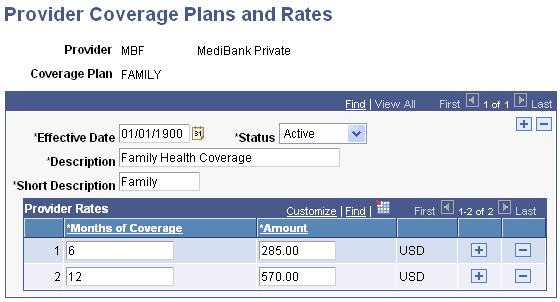
Access the Provider Coverage Plans and Rates page ().
This example illustrates the fields and controls on the Provider Coverage Plans and Rates page. You can find definitions for the fields and controls later on this page.
| Field or Control | Description |
|---|---|
|
Months of Coverage |
The intervals of coverage in months that IHC is offered by this provider. Enter any amount in this field up to 99 months. |
|
Amount |
The premium rate amount of the specified interval. |
|
USD |
Displays the appropriate currency type. The currency type defaults from the base currency specified on the Installation Table page. |
Setting Up IHC Item Types
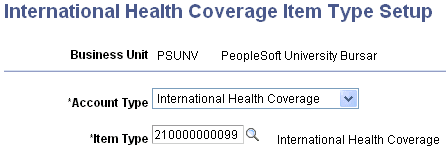
Access the International Health Coverage Item Type Setup page ().
This example illustrates the fields and controls on the International Health Coverage Item Type Setup page. You can find definitions for the fields and controls later on this page.
| Field or Control | Description |
|---|---|
|
Account Type |
Select the account type to which the IHC charge item type is associated. |
|
Item Type |
Select the appropriate IHC charge item type. |
See:
Setting Up IHC Contact Information
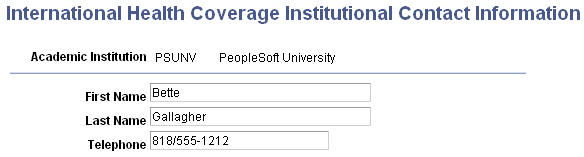
Access the International Health Coverage Institutional Contact Information page ().
This example illustrates the fields and controls on the International Health Coverage Institutional Contact Information page. You can find definitions for the fields and controls later on this page.
| Field or Control | Description |
|---|---|
|
First Name |
Enter the first name of the IHC contact at the institution. This information is used on the payment schedule. |
|
Last Name |
Enter the last name of the IHC contact at the institution. |
|
Telephone |
Enter the telephone number of the IHC contact at the institution. |