Creating Nets Manually
Pages Used to Manually Create Nets
| Page Name | Definition Name | Usage |
|---|---|---|
|
NET_MANUAL_RQST |
Enter primary information. |
|
|
NET_MANUAL_RQST1 |
Set up your settlement instructions. |
|
|
NET_MAN_RQST_AP |
Set up payables for manual netting. |
|
|
Enter Manual Selection Page (vouchers) |
NET_VOUCHER_ADD |
Add multiple vouchers to payables for manual netting. |
|
NET_MAN_RQST_AR |
Set up receivables for manual netting. |
|
|
Enter Manual Selection Page (items) |
NET_ITEM_ADD |
Add multiple items to receivables for manual netting. |
Understanding Creating Nets Manually
To manually create bilateral nets, you do the following:
-
Enter primary netting information.
-
Define the settlement instructions.
-
Set up the payables leg.
-
(Optional) Add multiple vouchers to the payables leg.
-
Set up the receivables leg.
-
(Optional) Add multiple items to the receivables leg.
Common Elements Used to Manually Create Nets
| Field or Control | Description |
|---|---|
|
Add Multiple Items |
Click to add multiple vouchers from a specified business Unit and Supplier ID to your bilateral net. |
|
Request Status |
Displays either WIP (work in progress) or Submitted. |
|
Total AP Txns (transactions) |
Total number of Payables transaction items. |
|
Total AR Txns (transactions) |
Total number of Receivables transaction items. |
Manual Selection Page
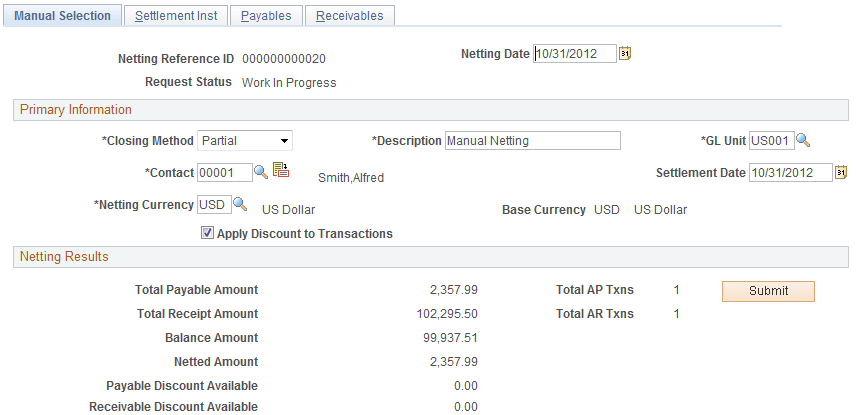
Use the Manual Selection page (NET_MANUAL_RQST) to enter primary information.
Navigation:
This example illustrates the fields and controls on the Manual Selection page. You can find definitions for the fields and controls later on this page.
| Field or Control | Description |
|---|---|
|
Netting Date |
Displays the effective date of the net. |
|
Netting Currency |
Select a netting currency. The system converts all amounts and displays them in this defined netting currency. |
|
Base Currency |
Displays the base currency of the selected GL Unit. |
|
Submit |
Click to submit the net. Note: Prior to submitting the net, you must complete the other pages in this component. |
Manual Select Netting - Settlement Inst Page
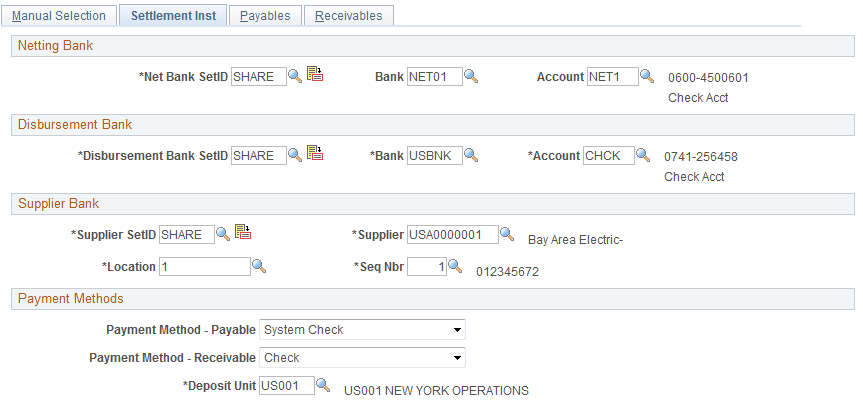
Use the Manual Select Netting - Settlement Inst (instructions) page (NET_MANUAL_RQST1) to set up your settlement instructions.
Navigation:
This example illustrates the fields and controls on the Settlement Inst (instructions) page. You can find definitions for the fields and controls later on this page.
| Field or Control | Description |
|---|---|
|
Netting Bank |
Click to select your netting bank SetID, and specify the bank and account. |
|
Disbursement Bank |
Click to select your disbursement bank ID, and specify the bank and account. |
|
Supplier Bank |
Click the link to select your supplier bank ID. Enter the Supplier, Location, and Sequence Nbr (sequence number). |
|
Payment Method-Payable |
Select Automated Clearing House, Direct Debit, EFT, Manual Check, System Check, or Wire Report. |
|
Payment Method-Receivable |
Select Check, Direct Debit, or Draft. |
|
Deposit Unit |
Define which business unit receives payment after the net. |
Related Topics
Manual Select Netting - Payables Page
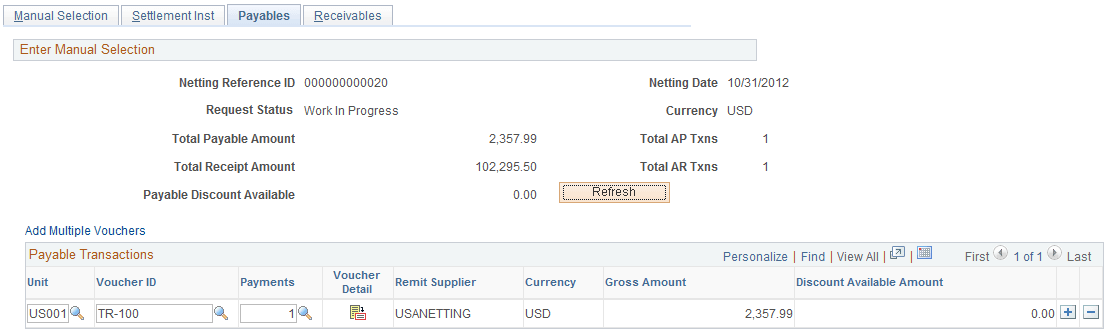
Use the Manual Select Netting - Payables page (NET_MAN_RQST_AP) to set up payables for manual netting.
Navigation:
This example illustrates the fields and controls on the Manual Select Netting - Payables page. You can find definitions for the fields and controls later on this page.
| Field or Control | Description |
|---|---|
|
|
Click Voucher Detail to access the Payables Voucher Detail page and view information for the voucher line item. |
|
Refresh |
When you are finished entering payable transaction items, click to update Total Payment Amount. |

Adding Multiple Vouchers for Payables Manual Netting
Use the Enter Manual Selection (vouchers) page (NET_VOUCHER_ADD) to add multiple vouchers to payables for manual netting.
Navigation:
Click the Add Multiple Vouchers link on the Manual Select Netting - Payables page.
After you enter a business unit and supplier ID, select each voucher that you want to add and click Add.
Manual Select Netting - Receivables Page
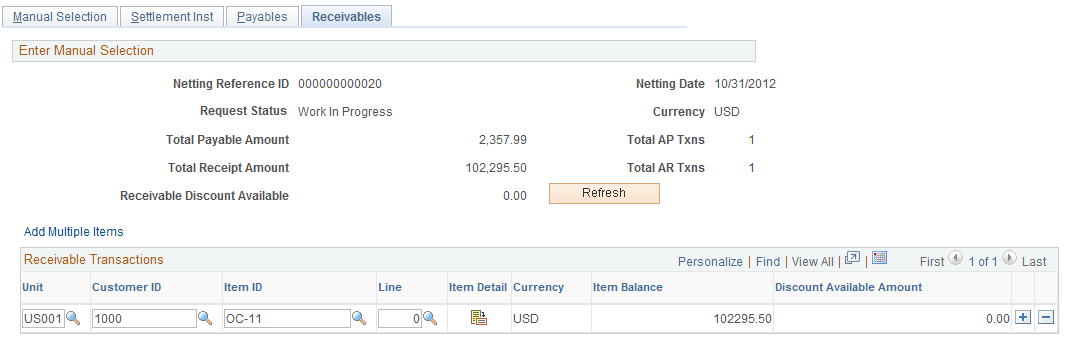
Use the Manual Select Netting - Receivables page (NET_MAN_RQST_AR) to set up receivables for manual netting.
Navigation:
This example illustrates the fields and controls on the Manual Select Netting - Receivables page. You can find definitions for the fields and controls later on this page.
| Field or Control | Description |
|---|---|
|
|
Click Show Item Detail to access the Receivables Item Maintenance page, and view information for the receivables line item. |
|
Refresh |
When you are finished entering receivable transaction items, to update Total Receipt Amount. |

Adding Multiple Items for Receivables Manual Netting
Use the Enter Manual Selection (items) page (NET_ITEM_ADD) to add multiple items to receivables for manual netting.
Navigation:
Click the Add Multiple Items link on the Manual Select Netting - Receivables page.
After you enter a business Unit and Customer ID, select each item that you want to add and click Add.