Canceling Approved Travel Authorizations
Page Used to Cancel Travel Authorizations
| Page Name | Definition Name | Usage |
|---|---|---|
|
TE_CANCEL_TAUTH |
Cancel a travel authorization request. |
Understanding Travel Authorization Cancellations
The Cancel Approved Travel Authorization feature is available to employees and system administrators. It provides the mechanism that is necessary to cancel unused travel authorizations that you have not applied to expense reports.
If you use PeopleSoft Commitment Control, the Cancel Approved Travel Authorization feature automatically runs budget checking to reverse encumbrances that are associated with the travel authorizations being closed.
After you cancel a travel authorization, you can delete it.
Cancel Approved Travel Authorization Page
Use the Cancel Approved Travel Authorization page (TE_CANCEL_TAUTH) to cancel a travel authorization request.
Navigation:
This example illustrates the fields and controls on the Cancel Approved Travel Authorization page. You can find definitions for the fields and controls later on this page.
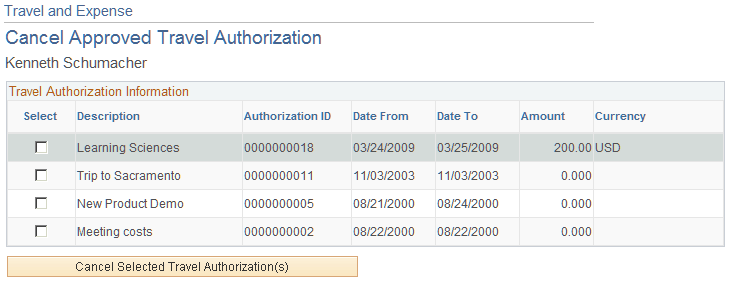
The Cancel Approved Travel Authorization page displays all travel authorization requests that have been approved, or approved and budget-checked, but not assigned to an expense report. Select the travel authorization requests that you want to cancel, and click Cancel Selected Travel Authorization(s). If you use PeopleSoft Commitment Control, the system then performs budget checking to reverse encumbrance amounts that are associated with the travel authorizations.