Canceling Travel Authorizations
Pages Used to Cancel Travel Authorizations
| Page Name | Definition Name | Usage |
|---|---|---|
|
TE_CANCEL_TAUTH |
Cancel approved travel authorization requests. |
|
|
EX_BGTCHK_TAUTH |
Cancel submitted or approved travel authorizations in batch mode. |
|
|
Change Accounting Date Page |
EX_BGTCHK_CANCEL2 |
Change the accounting date to close in a different accounting period. |
Understanding Canceling Travel Authorizations
Unused travel authorizations that have been budget checked can be canceled by the originator using the Employee Self-Service navigation or by a system administrator using the Travel and Expense navigation.
For approved travel authorizations, navigate to the Cancel Approved Travel Authorization page, select the desired travel authorizations to cancel, and click the Cancel Selected Travel Authorization(s) button. This triggers an automatic budget checking process to reverse out encumbrances that were previously recorded.
Administrators can cancel, in batch mode, budget-checked travel authorizations with a status of Approved. The Cancel Travel Authorization process budget checks travel authorizations to liquidate their encumbrances in the commitment control ledgers.
Note:
You cannot delete travel authorizations that have been budget checked.
Cancel Approved Travel Authorization Page
Use the Cancel Approved Travel Authorization page (TE_CANCEL_TAUTH) to cancel approved travel authorization requests.
Navigation:
The cancel process closes travel authorizations and reverses encumbrances if the travel authorization was already budget checked. If a travel authorization is partially through the year-end process and the encumbrances are already reversed, the system simply closes the travel authorization.
Cancel Travel Authorizations Page
Use the Cancel Travel Authorizations page (EX_BGTCHK_TAUTH) to cancel submitted or approved travel authorizations in batch mode.
Navigation:
This example illustrates the fields and controls on the Cancel Travel Authorizations page.
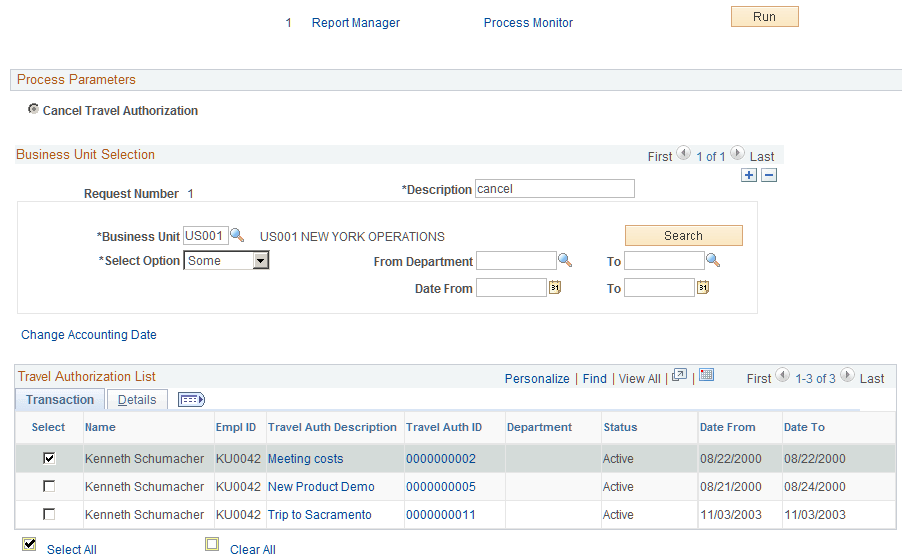
Business Unit Selection
| Field or Control | Description |
|---|---|
|
Description |
Enter a description of the defined set of parameters. |
|
Business Unit |
Select a valid business unit. |
|
Search |
Click to retrieve transactions based on the criteria specified. If you do not enter any criteria, PeopleSoft Expenses retrieves and displays all eligible transactions. |
|
Select Option |
Select All to retrieve all eligible travel authorizations. Select Some to select by business unit, department, or date criteria. |
|
From Department and To |
Enter a value as criteria to select travel authorizations. The system retrieves all travel authorizations with department numbers that fall within the specified range in the criteria. |
|
Date From and To |
Enter a value as criteria to select travel authorizations. The system retrieves all travel authorizations with dates that fall within the dates specified in the criteria. |
|
Change Accounting Date |
Click to access the Change Accounting Date page to specify a different accounting date. The accounting date determines which accounting periods the reversals will be recorded in for the travel authorizations processed in this run. This link appears only if the Reversal Date Option on the Installation Options page is set to Current. |