Determining Employee Payment Option
The payment option allows you to determine the source of payments for PeopleSoft Expenses.
The Payment Destination option applies to cash advances and expense report reimbursements. It is defined in three different locations: installation, business unit, and employee, and is used during the Stage Payment process.
The system looks at the employee level to see the option selected on the User Payment Option Page.
-
If this option is Payables or Payroll, then the system uses this method for payment.
-
If this option is Default from Business Unit, then the system uses the option selected on the Expenses Definition - Business Unit 1 Page.
-
If this option is Default from Installation, then the system uses the option selected on the Application Fundamentals: Installation Options - Expenses Page.
The system looks at the business level to see the option selected on the Expenses Definition - Business Unit 1 Page when the employee level option is Default from Business Unit. If the business unit option is:
-
Payables or Payroll, then the system uses this method for payment.
-
Default from Installation, then the system uses the option selected on the Application Fundamentals: Installation Options - Expenses Page.
For additional information about the Stage Payments process, see Staging Payments.
Pages Used to Determine Employee Payment Option
Determine the Payment Destination option for an employee.
| Page Name | Definition Name | Usage |
|---|---|---|
|
Application Fundamentals: Installation Options - Expenses Page |
INSTALLATION_EX |
Define installation options for Expenses. |
|
BUS_UNIT_TBL_EX1 |
Define a PeopleSoft Expenses business unit. |
|
|
EX_USER_PYMNT |
Determine the source of expense payments for an employee |
User Payment Option Page
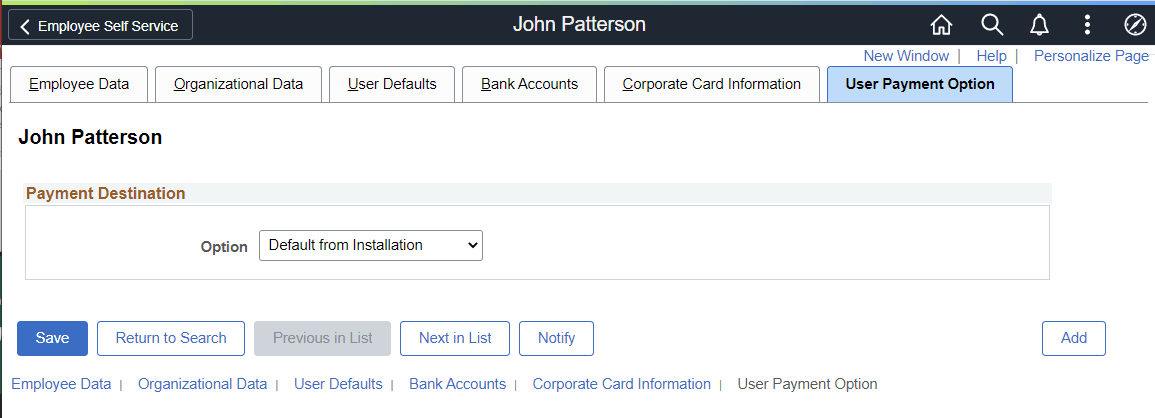
Use the User Payment Option page (EX_USER_PYMNT) to determine the source of expense payments for an employee.
Navigation:
This example illustrates the fields and controls on the User Payment Option page.
| Field or Control | Description |
|---|---|
|
Option |
Select one of these options, which is used during the Stage Payments process:
The system default is Default from Installation. Note: When you run the Load Employee Data process to update employee data from PeopleSoft Human Capital management, the system automatically defaults this value to Default from Installation. See Integrating With PeopleSoft Human Resources. |