Mileage Section - Do Not Display Distance Calculator
When Display Distance Calculator is not selected on the Expenses Definition - Business Unit 2 Page, these fields appear.
Note:
The Location and Originating Location check boxes are deselected on the Expense Types 1 Page for the Automobile Mileage expense type. This removes the Originating Location and Destination Location fields that appear in the Additional Information section.
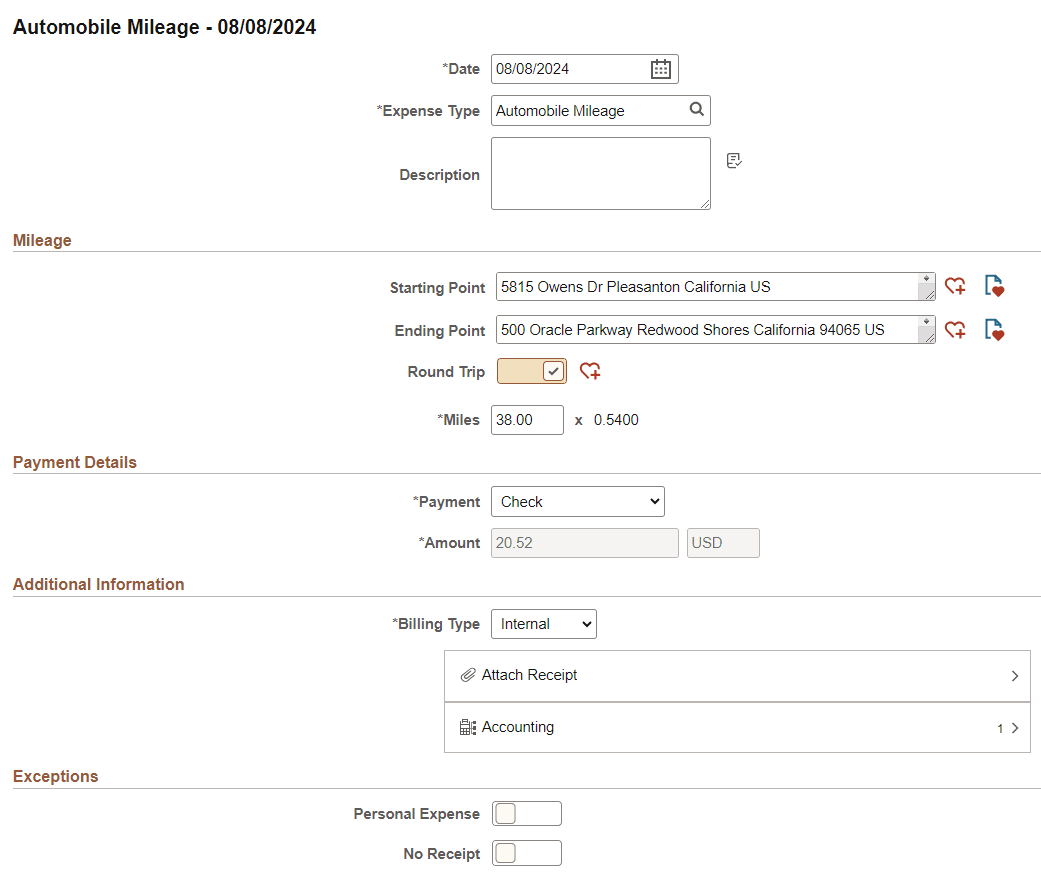
This example illustrates the fields and controls on the Expense Entry page when Automobile Mileage is selected, and the Display Distance Calculator is off.
| Field or Control | Description |
|---|---|
|
Staring Point and Ending Point |
Enter an address that matches your starting and ending locations. Because you have not selected Display Distance Calculator on the Expenses Definition - Business Unit 2 Page then there is no key ahead prompting in these fields. Note: When using these two fields, you may want to remove the Originating Location and Destination Location fields that appear in the Additional Information section. To do this, access the Expense Types 1 Page for Automobile Mileage and deselect the Location and Originating Location check boxes. |
 (Add to Favorite List) |
Select to access the Add to Favorite List window, which allows you to add a new favorite location. |
 (View Favorites) |
Select to access the View Favorites window, which lists favorite locations. |
|
Round Trip |
Select to indicate that the trip is not one-way, but a round trip. |
|
Transportation ID |
Select a transportation ID. This field only displays when Varied Rate is selected as the Distance Rate Type for the Auto Mileage expense type on the Distance Rates Page. This field does not display when Standard Rate is selected as the Distance Rate Type. |
|
Miles and (mileage rate) |
Enter the miles from the originating to the destination locations. When you exit this field, the system calculates the Amount field using the mileage rate. The mileage rate is displayed to the right of the Miles field and is used to calculate the reimbursement amount for the distance traveled. |