Setting Up Expense Type Groups
To set up expense type groups, use the Expense Type Group (EX_EXP_TYPE_GRP.GBL) component.
Page Used to Set Up Expense Type Groups
| Page Name | Definition Name | Usage |
|---|---|---|
|
EX_TYPE_GRP |
Create a group to collect and classify expense types for reporting and tracking. |
The data that is entered using these pages can also be loaded as an Application Data Set (ADS). For more information about ADS, see Migrating Data Using Application Data Sets
Expense Type Group Page
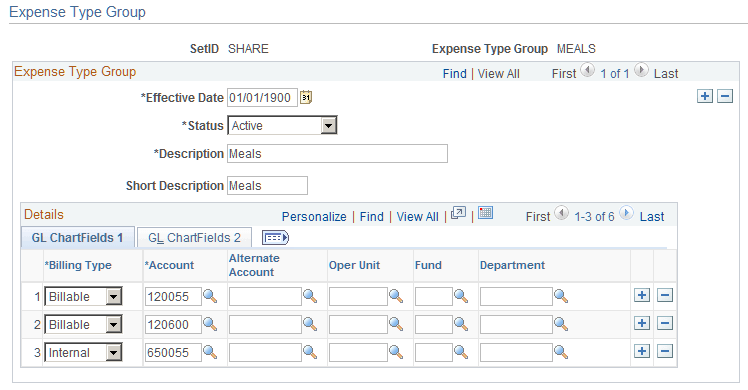
Use the Expense Type Group page (EX_TYPE_GRP) to create a group to collect and classify expense types for reporting and tracking.
Navigation:
This example illustrates the fields and controls on the Expense Type Group page.
| Field or Control | Description |
|---|---|
|
Overage |
Select if you want amounts exceeding a per diem amount to be booked to a different set of ChartFields. Note: To select the Overage check box, you must first select Allow Overage Accounting on the Installation Options - Expenses page. See Application Fundamentals: Installation Options - Expenses Page. |
|
Billing Code |
Select a billing type for which you want to define ChartFields to use for the expense type. PeopleSoft Expenses delivers the billing type values of Billable, Internal, and Nonbillable. |
In the remaining columns, select the accounting distribution defaults when a member of this expense type group is associated with the selected billing code in an expense report. Create other rows to designate additional charged accounts for different billing codes.
Note:
If any ChartField (other than account) is associated with this expense type group and an expense type group is used on an expense report, the expense type group accounting overrides the default for the expense transaction at the header level. However, if you change the accounting ChartFields at the transaction line level, the system uses only account and, if applicable, alternate account.
Related Topics