Setting Up Payment Types
To set up payment types, use the Payment Type (EX_EXPEND_MTHD.GBL) component.
Page Used to Set Up Payment Types
| Page Name | Definition Name | Usage |
|---|---|---|
|
EX_EXPEND_MTHD |
Create payment types that show how an expense item was paid on an expense report. |
Payment Type Page
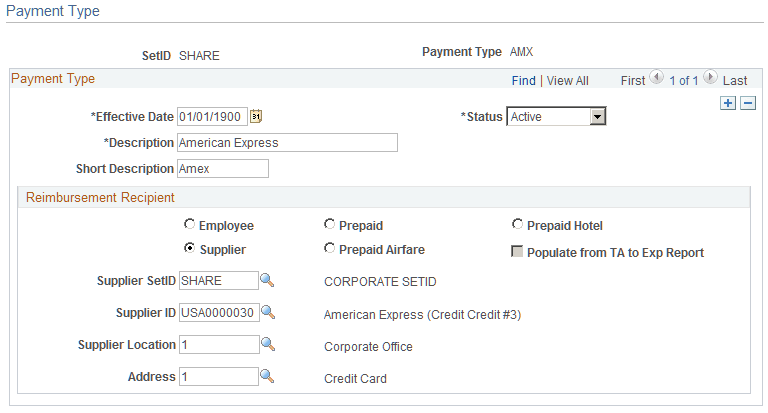
Use the Payment Type page (EX_EXPEND_MTHD) to create payment types that show how an expense item was paid on an expense report.
Navigation:
This example illustrates the fields and controls on the Payment Type page. You can find definitions for the fields and controls later on this page.
Reimbursement Recipient
Select a reimbursement recipient from the following options:
| Field or Control | Description |
|---|---|
|
Employee |
Select to generate a payment to the employee. |
|
Prepaid |
Select to designate expenses already paid, for example, through your payables system. This credits the prepaid expense account that you designate in your accounting entry template and does not generate a payment. |
|
Prepaid Hotel |
Select to designate hotel expenses already paid, for example, through your payables system. This credits the prepaid hotel expense account that you designate in your accounting entry template and does not generate a payment. |
|
Supplier |
Select to generate a payment to the supplier. You must also select a supplier SetID, supplier ID, supplier location, or address to indicate which supplier to reimburse. |
|
Prepaid Airfare |
Select to designate airfare expenses already paid, for example, through your payables system. This credits the prepaid airfare expense account that you designate in your accounting entry template and does not generate a payment. |
|
Populate from TA to Exp Report (populate from travel authorization to expense report) |
When you select any of the prepaid options as a reimbursement recipient, this option becomes active. If you select this option, the system includes the payment type when populating expense report lines from travel authorizations. |