Unposting Expense Reports
Pages Used to Unpost Expense Reports
| Page Name | Definition Name | Usage |
|---|---|---|
|
EX_UNPOST_SHEET |
Mark expense reports for unposting. |
|
|
TE_SHT_DOCSEQ_INFO |
Enter document sequencing information about unposted expenses reports. |
|
|
RUN_EXTRNPRC |
Process an expense report that is marked for unposting. |
Understanding How to Unpost Expense Reports
If you post the liabilities for an expense report and need to change the accounting entries, you can unpost the expense report. This two-step operation requires you to mark the expense reports that you wish to unpost, then run a process to reverse the accounting liability entries and make the expense reports available for ChartField editing. If you are using PeopleSoft Commitment Control, you also must budget-check the expense transaction.
Note:
The unposting process changes the posting status (POST_STATUS_EX) but not the expense report status (SHEET_STATUS). Because the expense report status does not change when you unpost it, you cannot deny or reapprove the expense report.
Mark Expense Report For Unpost Page
Use the Mark Expense Report For Unpost page (EX_UNPOST_SHEET) to mark expense reports for unposting.
Navigation:
This example illustrates the fields and controls on the Mark Expense Report For Unpost page. You can find definitions for the fields and controls later on this page.
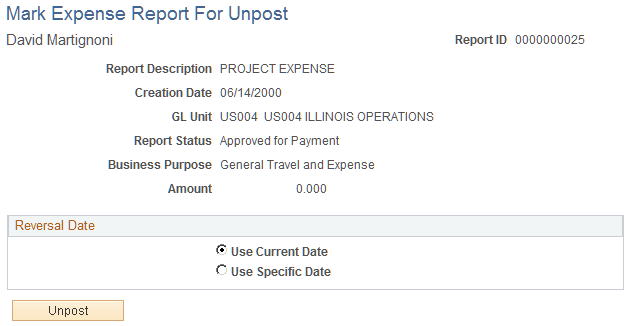
The information on this page comes from the expense report description.
The information on the Mark Expense Report for Close page comes from the expense report description.
Reversal Date
| Field or Control | Description |
|---|---|
|
Use Current Date |
Select to use the current date on which to reverse the accounting liability entries. |
|
Use Specific Date |
Select to enter a specific date. When selected, PeopleSoft Expenses opens a field to enter the day on which to reverse the accounting liability entries. |
|
Unpost |
Click to save the expense report with a status (POST_STATUS_EX) of Mark for Unpost. |
Document Sequence Page
Use the Document Sequence page (TE_SHT_DOCSEQ_INFO) to enter document sequencing information about unposted expenses reports.
Navigation:
Click the Document Sequencing link on the Mark Expense Report for Unpost page.
This example illustrates the fields and controls on the Document Sequence page. You can find definitions for the fields and controls later on this page.
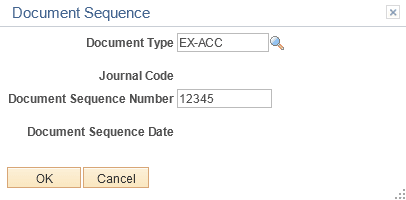
If you use document sequencing, you can enter the document type that is associated with the expense report that you mark for unposting. The unpost process adjusts the document sequence numbering based on the document type that you select.
Expense Processes Page
Use the Expense Processes page (RUN_EXTRNPRC) to process an expense report that is marked for unposting.
Navigation:
To process an expense report that is marked for unposting, use the Expense Processes page and select Unpost Expense Report. When you run the Application Engine process, it drives a program that reverses the liability entries for expense reports that are marked for unposting and changes the status (POST_STATUS_EX) to Unposted.