Express Fulfillment
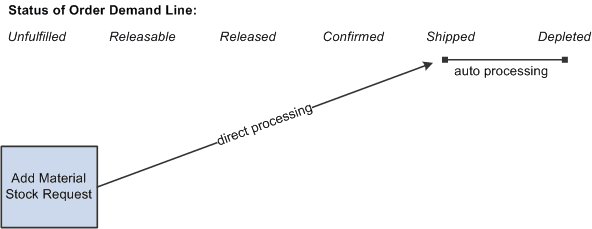
A material stock request (MSR) can be created in the shipped fulfillment state and then auto processing can put it in the depleted fulfillment state, using:
-
Express Issue component With this direct processing method, the MSR is added in the shipped state when you save the Express Issue component. Using the auto-processing options for express issue, you can have the system launch the Deplete On Hand Quantity (Depletion) process at save time along with any direct invoicing processes.
-
Shipping EIPs: You can use one of two EIPs (Inventory_Front_End_Shipping and Inventory_Shipping) to add a stock request directly in the shipped state and immediately move it to the depleted state. With this direct processing method, the MSR is added in the shipped state when the message transaction is processed by the Fulfillment Requests process. Auto processing is then used to automatically launch the Deplete On Hand Quantity (Depletion) process and move the order to the depleted state. To use either one of these EIPs to create a stock request and move it to the depleted state:
-
Use the transaction code 0365 for the Inventory_Front_End_Shipping EIP. Use the transaction code 0366 for the Inventory_Shipping EIP.
-
Enter Y (yes) in the Create Demand field (IN_CREATE_DMD_FLG) of your transaction to create a new MSR.
-
Enter 70 (advance to depleted) in the Auto Release Option field (AUTO_RELEASE_OPT) of your transaction to move your new MSR to the depleted state.
-
The following diagram illustrates the fulfillment option using direct processing to place the order in the shipped fulfillment state and then using auto processing to put the order in the depleted fulfillment state: