Preparing to Transition to the New Standard
This section details the steps required for successful transition to accounting standards ASC 842, IFRS 16, and GASB 87. This includes tasks to configure Asset Management to function under the new accounting standard such as the creation of new accounting entry templates. Other tasks prepare LA for the initial capitalization of operating leased assets such as the identification of interest rates used to calculate Present Value of Lease Payments (PVLP) calculations. Tasks in this section impact both AM operating leases migrated to LA and operating leases originating in LA (LA Operating Leases).
Note:
The ‘Identify Exempt Leases’ step will not appear until you delete the existing activity guide template LA_MIG_TRA. For information about how to delete an activity guide template, see the task ‘Creating and Maintaining Activity Guide Templates’ in the PeopleTools: Portal Technology documentation.
If you have entered functional data into the activity guide, that data is not deleted. However, the progress icon to the left of each step indicating that you have started or completed a task is reset.
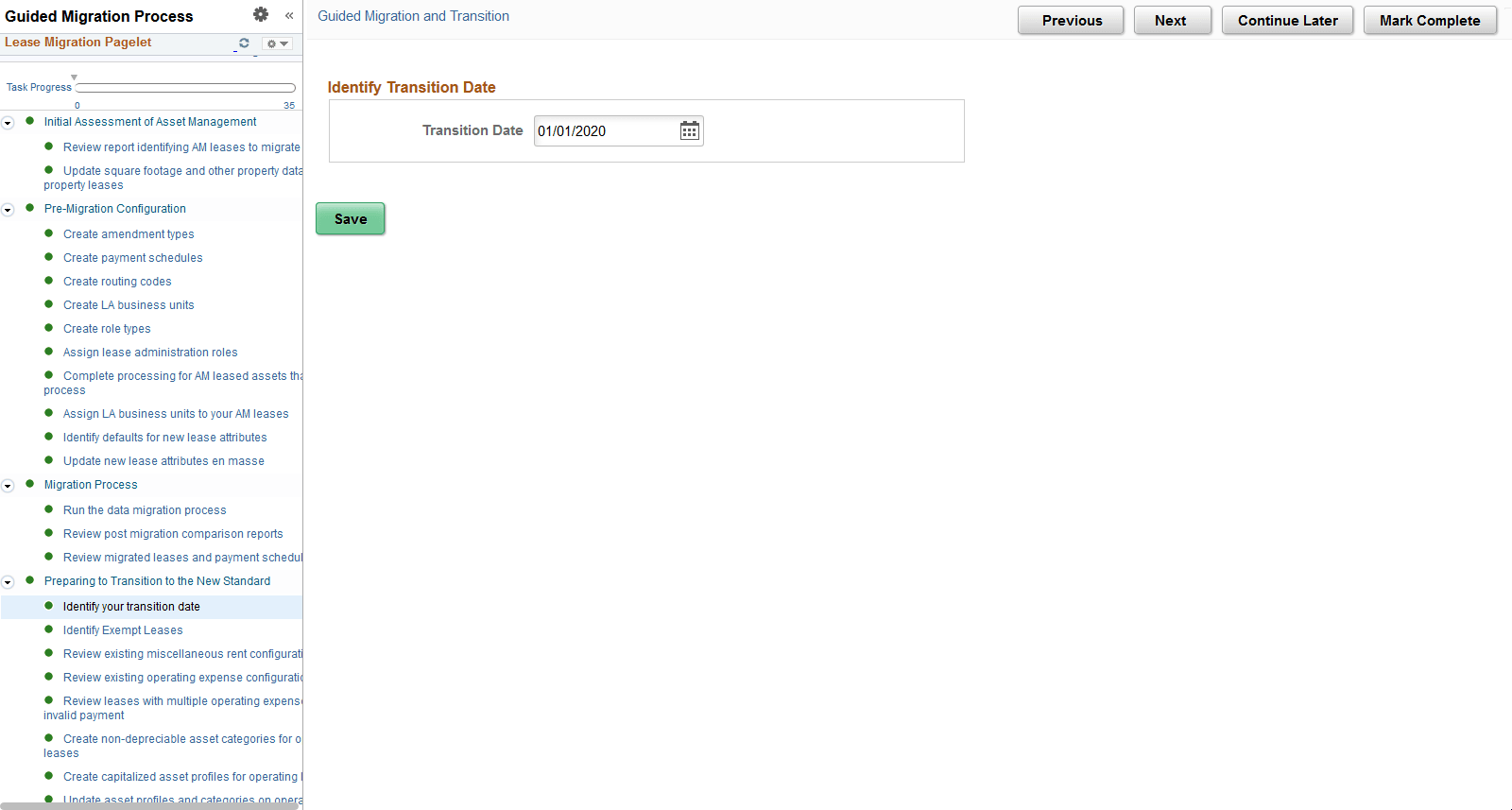
Identify Your Transition Date
Use this page to identify and update your organization's transition date. This should be the effective date your organization will adopt the new accounting standard. Payments made on or after this date will be included in the initial capitalization of your operating leases.
This example illustrates the fields and controls on the Identify Your Transition Date page.
Identify Exempt Leases
Use this page to identify leases that are exempt from recognition.
This example illustrates the fields and controls on the Identify Exempt Lease page.
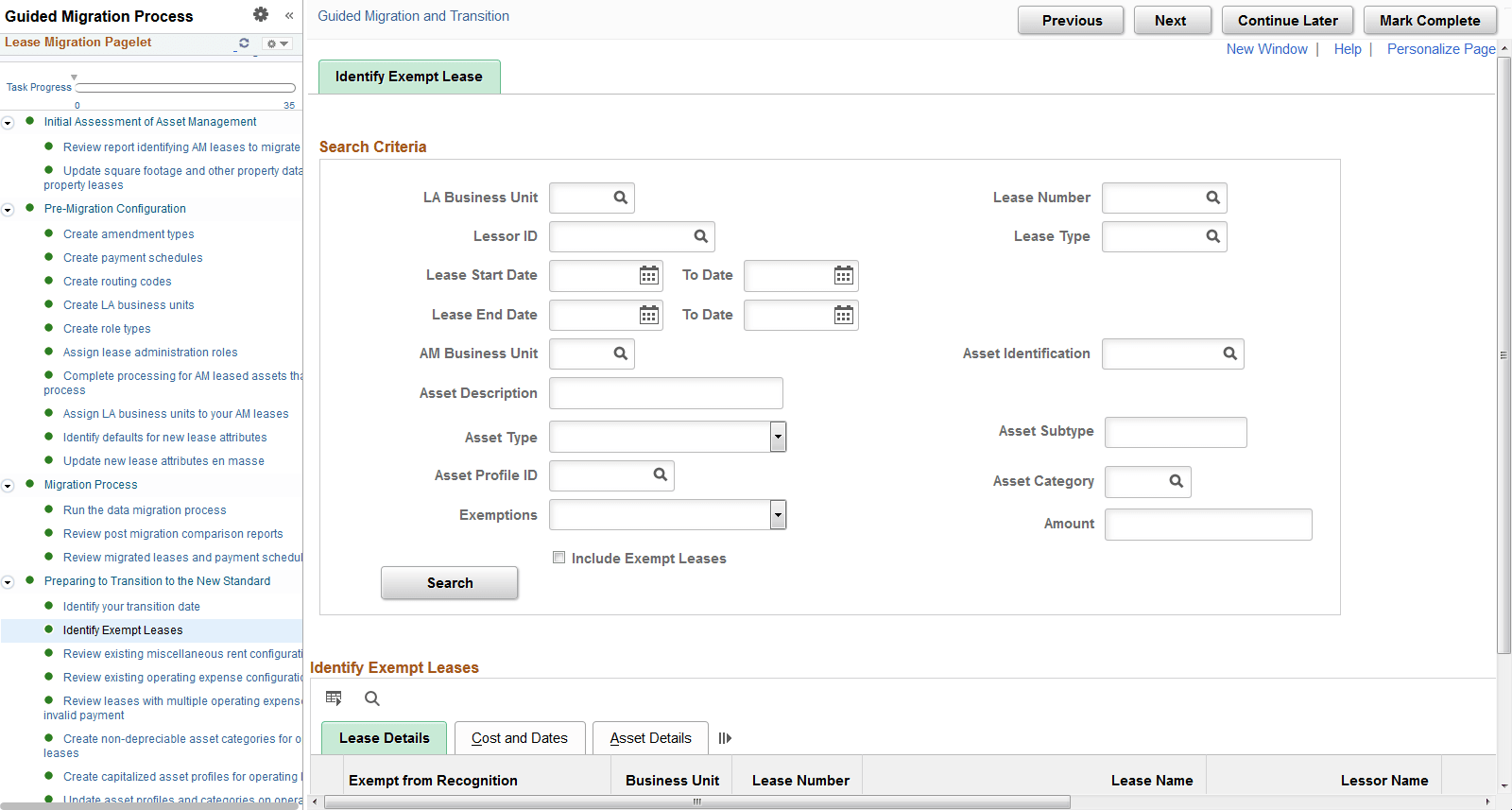
Select the Exempt from Recognition option to identify exempt leases.
Exempt leases are automatically excluded from the following activity guide tasks:
-
Update Interest Rates on Operating Leases en Masse
-
Update Advance/Arrears Payment Selection on Operating Leases
-
Run Transition Analytics for Operating Leases
-
Review Transition Analytics for Operating Leases
-
Review Report Identifying Leases to Transition
-
Update Cost Distribution for Operating Leases
-
Capitalize Operating Leases in AM
Review Existing Miscellaneous Rent Configuration
Use this page to review and adjust the Include in Lease Payments selection on your miscellaneous rent payments.
A miscellaneous rent with the Include in Lease Payments box selected will be included in the initial capitalization of an operating leased asset. If an operating lease includes a misidentified miscellaneous rent, the initial capitalization of the asset will be incorrect. See Defining Miscellaneous Rent Types.
Review Existing Operating Expense Configuration
Use this page to review and adjust the Include in Lease Payments selection on your operating expenses. An operating expense with the Include in Lease Payments box selected will be included in the initial capitalization of an operating leased asset. See Establishing Operating Expenses for a Lease.
Review Leases with Multiple Operating Expenses and Invalid Payment
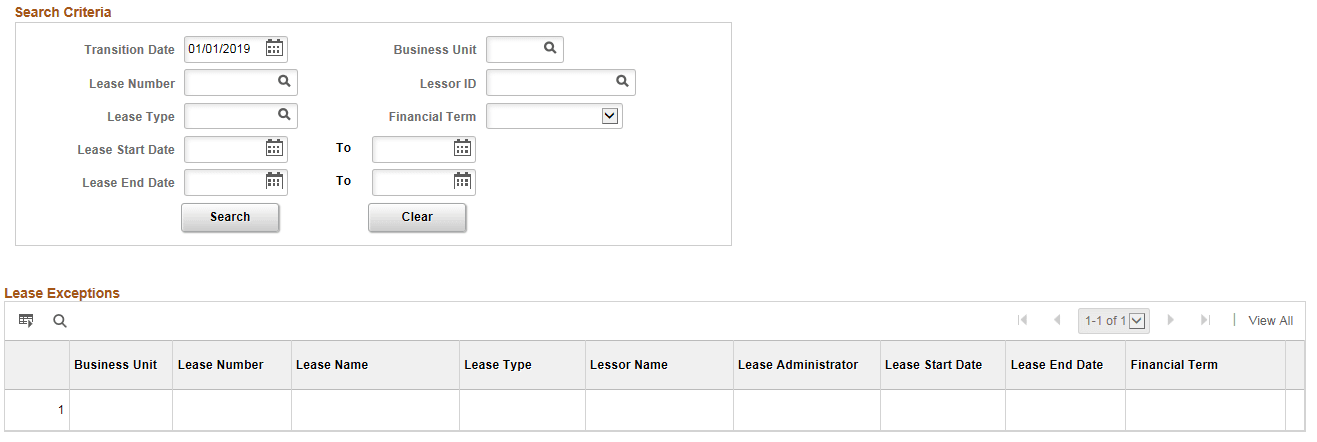
Use this page to review and resolve three exceptions/issues for leases. This applies primarily to leases originating in LA (LA leases), but also to AM leases that were modified after being migrated to LA. This step is critical to ensuring an accurate calculation of PVLP on your operating leases, the amount used for capitalizing your operating leased assets. The three exceptions are:
-
Operating Expenses with Multiple Expense Categories — for proper calculation of PVLP, an operating expense payment on a lease can be either included in lease payments or not included in lease payments, but not both. You must adjust the lease to break out the combined payment into two separate payments before capitalizing the lease.
-
Overlapping Payment Dates Within a Payment Group — this exception includes leases that have overlapping payment dates within a payment group. This exception applies to existing LA operating leases with multiple payments within a payment type. The payment group number must be different if the dates overlap with another payment. Note that overlapping payment dates are permitted across payment types. You must adjust the lease to correct this exception before capitalizing the lease.
-
Gaps in Payment Dates Within a Payment Group - this exception includes leases that have multiple payments within a payment group with gaps in payment start dates between the payments. Some of these gaps may be correct and should not be adjusted, however that determination must be made by the organization based on the following guidance:
-
The system calculates PVLP based on the start date for the individual payment which is not necessarily the start date on the lease. If the payment should be discounted back to the start date of the lease, then the start date for the individual payment should be the same as the start date on the lease.
-
The system will not validate if the Gaps in Payment Date exception has been cleared when the lease is capitalized since some of these may be correct. However, this exception has to be reviewed to ensure that the payment dates are setup correctly.
-
This example illustrates the fields and controls on the Review Leases with Multiple Operating Expenses or Invalid Payment page.
Create Non-Depreciable Asset Categories For Operating Leases
Use this page to modify your existing asset categories or create new asset categories for your operating leased assets. Categories used for operating leases must be identified as non-depreciable.
Under the new accounting standards, you amortize operating lease assets. You do not depreciate them. You should review your existing asset categories to determine which asset categories you are using for operating leased assets currently and verify they are setup as non-depreciable. You may also create new asset categories for your operating leased assets with a status of non-depreciable. Your asset categories used on finance lease assets should already be configured as depreciable and you should only need to identify a Related Lease Category. After transitioning to the new lease accounting standard, a lease modification may require the lease to be reclassified from operating to finance or vice versa. The Related Lease Category is used in the reclassification. See Asset Lifecycle Management Fundamentals: Categories Page.
For all asset categories assigned to your operating leased assets, you must select a status of non-depreciable, else you cannot capitalize the asset in AM.
Create Capitalized Asset Profiles for Operating Leases
Use this page to create new capitalized asset profiles for operating leases. New profiles should have an acquisition code of leased, set as capitalized asset, and have a non-depreciable status. In a subsequent task, you will update the asset profile and asset category for your operating leased assets individually or en masse using the profiles created on this task. See Asset Lifecycle Management Fundamentals: Setting Up Asset Profiles.
Update Asset Profiles and Categories on Operating Leases
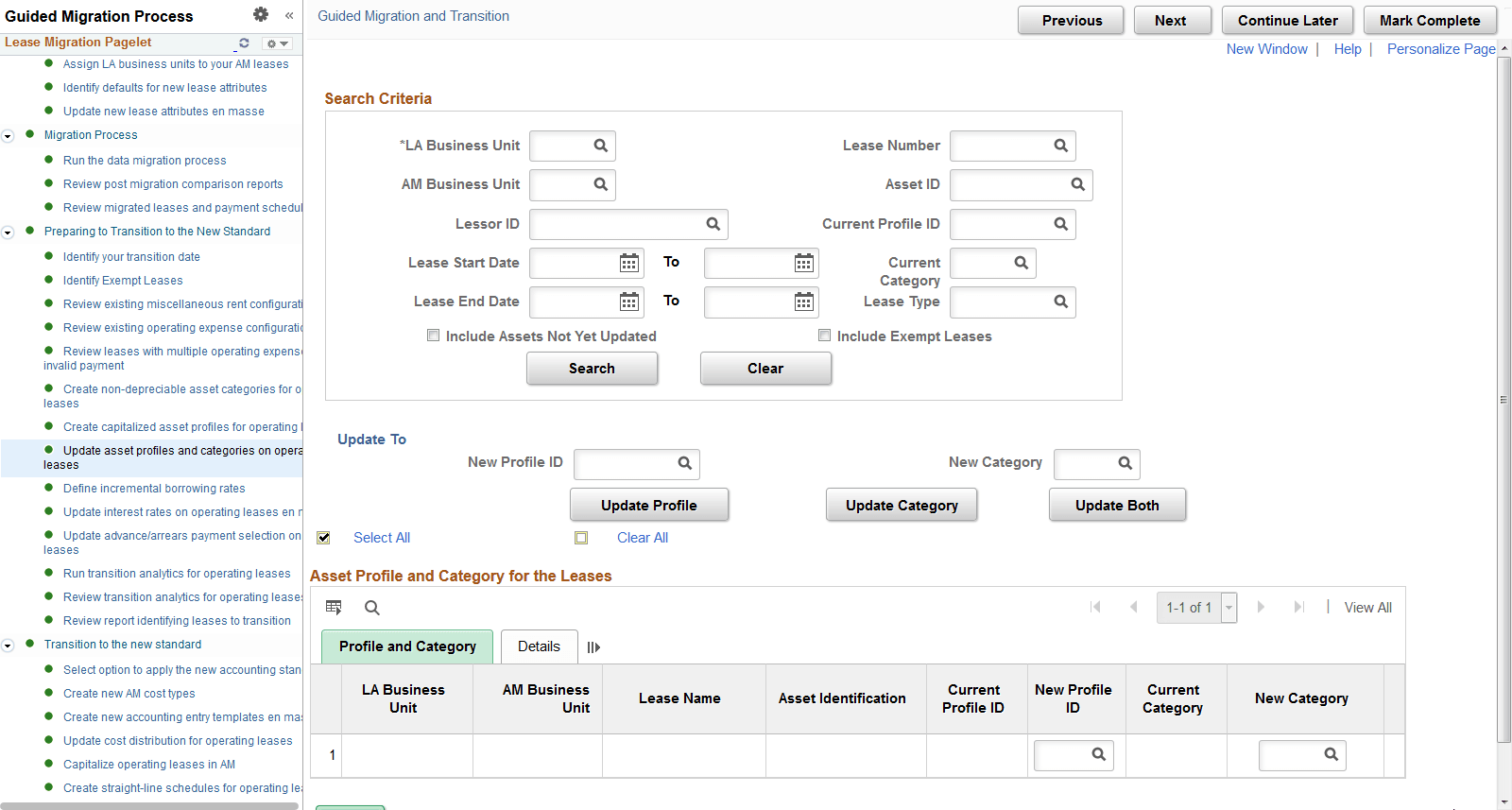
Use this page to update the asset profile and asset category on your operating leases. You can do this individually on an asset-by-asset basis or en masse. This applies to LA leases primarily, but also to some AM leases particularly those that do not have an asset profile.
Asset profiles and categories are required on all operating leases before you can capitalize them in AM. The New Asset Category will default based on the asset profile configuration, but you can update it to another value. If you change the asset profile for a specific asset in the grid using the prompt, the system will default a new asset category based on the new asset profile.
Asset profiles provide a template for depreciation and tax information when you capitalize the asset in AM. Asset categories classify assets by type for accounting purposes.
This example illustrates the fields and controls on the Update Asset Profiles and Categories on Operating Leases page.
Define Incremental Borrowing Rates
Use this page to define your organization’s incremental borrowing rates. As part of your transition to the new accounting standard and capitalization of your operating leased assets, the system uses the incremental borrowing rate to calculate PVLP for your operating leases. In a subsequent task in the activity guide, you will update your leases to use the incremental borrowing rates entered here, on this task.
Organizations electing to restate their prior year reports should consider entering rates as follows:
-
You should enter one incremental borrowing rate with an ‘early’ effective date, for example 1/1/1901, a date earlier than the earliest start date on your operating leases. The system will apply this rate to leases starting before the earliest restatement date. This applies to AM and LA operating leases.
-
You should enter additional effective dated rows to identify rate changes DURING your restatement period. If your incremental borrowing rate changed during the restatement period, you should have an effective dated row with that rate. The system will apply these effective dated rates to leases starting during the restatement period.
To use a single rate for all of your leases as of your transition date, you would only need to enter one effective dated row. The row should have an 'early date' to include all of your leases. However, the rate entered for this effective dated row should be your organization's borrowing rate as of your transition date.
Update Interest Rates on Operating Leases en masse
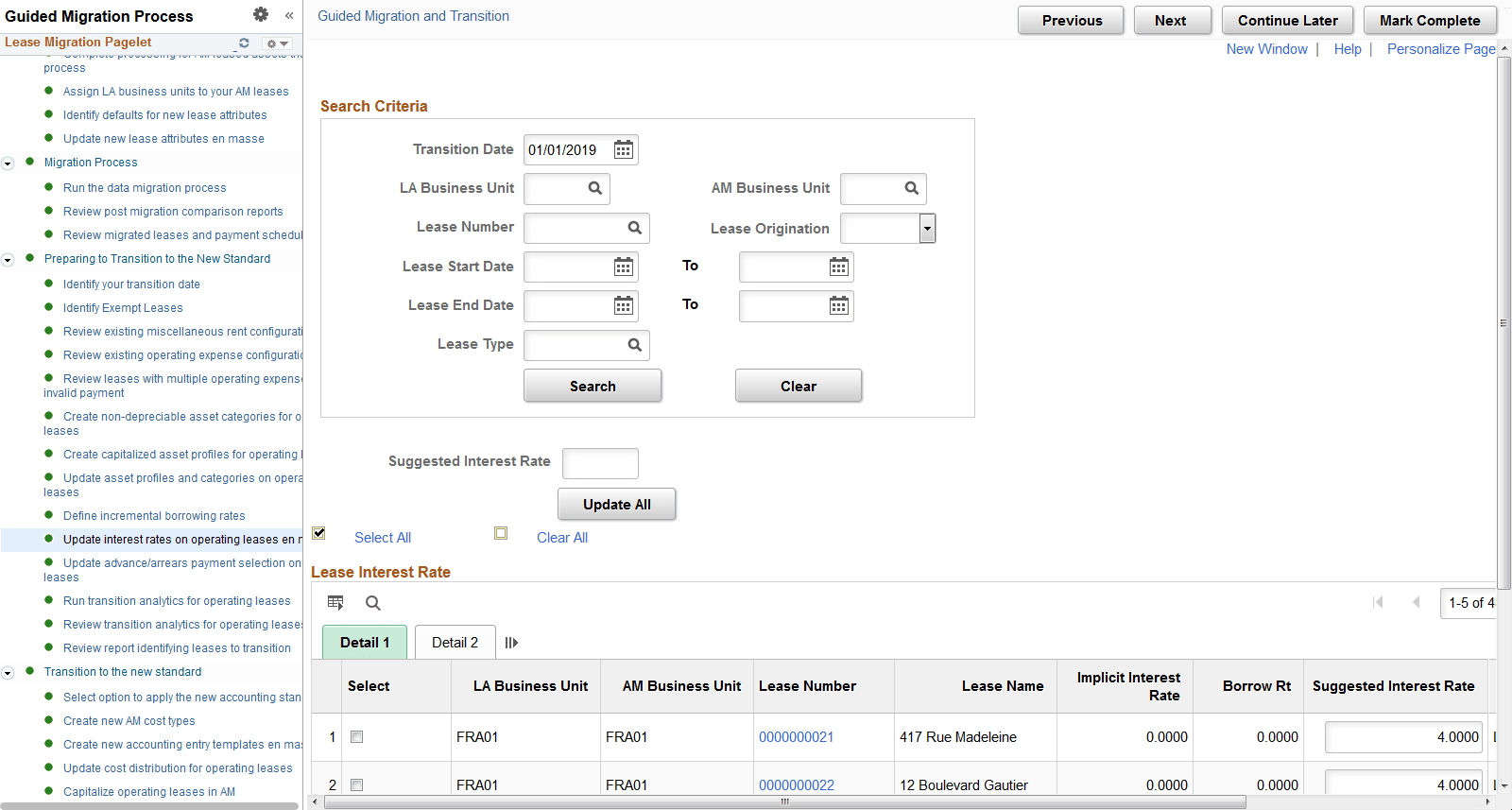
Use this page to review and confirm the interest rates used to calculate initial cost (PVLP) on your operating leases.
You can review leases for an entire LA BU or AM BU, filter results for a specific lease or lease type or review leases with specific ranges for lease start date. The first time you open the page, the system will populate the Suggested Rate based on the way you have configured your incremental borrowing rate (the previous step in the guide), the start date of the lease and whether you report the lease under FASB or IASB. When you save the page the suggested interest rate is saved in the system. This applies to all leases displayed not just the leases selected with the check box. The check box on the grid is used to update leases en masse.
You might need to refresh the suggested rate if you had to go back and update your incremental borrowing rates after already reviewing and saving rates for your leases. To refresh the Suggested Interest Rate with the latest system generated information, first select the lease (or leases) by checking the box next to the lease. Then enter a value of 0 in the Suggested Rate field underneath the search criteria. Select the Update All button and you should see the suggested rate updated by the system. Save the changes.
This example illustrates the fields and controls on the Update Interest Rates on Operating Leases en masse page.
Note:
Exempt leases do not appear on this page.
Update Advance/Arrears Payment Selection on Operating Leases
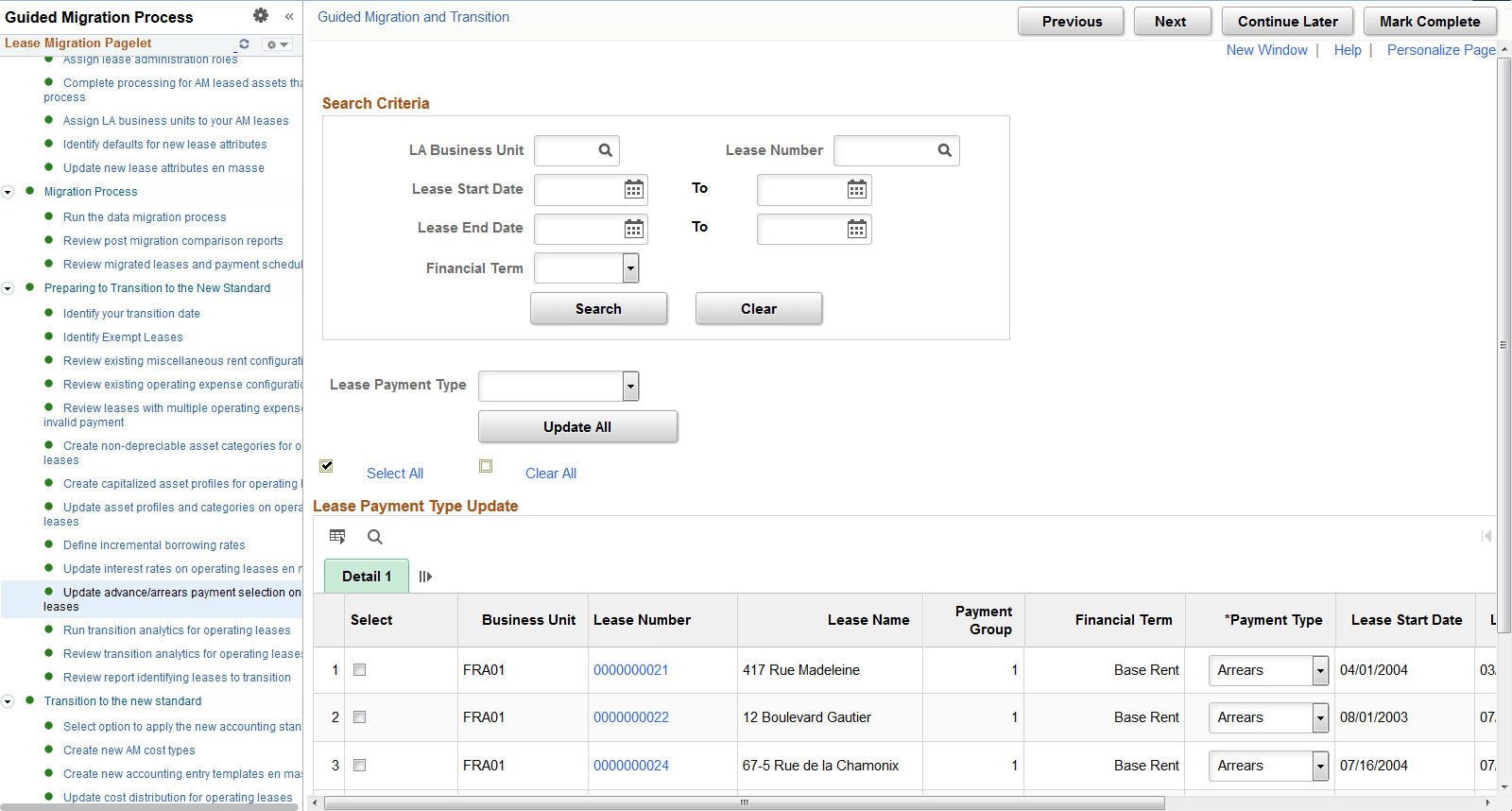
Use this page to update the payment type selection on your operating leases. The Advance/Arrears functionality was added to Lease Administration in a prior image and all leases were set to Arrears. Use this task in the activity guide to update the payment type on your lease payments to Advance where required.
This example illustrates the fields and controls on the Update Advance/Arrears Payment Selection on Operating Leases page.
Note:
Exempt leases do not appear on this page.
Run Transition Analytics for Operating Leases
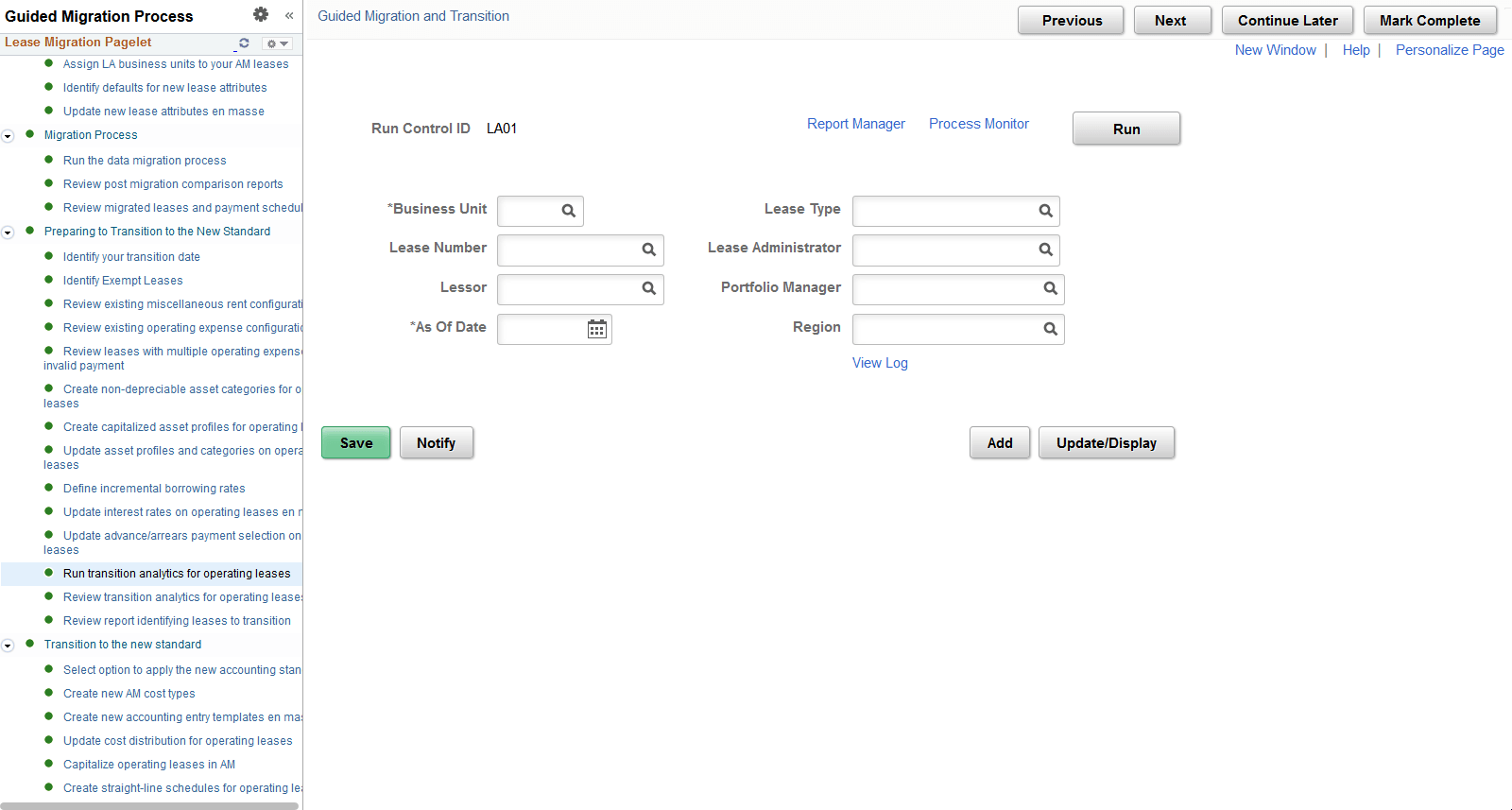
Use this page to execute a process to summarize the lease payment data used to transition to the new accounting standard.
This task runs a process and populates a reporting table summarizing the remaining lease payments on your operating leases at points in time over the life of the lease. You can use the results of this process to review the initial cost amounts the system will capitalize as of your transition date. Only lease payments dated on or after the date on the run control are included in the process. If you would like to see payment information for earlier periods, enter an earlier date on the run control.
You must run the transition analytics process for your leases before you can transition them to the new accounting standard. In addition, this process is the only way to review the initial cost amounts the system will use to capitalize your assets in AM when you transition to the new accounting standard.
This example illustrates the fields and controls on the Run Transition Analytics for Operating Leases.
Note:
Exempt leases do not appear on this page.
Review Transition Analytics for Operating Leases
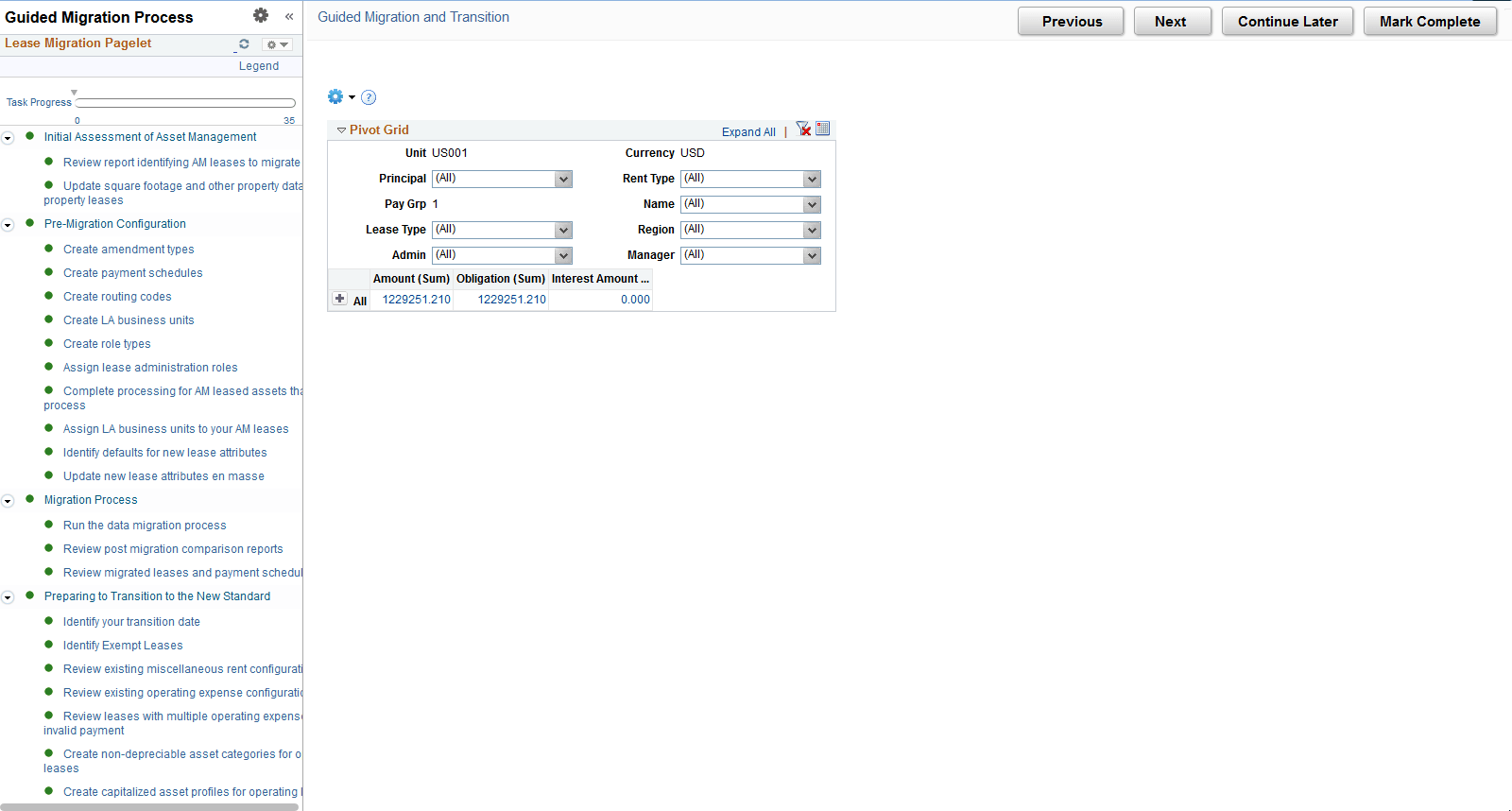
Use this page to review a summary of remaining lease payments as of a specific date. You must enter a date and business unit on the prompt. The pivot grid summarizes the remaining payments as of the date entered. ‘Amount’ represents the full amount (or undiscounted amount) of the remaining payments. 'Obligation’ represents the discounted amount of your remaining payments and ‘Interest’ represents the interest portion of your remaining payments.
The pivot grid includes base rents as well as miscellaneous rents and operating expenses identified as ‘Included in Lease Payments’. It also includes guaranteed residual value amounts. You can export the results to Excel. To review a larger amount of data at one time you can run the query RE_TRANSITION_ANALYTICS, which is the basis for the numbers in the pivot grid.
Note that in the previous step of the guide, you ran the process to populate the pivot grid. This process summarized lease payments dated on or after the date on the run control. If you identify in the pivot grid that payments are missing, then you need to rerun the transition analytics process with an earlier date. To ensure accurate reporting, select an earlier date on the run control.
This example illustrates the fields and controls on the Review Transition Analytics for Operating Leases.
Note:
Exempt leases do not appear on this page.
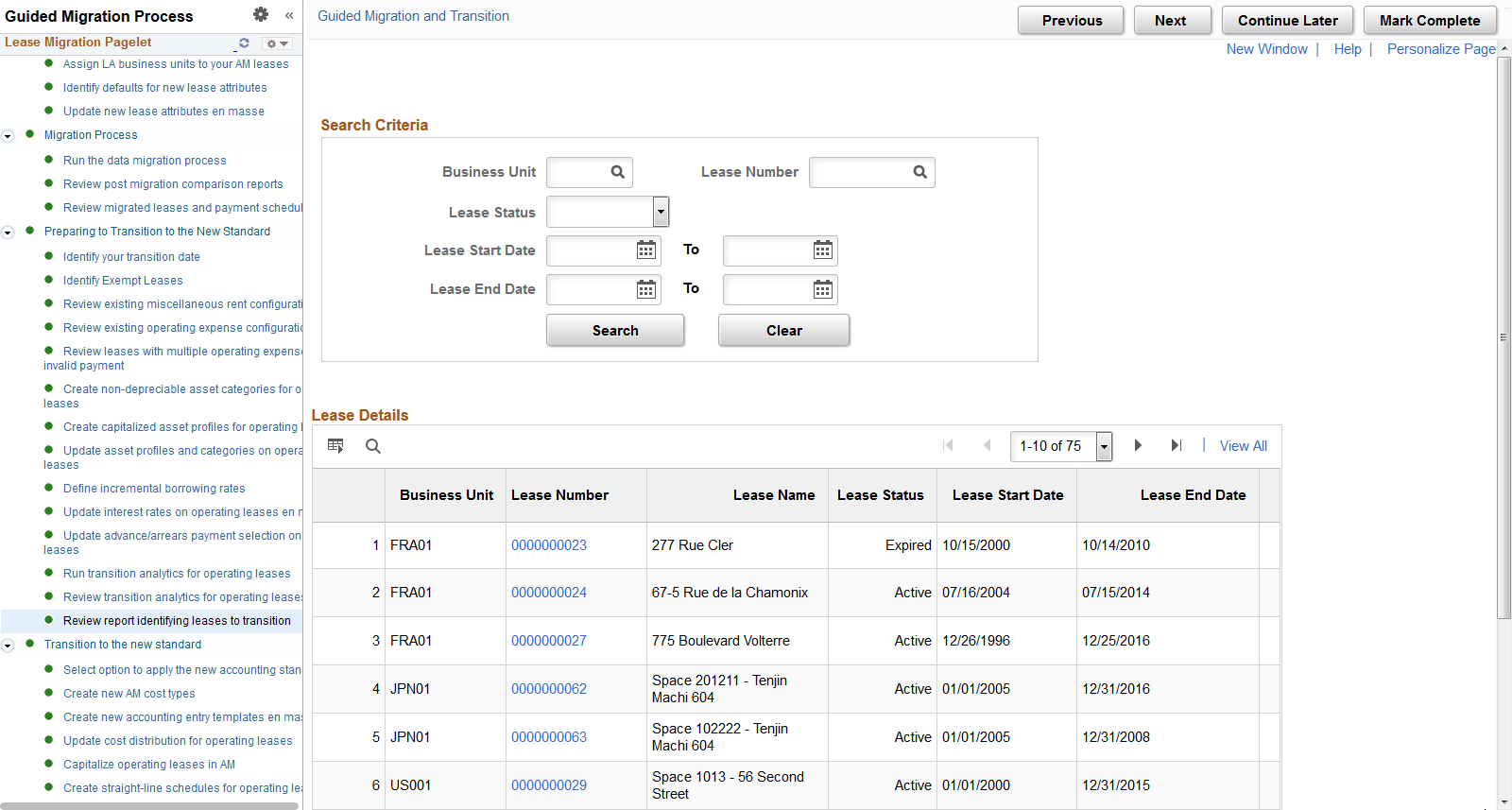
Review Report Identifying Leases to Transition
Use this page to review your operating leases before they transition to the new accounting standard. You will transition all operating leases to the new accounting standard including those originating in AM and others originating in LA.
This is the last task in the activity guide before you transition to the new accounting standard and begin applying ASC 842 and IFRS 16.
This example illustrates the fields and controls on the Review Report Identifying Leases to Transition page.
Note:
Exempt leases do not appear on this page.