Viewing Component and Output Mix and Production Options
This section discusses how to View Component and Output Mix and Production Options.
Pages Used to View Component and Output Mix and Production Options
| Page Name | Definition Name | Usage |
|---|---|---|
|
EN_PDO_INQ_SUM |
Enter the search for the component and output mix, and view the routing operation sequences associated with BOM and routing combinations. You can view operation information such as tasks and work centers. |
|
|
EN_PDO_INQ_DTL |
View the component and output mix by routing operation for a BOM and routing combination at a particular time. This inquiry displays the inputs and outputs at each operation for a specific BOM and routing combination. |
|
|
Production Option - Definition (inquiry) |
EN_PDO_BR_INQ |
View production option data. |
|
EN_PDO_BR_INQ_PA |
View the production area data that is defined for the production option. |
|
|
Production Option - Text Page(inquiry) |
EN_PDO_BR_INQ_TXT |
View production option text. |
|
Production Option - Documents Page(inquiry) |
EN_PDO_BR_INQ_DC |
View documents that are associated with the production option. You must have PeopleSoft Engineering installed to access this page. |
|
Production Option - Attachments Page(inquiry) |
EN_PDO_BR_INQ_ATT |
View attachments that are associated with the production option. |
|
Production Option Selection Page Update Production Page(in PeopleSoft Supply Planning) |
EN_PDO_SEL_SP PL_SRC_PROD_SP |
View and select existing production options. |
Component/Output Mix - Operation (inquiry) Page
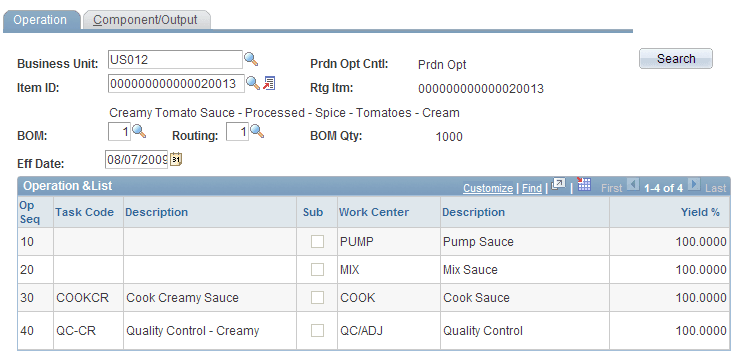
Use the Component/Output Mix - Operation (inquiry) page (EN_PDO_INQ_SUM) to enter the search for the component and output mix, and view the routing operation sequences associated with BOM and routing combinations.
You can view operation information such as tasks and work centers.
Navigation:
This example illustrates the fields and controls on the Component/Output Mix - Operation page. You can find definitions for the fields and controls later on this page.
| Field or Control | Description |
|---|---|
|
Unit and Item ID |
Select the business unit and item ID for the BOM and routing combination that you want to view. |
|
|
Click the View Related Links button to select one of these pages:
|
|
BOM, Routing, Revision and Eff Date (effectivity date) |
Select the desired BOM, routing, effectivity date, and revision. If the item is revision-controlled, the system pulls the BOM revision data. If it's not revision-controlled, the system sets the effectivity date to today's date. In addition, the system displays the BOM Qty. |
|
Prdn Opt Cntl (production option control) |
Displays the production option control, which indicates whether the item has been defined as using production options with the Define Business Unit Item - Manufacturing: General page. Therefore, it displays either Prdn Opt (use production option maintenance) or BOM/Rtg (BOM and routing combination defaults). |
|
Rtg Itm (routing item) |
Displays the item's reference routing. All of the data that appears is for the item's reference routing, if one exists. Note: All of the data that appears is for the item's reference routing, if one exists. |
|
Search |
Click to populate the operation list. This section displays the operation sequence for the BOM and routing combination that you selected. The page also indicates whether the operation sequence is subcontracted, and displays the work center and its description. In addition, clicking the Search button populates the Component/Output page in this component. |

Note:
A production option does not have to exist for you to view the BOM and routing combination data. You view the same information in either case. In addition, use this inquiry for multiple what-if scenarios.
Component/Output Mix - Component/Output (inquiry) Page
Use the Component/Output Mix - Component/Output (inquiry) page (EN_PDO_INQ_DTL) to view the component and output mix by routing operation for a BOM and routing combination at a particular time.
This inquiry displays the inputs and outputs at each operation for a specific BOM and routing combination.
Navigation:
| Field or Control | Description |
|---|---|
|
Yield % |
This display-only field indicates the percentage of manufacturing items expected at the end of the operation sequence. |
Note:
If the BOM component and output operation sequence do not match the header operation sequence, an asterisk appears in front of the number. The header operation that appears against the output or component is an operation assigned when defining the BOM and might not match the routing operation. For components, the component appears as part of the first operation sequence. For outputs, the output appears as part of the last operation sequence.
Production Option - Definition (inquiry) Page
Use the Production Option - Definition (inquiry) page (EN_PDO_BR_INQ) to view production option data.
Navigation:
| Field or Control | Description |
|---|---|
|
|
Click the Item Search button to view the components and outputs at each routing operation for a specific BOM and routing combination. |

Production Option - Production Area (inquiry) Page
Use the Production Option - Production Area (inquiry) page (EN_PDO_BR_INQ_PA) to view the production area data that is defined for the production option.
Navigation:
| Field or Control | Description |
|---|---|
|
|
Click the Item Search button to view the components and outputs at each routing operation for a specific BOM and routing combination. |

Production Option Selection Page
Use the Production Option Selection page (EN_PDO_SEL_SP ) to view and select existing production options.
Navigation:
-
Click the Item Search button next to the Item to access the Production Option Selection page.
-
Click the Production Option Selection button next to the BOM or Routing fields.
-
Click the Production button to select a production option.
| Field or Control | Description |
|---|---|
|
Select |
Select this check box to populate the production option data on the page that called this page. |