Setting Up Approval Insights Tables
To set up Approval Insights tables to be used for the Approval Insights dashboards, use the Define Functional Category (HCSC_FUNC_CATG), Map Functional Category (HCSC_PRCS_CATG), Insights Approval Status (HCSC_APRV_STTS), Insights Approval Transactions (HCSC_APRV_PRCS), and Approval Insights Security (HCSC_APR_INS_SEC) components.
This topic discusses the setup pages used to support Approval Insights for the manager and administrator.
Pages Used to Set Up Approval Insights Tables
| Page Name | Definition Name | Usage |
|---|---|---|
|
HCSC_FUNC_CATG |
Review and manage functional categories for grouping approval transactions on the Approval Insights dashboards. |
|
|
HCSC_PRCS_CATG |
Associate approval transactions to a functional category. |
|
|
HCSC_AP_AD_STTS |
Identify approval request statuses to be indexed and used by administrators on the Admin Approval Insights dashboard. |
|
|
HCSC_APINS_STTS |
Identify approval request statuses to be indexed and used by managers on the Approval Insights dashboard. |
|
| Insights Approval Transactions - Admin Insights Page |
HCSC_AP_ADM_PRCS |
Define the approval transactions you want administrators to view and the period of time for them to analyze approval data on the Admin Approval Insights dashboard. |
|
HCSC_APINS_PRCS |
Define the approval transactions you want managers to view and the period of time for them to analyze approval data on the Approval Insights dashboard. |
|
|
HCSC_APR_INS_SEC |
Specify which roles can access the different approval processes for Insights transaction data. |
Understanding How to Set Up the Approval Insights Dashboards
Before managers and administrators can access the visualizations for approval analytics, the following steps need to be performed:
-
Set up Insights Approval tables.
-
Define functional categories for grouping approval transactions on the Define Functional Category Page.
-
Map approval transactions to functional categories on the Map Functional Category Page.
-
Define Insights approval statuses for indexing on the Insights Approval Statuses - Manager Insights Page and Insights Approval Statuses - Admin Insights St Page.
-
Specify approval processes for indexing and the look back review period for analysis on Insights Approval Transactions - Manager Insights Page and Insights Approval Transactions - Admin Insights Page.
Note:
This needs to be performed prior to running the full index. The look back period set here will become the duration filter on the open search dashboard.
- Specify which roles can access the different approval processes for Insights transaction data on the Approval Insights Security Page.
-
-
Run Search Indexes.
-
Deploy the index for the following users:
()
- (Manager) HCSC_APRV_INSIGHTS - Approval Insights Feed.
- (Administrator) HCSC_APR_ADM_INSIGHTS - Approval Insights for Admins
-
Build the search index for the following users:
()
- (Manager) HCSC_APRV_INSIGHTS.
- (Administrator) HCSC_APR_ADM_INSIGHTS
If the full indexing takes too long, you can use the following options:
–- Use the Index Data Partitioning feature provided by PeopleTools on the Schedule Search Index page (see PeopleTools: Search Technology, “Administering PeopleSoft Search Framework," Working with Search Indexes).
–- Select only the specific transactions required in the Insights Approval Transactions component.
–- Select only the specific statuses required in the Insights Approval Statuses component.
-
-
Deploy the tile and dashboard for the following users:
()
- (Manager) Approval Insights Tile and Approval Insights dashboard
- (Administrator) Admin Approval Insights Tile and Admin Approval Insights dashboard
Note:
The full index must be run before the dashboard can be deployed.
-
Assign roles to the following users:
-
(Administrator)
AWE Administrator role includes access to the manager Insights approval setup pages.
Ins Cat Admin Approval Insight role is required to access the dashboard through Insights Catalog.
HR Administrator role is required to access the dashboard through the tile. The user can use personalizations to add the tile to a homepage.
-
(Manager) Manager role includes access to the Approval Insights tile and dashboard. It also give access to the View Approval Chain page.
-
Real Time Indexes for Approval Insights Visualizations
The HCSC_APRV_INSIGHTS (Approval Insights) search index that allows managers to view team approval statistics supports real time indexing (RTI) with a minimum PeopleTools version 8.59.10 or higher. When enabled, RTI allows real-time updates to the indexed data to provide a search using the latest information.
The HCSC_APR_ADM_INSIGHTS (Admin Approval Insights) search index that allows administrators to view the organization's approval statistics supports real time indexing (RTI) with a minimum PeopleTools version 8.62.06 or higher. When enabled, RTI allows real-time updates to the indexed data to provide a search using the latest information.
For more information about Real Time Indexing, refer to PeopleTools: Search Technology, “Administering Real Time Indexing."
Define Functional Category Page
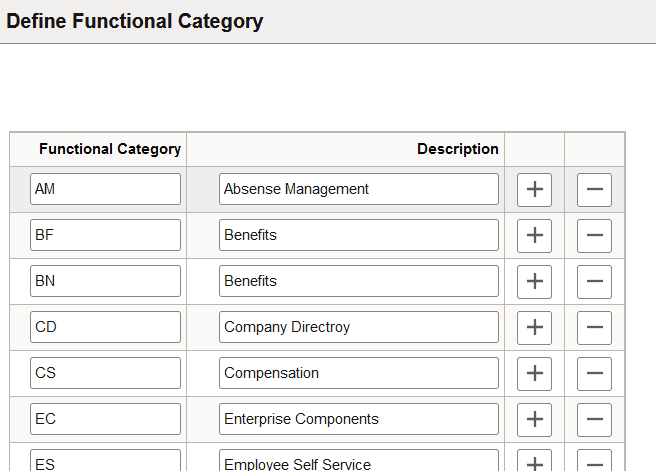
Use the Define Functional Category page (HCSC_FUNC_CATG) to review and manage functional categories for grouping approval transactions on the Approval Insights dashboards.
Navigation:
This example illustrates the fields and controls on the Define Functional Category page.
| Field or Control | Description |
|---|---|
|
Functional Category and Description |
Enter a two character code and description to identify a functional category that will be available on the Approval Insights dashboards. When you add a new functional category row, the system automatically adds the row to the Map Functional Category Page, where you identify approval transactions that should be part of that category. This information is used when building the Approval Insights index. Users can then use these categories as a filter on the Approval Insights Dashboard (for Managers) and Admin Approval Insights Dashboard. |
Related Topics
Map Functional Category Page
Use the Map Functional Category page (HCSC_PRCS_CATG) to associate approval transactions to a functional category.
Navigation:
This example illustrates the fields and controls on the Map Functional Category page.
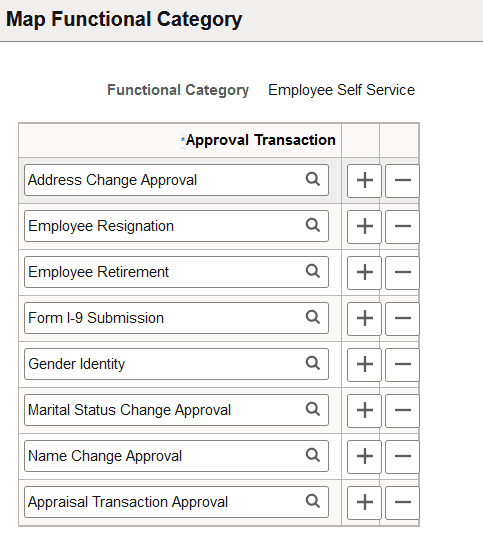
For each functional category, add or removed approval transactions.
Insights Approval Statuses - Admin Insights St Page
Use the Insights Approval Statuses - Admin Insights St page (HCSC_AP_AD_STTS) to identify approval request statuses to be indexed and used by administrators on the Admin Approval Insights dashboard.
Navigation:
This example illustrates the fields and controls on the Insights Approval Statuses - Admin Insights St page.
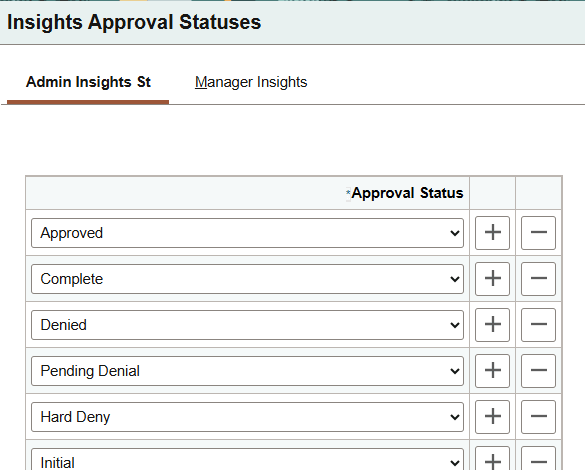
Add or removed statuses you want to capture for the Admin Approval Insights dashboard.
Insights Approval Statuses - Manager Insights Page
Use the Insights Approval Statuses - Manager Insights page (HCSC_APINS_STTS) to identify approval request statuses to be indexed and used by managers on the Approval Insights dashboard.
Navigation:
This example illustrates the fields and controls on the Insights Approval Statuses - Manager Insights page.
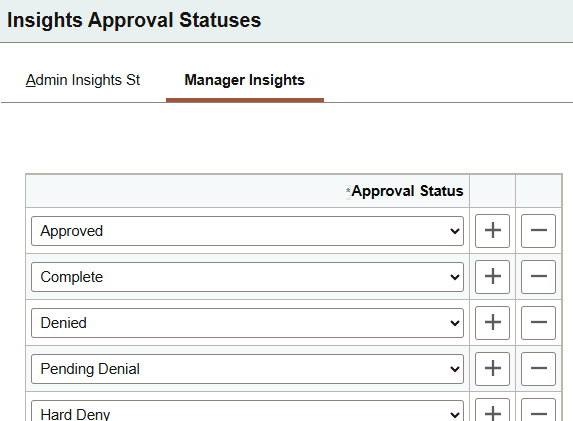
Add or removed statuses you want to capture for the Approval Insights dashboard.
Insights Approval Transactions - Admin Insights Page
Use the Insights Approval Transactions - Admin Insights St page (HCSC_AP_ADM_PRCS) to define the approval transactions you want administrators to view and the period of time for them to analyze approval data on the Admin Approval Insights dashboard.
Navigation:
This example illustrates the fields and controls on the Insights Approval Transactions - Admin Insights St page.
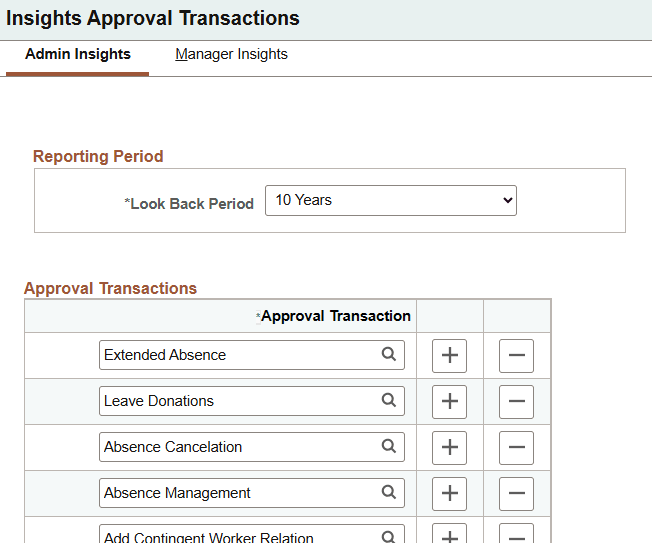
| Field or Control | Description |
|---|---|
|
Look Back Period |
Select the desired period of time you want administrators to view and analyze approval data. Initial indexing of the data is based on the look back period. Time period options are from one to five years in annual increments from today's date. Note. This needs to be performed prior to running the full index. The look back period set here will become the duration filter on the open search dashboard. |
|
Approval Process |
Select the approval transactions that need to be indexed. |
Insights Approval Transactions - Manager Insights Page
Use the Insights Approval Transactions - Manager Insights page (HCSC_APINS_PRCS) to define the approval transactions you want managers to view and the period of time for them to analyze approval data on the Approval Insights dashboard.
Navigation:
This example illustrates the fields and controls on the Insights Approval Transactions - Manager Insights page.
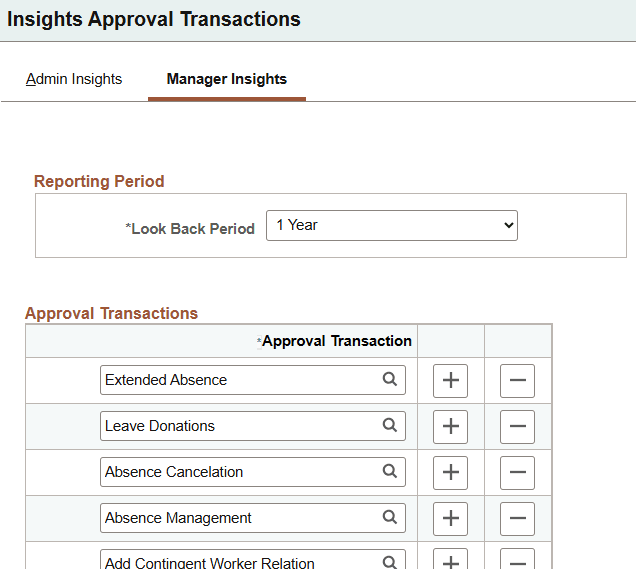
| Field or Control | Description |
|---|---|
|
Look Back Period |
Select the desired period of time you want managers to view and analyze approval data. Initial indexing of the data is based on the look back period. Time period options are from one to five years in annual increments from today's date. Note. This needs to be performed prior to running the full index. The look back period set here will become the duration filter on the open search dashboard. |
|
Approval Process |
Select the approval transactions that need to be indexed. |
Approval Insights Security Page
Use the Approval Insights Security page (HCSC_APR_INS_SEC) to specify which roles can access the different approval processes for Insights transaction data.
Navigation:
This example illustrates the fields and controls on the Approval Insights Security page.
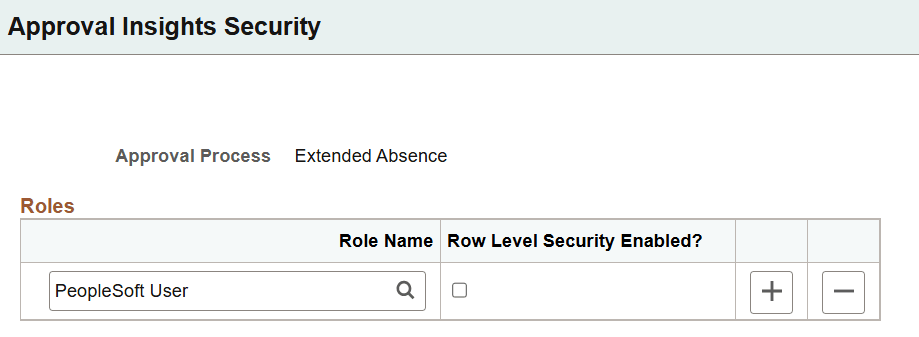
| Field or Control | Description |
|---|---|
|
Approval Process |
Displays the approval process to which you will add security roles. You will select from a list of all approval transactions on the search page before accessing this page. |
|
Roles |
Identify the roles that should have access to the selected approval process. |
|
Role Level Security Enabled? |
Select to grant access only to those transactions where approvers fall within the administrator's row level access. Deselect to grant access to all the approval transactions within this approval process. |