Absence Request History Page
Use the Absence Request History page (GP_ABS_SS_REQHIST) to review the absence request history for an employee for a specified time range of dates.
Navigation:
Select the employee Name on the Absence Request History page.
This example illustrates the fields and controls on the Absence Request History page.
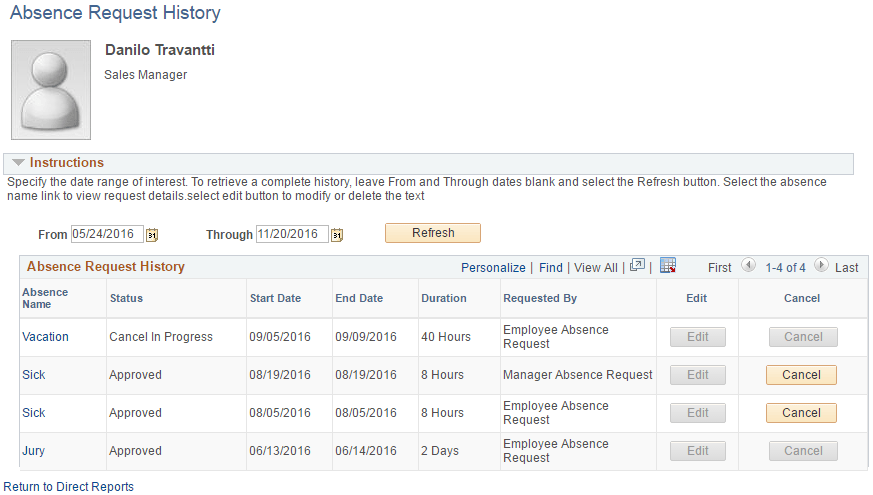
The system displays a page that is identical to the employee self service PeopleSoft Absence Management: Absence Request History Page, with the exception that it contains a Return to Direct Reportslink to return to the Absence Request History Page where you can select a different direct report.
Clicking the link in the Absence Name column displays the Approval Details page. Links appear only for absence requests that the manager has worked with using the self service pages. Absence requests or any absence entered or modified via Timesheets or by the Absence Administrator using the Event Entry component can not be edited in Absence self-service.
Note:
The system calculates and stores duration values for absence requests entered through self-service only. The system does not calculate or store absence duration for absences entered through other online pages such as Absence Event Entry or via Component Interface.
| Field or Control | Description |
|---|---|
|
From and Through |
The user can display absence request history that falls within a specified date range by entering dates in the From and Through fields. If the manager enters a date in only the From field, the system displays absence requests that have a Start Date equal to or after the specified date. Alternatively, if the manager enters a date only in the Through field, the system displays absence requests that have an End Date equal to or prior to the specified date. If no date is entered in either field, the system displays all absence requests for the employee. |
|
Cancel |
Click to access the Cancel Absence page where you can submit an absence cancellation request. |
Related Topics