Generating Payee Reports
This section provides an overview of the report generation process.
Pages Used to Generate Payee Reports
| Page Name | Definition Name | Usage |
|---|---|---|
|
GPIN_PR_GPINPY01 |
Generate enrollment and termination reports. |
|
|
Chunk1884032337.html#GUID-F2BFCD3B-2978-4059-9860-A3E19D2B3C92 |
GPIN_PR_RC |
Generate ESI remittance statement reports. |
|
GPIN_PR_RC |
Generate provident fund remittance statement reports. |
|
|
GPIN_FORMLWF_RC |
Run LWF form A. |
Understanding the Report Generation Process
When you run the payee report process, an Application Engine payee report extract process runs first. The extract process retrieves the run control and determines which report to run. The appropriate report setup is also retrieved along with the break levels and element mapping that is associated with the report. So the process runs in this order:
-
The payee report extract process (Application Engine) gathers information about the report.
-
SQR runs the actual report.
Enroll and Term Reports IND Page
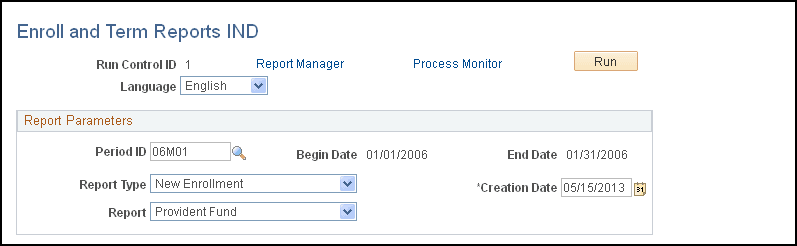
Use the Enroll and Term Reports IND page (GPIN_PR_GPINPY01) to generate enrollment and termination reports.
Navigation:
This example illustrates the fields and controls on the Enroll and Term Reports IND page. You can find definitions for the fields and controls later on this page.
| Field or Control | Description |
|---|---|
|
Period ID |
Select the period ID that identifies the pay period to be used for the report. When you enter a value in this field, the associated begin date and end date appear. |
|
Report Type |
Select whether to generate a new enrollment or termination report. |
|
Report |
Select whether to generate an ESI or provident fund report. |
Contingency Funds
Contingency fund contributions follow the same rules as for ARRCO/AGIRC. For organizations with more than ten payees, there is only a single contribution from the employer. For organizations with less than ten payees, no contribution is triggered.
PF Remittance Statement IND Page
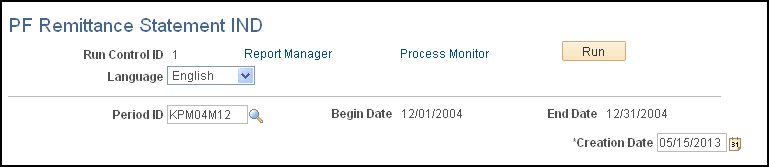
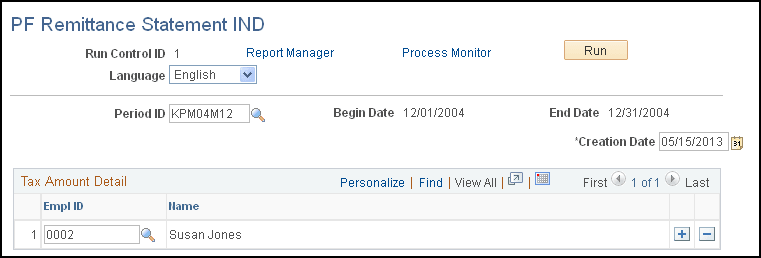
Use the PF Remittance Statement IND (provident fund remittance statement IND) page (GPIN_PR_RC) to generate provident fund remittance statement reports.
Navigation:
This example illustrates the fields and controls on the PF Remittance Statement IND page (1 of 2). You can find definitions for the fields and controls later on this page.
This example illustrates the fields and controls on the PF Remittance Statement IND page (2 of 2). You can find definitions for the fields and controls later on this page.
| Field or Control | Description |
|---|---|
|
Period ID |
Select the period ID that identifies the pay period to be used for the report. When you enter a value in this field, the associated begin date and end date appear. |
|
Payee Sort Option |
Select a sort order for the report. Options are:
|
Print LWF Report Page
Use the Print LWF Report (print labour welfare fund report) page (GPIN_FORMLWF_RC) to run LWF form A.
Navigation:
This example illustrates the fields and controls on the Print LWF Report page. You can find definitions for the fields and controls later on this page.
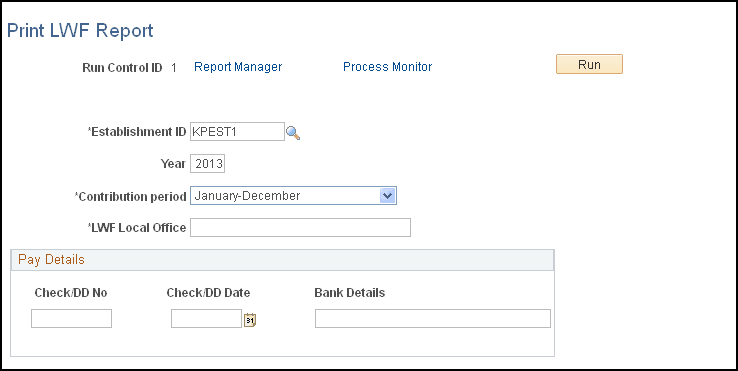
This report prints the contribution made by the employer and employee toward LWF.