Setting Up for Social Insurance Processing
This section lists a prerequisite and discusses how to set up social insurance premium and view standard remuneration grades.
Pages Used to Set Up Social Insurance Data
| Page Name | Definition Name | Usage |
|---|---|---|
|
GPJP_SC_STD_REMUN |
View the values and grades on the Monthly Standard Remuneration table. |
|
|
GPJP_SC_EST_DATA |
Set up social insurance premium rates. Enter the social insurance premium rates for each social insurance establishment. |
Related Topics
Prerequisite
Before setting up social insurance premium rates, you must define social insurance establishments.
Rvw SI Std Remun Grades JPN Page
Use the Rvw SI Std Remun Grades JPN (review social insurance standard remuneration grades) page (GPJP_SC_STD_REMUN) to view the values and grades on the Monthly Standard Remuneration table.
Navigation:
This example illustrates the fields and controls on the Rvw SI Std Remun Grades JPN page. You can find definitions for the fields and controls later on this page.
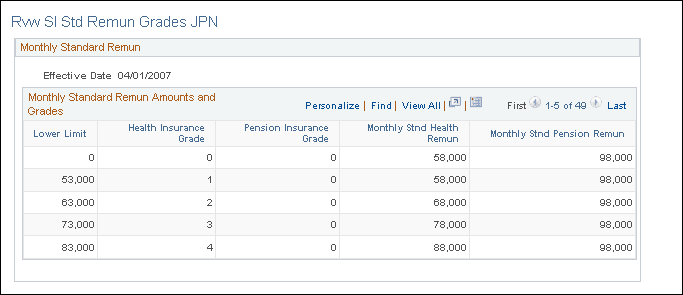
View the information on the Monthly Standard Remuneration table, which the system uses to determine an employee's monthly standard remuneration amount and the grade for health insurance and pension insurance premium calculations.
SI Premium Rates JPN Page
Use the SI Premium Rates JPN (social insurance premium rates) page (GPJP_SC_EST_DATA) to set up social insurance premium rates.
Enter the social insurance premium rates for each social insurance establishment.
Navigation:
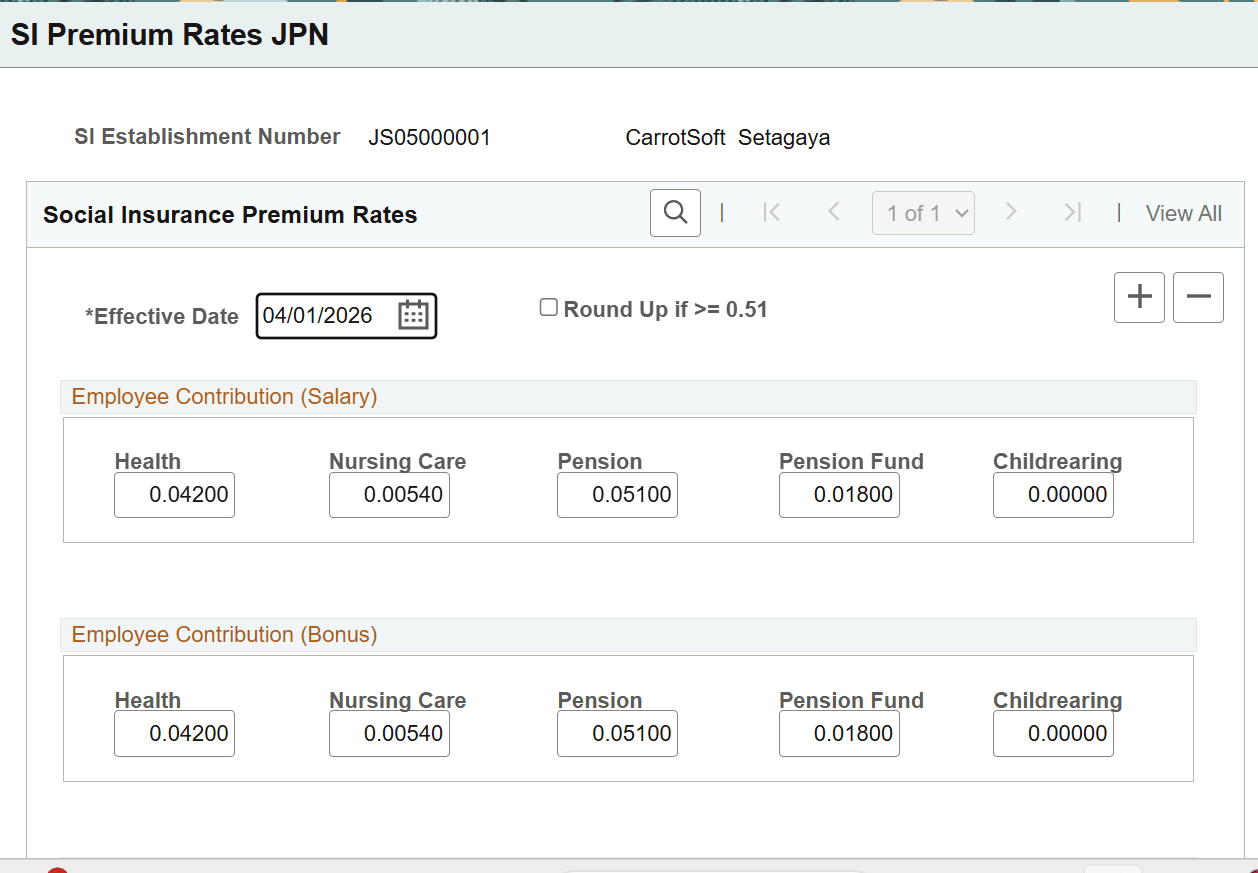
Enter the premium rates used to calculate employee and payer contributions for salary and bonus payments.
As the Childrearing Fund is applicable effective 01-Apr-2026, update the effective date by adding a new row with the date set to 01-Apr-2026. Upon updating the effective date, the system enables the Childrearing field, allowing entry of the applicable rates for Employee Salary and Bonus as well as Payer Salary and Bonus.
| Field or Control | Description |
|---|---|
|
Round Up if >= 0.51 |
If this check box is selected, the payee's contribution to social insurance is rounded up if the fraction is greater than or equal to 0.51. If the check box is deselected, the amount is rounded up if the fraction is greater than or equal to 0.6. |