Setting Up Deduction Codes
To set up deduction codes, use the Deduction Table (DEDUCTION_TABLE) component.
This section provides an overview of deduction codes and discusses how to create deduction codes.
Page Used to Set Up Deduction Codes
| Page Name | Definition Name | Usage |
|---|---|---|
|
DEDUCTION_TABLE1 |
Create deduction codes. |
Understanding Deduction Codes
The Manage Base Benefits business process in PeopleSoft HR is designed to work with PeopleSoft Payroll for North America and PeopleSoft Payroll Interface. Calculating deductions accurately is an important payroll function.
To set up benefit deductions:
-
Use the Deduction Table component (DEDUCTION_TABLE) to select the plan type (any plan type except General Deduction), enter a deduction code, and set up the deduction processing rules.
See PeopleSoft Payroll for North America: Setting Up Deductions.
See PeopleSoft Payroll Interface: Setting Up and Maintaining General Deductions.
-
Use the Benefit Plan Table component (BENEFIT_PLAN_TABLE) and other components in the Manage Base Benefits business process to set up the benefit plans.
-
Use the Benefit Program Table component (BEN_PROG_DEFN) and other components in the Manage Base Benefits business process to build the benefit program and to define the deduction calculation rules.
The Deduction Table component enables you to select a plan type, enter a deduction code, and set up the deduction processing rules that enable you to specify processing details such as deduction priorities, deduction tax classifications, deduction pay period schedules, and other special payroll process indicators. The Benefit Program Table component enables you to set up the deduction calculation rules, actual rates, rules, and routines to use to determine the cost of the deduction. To calculate benefit deductions, payroll uses both the deduction processing rules from the Deduction Table component and deduction calculation rules from the Benefit Program Table.
Note:
To set up the Benefit Program Table, you must enter deduction codes. Deduction codes are set up on the Deduction Table component through either PeopleSoft Payroll for North America or PeopleSoft Payroll Interface. However, if you are not using a PeopleSoft payroll application to calculate deductions, you can set up dummy deduction codes using other pages in PeopleSoft HR.
Designing a Deduction Strategy
When setting up deductions, you need to make some basic decisions about your strategy before you set up deduction rules, and these decisions depend in part upon how you want to report deductions to employees.
Here's a quick reference that shows the basic benefit deduction pay stub reporting options and how to make them happen:
| You Want to Report | Do This | Result on Pay Stubs |
|---|---|---|
|
The amount for each benefit plan. |
Define a deduction code for each benefit plan. |
Itemized descriptions and deduction amounts appear for each chosen plan type. |
|
One total for a plan type. |
Define a deduction code for a specific plan type. |
The total deduction of a plan type appears. |
|
One total for all deductions. |
Modify your pay check print program to print the total deduction for several plan type series. For example, you might print the total deductions for all health and life plan type series, while still showing a separate deduction for a savings plan, such as 401(k). You must modify your system because you can't automatically roll up to a higher level than plan type. |
The total deduction of all plan types you modify appears. |
Deduction Table - Setup Page
Use the Deduction Table - Setup page (DEDUCTION_TABLE1) to create deduction codes.
Navigation:
This example illustrates the fields and controls on the Deduction Table - Setup page. You can find definitions for the fields and controls later on this page.
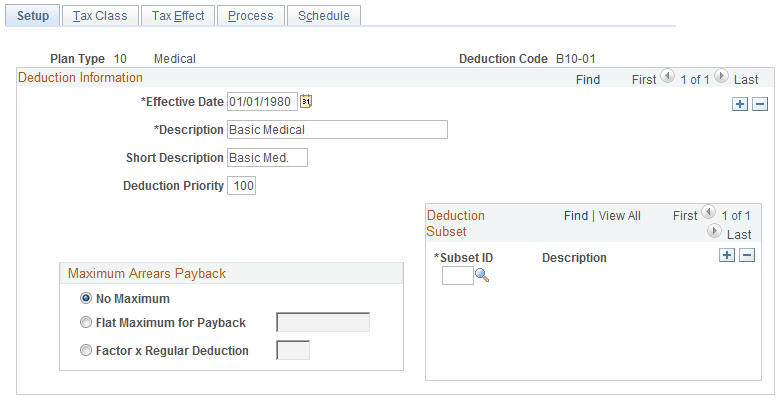
To create a deduction code, enter the effective date and the long description.
If you are using PeopleSoft Payroll for North America or Payroll Interface, refer to the documentation for those products for information about how to set up the Deduction Table component (DEDUCTION_TABLE).
See PeopleSoft Payroll for North America: Setting Up Deductions.
See PeopleSoft Payroll Interface: Setting Up and Maintaining General Deductions.