Managing Recall Rights
To manage recall rights, use the Worker Recall Rights Process component (HR_RUNCTL_RGT) and the Manage Recall Rights component (HR_RCL_RIGHTS).
This topic discusses how to process and maintain recall rights.
Note:
Recall rights are the rights a laid off worker has to accept a lower level job (bumping) or to be recalled back to work when a position becomes available. Each labor agreement has a recall expiration rule that calculates how long a worker has recall rights following a layoff and under what circumstances those rights would expire.
Pages Used to Manage Recall Rights
| Page Name | Definition Name | Usage |
|---|---|---|
|
HR_RUNCTL_RGT |
Use to update the Manage Recall Rights component with information from the Job Data records of those candidates who have a process event status on the roster and who were processed using PeopleSoft Mass Update. |
|
|
HR_RCL_RIGHTS |
View and maintain a worker's reemployment rights. |
Worker Recall Rights Process Page
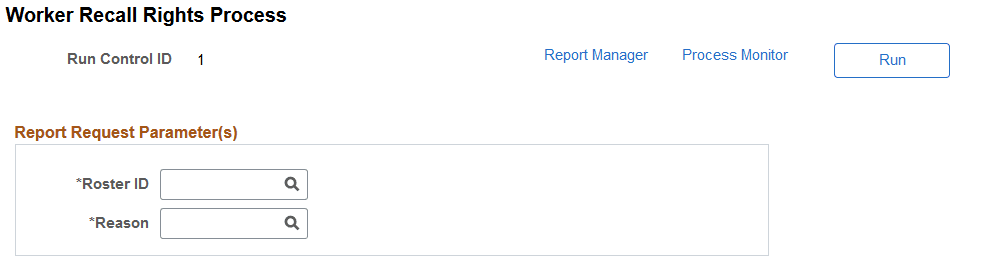
Use the Worker Recall Rights Process page (HR_RUNCTL_RGT) to update the Recall Rights component with information from the Job Data records of those candidates who have a process event status on the roster and who were processed using PeopleSoft Mass Update.
Navigation:
This example illustrates the Worker Recall Rights Process page.
Note:
Use this process only when using PeopleSoft Mass Update to update candidates' job information. The layoff, recall, and reinstatement processes create recall rights automatically.
| Field or Control | Description |
|---|---|
|
Roster ID |
Select the ID of the layoff or recall roster whose candidates' recall rights you want to update. The system will create a record in the Recall Rights component for those candidates who have a process event status on the roster. When an employee's recall rights have been processed for a particular Roster ID they cannot be processed a second time for the same Roster ID. |
|
Reason |
Select the reason for the new recall rights record. The system will insert this value in the Reason field on the Manage Recall Rights page. |
Manage Recall Rights Page
Use the Manage Recall Rights page (HR_RCL_RIGHTS) to view and maintain a worker's reemployment rights.
Navigation:
This example illustrates the Manage Recall Rights page.
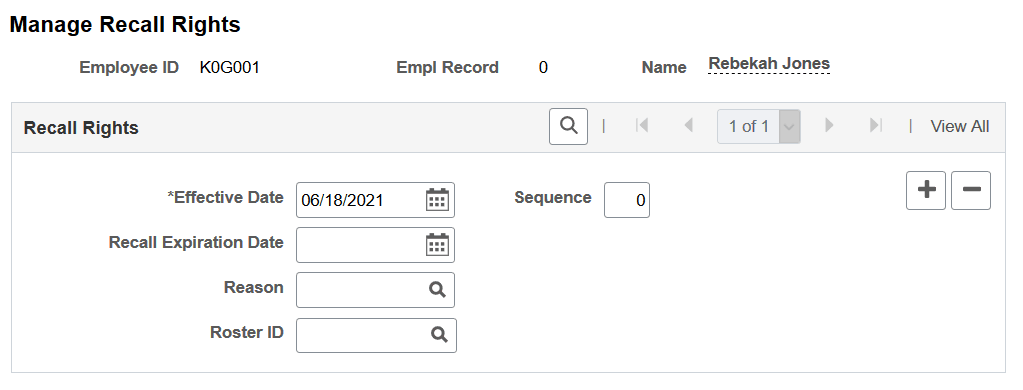
You can manually enter and maintain recall rights for a person but the system will create and populate a row on this page for each person being processed when you run the:
-
Process Layoff process.
-
Process Recall or Process Reinst (Reinstatement) processes.
Note:
The system will create rows for those who accept a recall. Employees who reject recalls may lose their Recall Rights depending on the recall rights expiration rule assigned to their labor agreement. If a person rejects a recall, update the Recall Rights manually.
-
Worker Recall Rights Process process.
This table shows the values that the system enters depending on which process you run:
| Process | Effective Date | Recall Expiration Date: | Reason | Roster ID |
|---|---|---|---|---|
|
Run Layoff Process |
The date the layoff takes effect, as entered in the Termination Date field on the Layoff Process component. |
The system populates this date using the recall expiration rule associated with the person's labor agreement. |
LAYOFF |
The system populates this field with the ID of the layoff roster that prompted the layoff action. |
|
Recall or Reinstatement processes |
The date the recall or reinstatement takes effect as entered in the Rehire Date column on the Recall Roster List or Reinstatement Roster List pages. |
The system populates this date using the recall expiration rule associated with the person's labor agreement. |
RECALL |
The system populates this field with the ID of the recall or reinstatement roster that prompted the recall or reinstatement action. |
|
Worker Recall Rights Process On the Worker Recall Rights Process page, you can select a:
|
|
|
LAYOFF RECALL |
The system populates this field with the ID of the roster that was selected on the Worker Recall Rights Process page. |
| Field or Control | Description |
|---|---|
|
Recall Expiration Date |
Enter the date the person's recall rights expire. The system does not include candidates whose recall rights have expired when creating recall or reinstatement rosters. |
|
Reason |
Select the reason the person obtained the recall right. |
|
Roster ID |
The system populates this with the layoff or recall roster ID. |