Setting Up the Treasury and FRB Bond Interface
Page Used to Set Up the Treasury and FRB Bond Interface
| Page Name | Definition Name | Usage |
|---|---|---|
|
RUN_FGPY003 |
(USF) Select the control information that identifies the schedules to include in the Treasury Interface SQR Report process (FGPY003). |
Understanding the Treasury and FRB Bond Interface
Agencies must process all payments through the Treasury Department/Financial Management Services (FMS). There are four basic payroll transactions to be transmitted to the treasury: check, electronic funds transfer, bonds, and taxes.
Treasury Interface Page
(USF) Use the Treasury Interface page (RUN_FGPY003) to select the control information that identifies the schedules to include in the Treasury Interface SQR Report process (FGPY003).
Navigation:
This example illustrates the fields and controls on the Treasury/Federal Reserve Bank Bond Interface page.
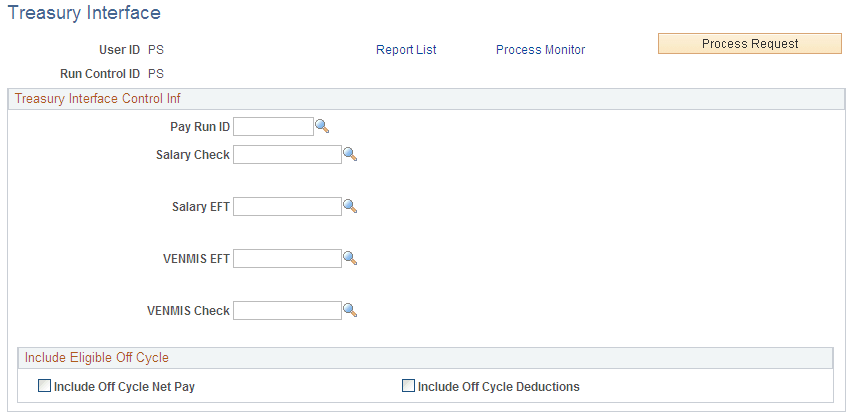
Treasury Interface Control Inf
| Field or Control | Description |
|---|---|
|
Salary Check |
Select the schedule of the checks in the payroll run, and enter the file name and extension. |
|
Salary EFT (salary electronic file transmission) |
Select the schedule of the EFT transactions of the payroll run, and enter the file name and extension. |
|
VENMIS EFT (vendor/miscellaneous electronic file transmission) |
Select the schedule of the EFT tax payment in the payroll run, and enter the file name and extension. |
|
VENMIS Check (vendor/miscellaneous check) |
Select the schedule of the check tax payment of the payroll run. |
Include Eligible Off Cycle
| Field or Control | Description |
|---|---|
|
Include Off Cycle Net Pay |
Select to include unprocessed off-cycle net pay in the Treasury interface processing. |
|
Include Off Cycle Deductions |
Select to include unprocessed off-cycle deductions in Treasury interface processing. |