Viewing and Debugging Data Cube Properties
This topic discusses how to:
-
View data cubes and data cube properties.
-
Debug data cubes.
See Understanding Data Cubes, Creating Calculation Data Cubes, Defining Data Cube Properties.
Viewing Data Cubes and Data Cube Properties
To view data cubes and data cube properties:
-
Select
-
Select a data cube whose properties you want to view.
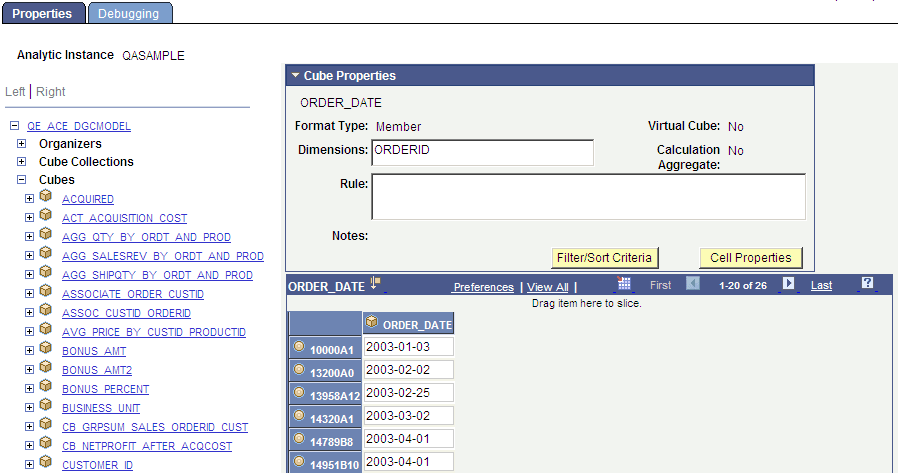
The analytic grid underneath the Cube Properties panel appears showing the data cube's values. As with cube collections, you can use drag and drop to manipulate the analytic grid. You can also view slices of your data by choosing from the drop-down lists of dimensions.
This example illustrates the fields and controls on the Analytic Model Viewer - Properties page, Cube Properties panel. Definitions for the fields and controls appear following the example.
| Field or Control | Description |
|---|---|
|
Format Type |
Displays the format type of the data cube—such as Number, Char, Date, and so on. These format types are attributes of the cube and are defined within PeopleSoft Application Designer. See Understanding the Relationship Between Field Definition Attributes and Data Cube Formats. |
|
Virtual Cube |
Indicates whether the selected data cube is a virtual cube. See Virtual Data Cubes. |
|
Dimensions |
Lists the dimensions that are attached to the selected data cube. |
|
Calculation Aggregate |
Indicates whether the analytic calculation engine calculates aggregates for the data cube. |
|
Rule |
Displays any rules that the analytic calculation engine uses to calculate the current data cube. |
|
Notes |
Lists notes related to this data cube that the developer entered when creating the model. See Entering Notes for an Analytic Model Definition's Parts. |
|
Cell Properties |
Click to displays a secondary window from which you can view the properties of a specified cell. You can view cell properties for data cubes and cube collections. |
|
Save Recalculate |
Click to recalculates the results of your analytic instance if you modified it. |
Debugging Data Cubes
To debug a data cube:
-
Select
-
Select a data cube whose properties you want to view.
-
Select the Debugging tab.
Note:
You can also audit data cubes at design time.
See Auditing Data Cubes at Design Time.
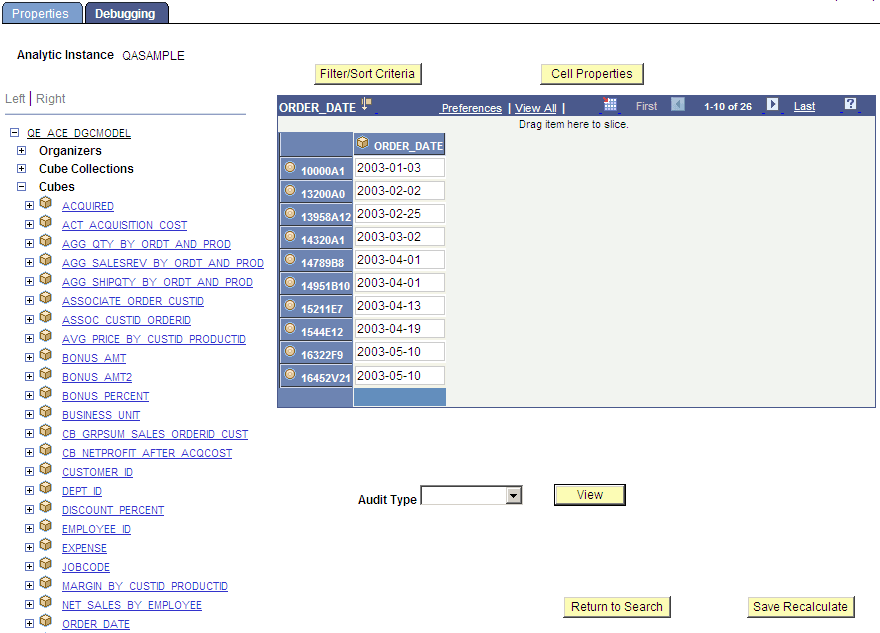
This example illustrates the fields and controls on the Analytic Model Viewer - Debugging page, Data Cube panel. Definitions for the fields and controls appear following the example.
| Field or Control | Description |
|---|---|
|
Cell Properties |
Click to displays a secondary window from which you can view the properties of a specified cell. You can view cell properties for data cubes and cube collections. |
|
Audit Type |
Select from one of the audit types: all causes, all effects, all inputs, circular system, direct causes, direct effects. |
|
View |
Displays the results of the audit in an audit grid below the analytic grid. |