Viewing and Debugging Cube Collection Properties
This topic discusses how to:
-
View cube collections and cube collection properties.
-
Debug cube collections.
-
Sort and filter cube collections.
See Purpose of Analytic Type Definitions, Relationship of Record Attributes to Data Caching Behavior, Synchronization Order.
Viewing Cube Collections and Cube Collection Properties
To view cube collections and cube collection properties:
-
Select
-
Select a cube collection whose properties you want to view.
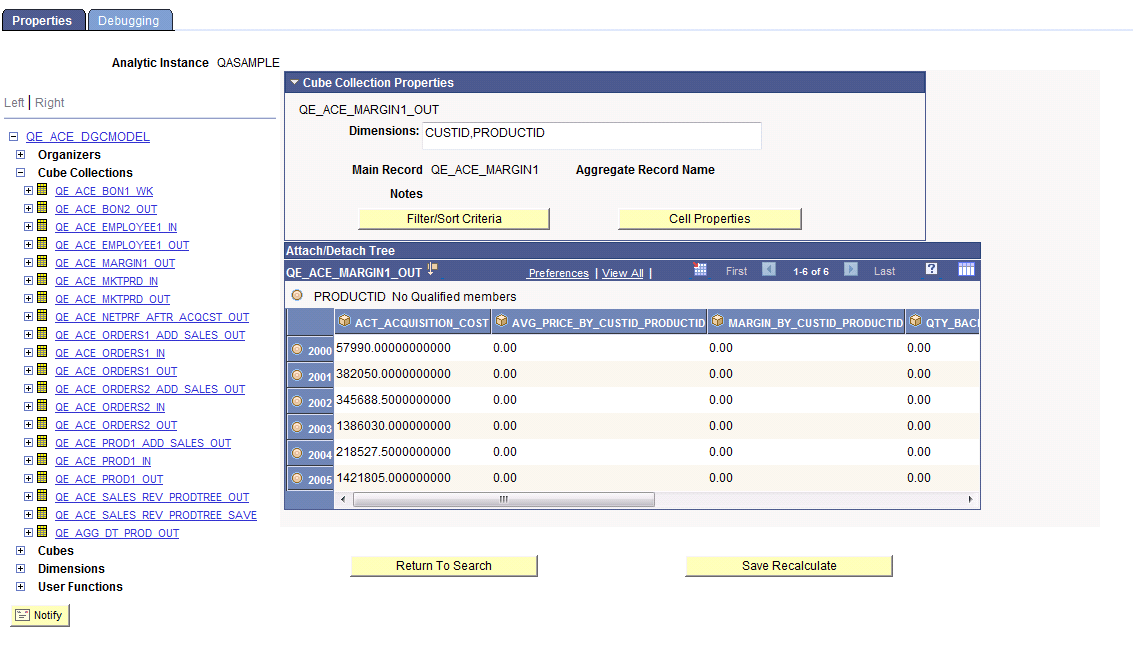
A Cube Collection Properties panel appears showing the properties of the selected cube collection.
Note:
The analytic grid underneath the Cube Collection Properties panel displays the cube collection data itself. You can drag and drop data cubes and dimensions within this grid; or view selected slices of your data by choosing from the slice bar.
See Understanding Analytic Grid Design, Creating a New Analytic Model Definition.
This is an example of the Cube Collection Properties panel within the Analytic Model Viewer - Properties page.
| Field or Control | Description |
|---|---|
|
Dimensions |
Lists all of the dimensions that are attached to the data cubes within the cube collection. |
|
Main Record |
Lists the main record to which the cube collection is mapped. |
|
Aggregate Record |
Lists the aggregate record that stores the cube collection's aggregate data, if applicable. |
|
Notes |
Lists notes related to this cube collection that the developer entered when creating the model. See Entering Notes for an Analytic Model Definition's Parts. |
|
Filter/Sort Criteria |
Click to displays a secondary window enabling you to filter and/or sort a selected dimension within the cube collection. |
|
Cell Properties |
Click to displays a secondary window from which you can view the properties of a specified cell. You can view cell properties for data cubes and cube collections. |
|
Save Recalculate |
Click to recalculates the results of your analytic instance, if you modified it. |
Debugging Cube Collections
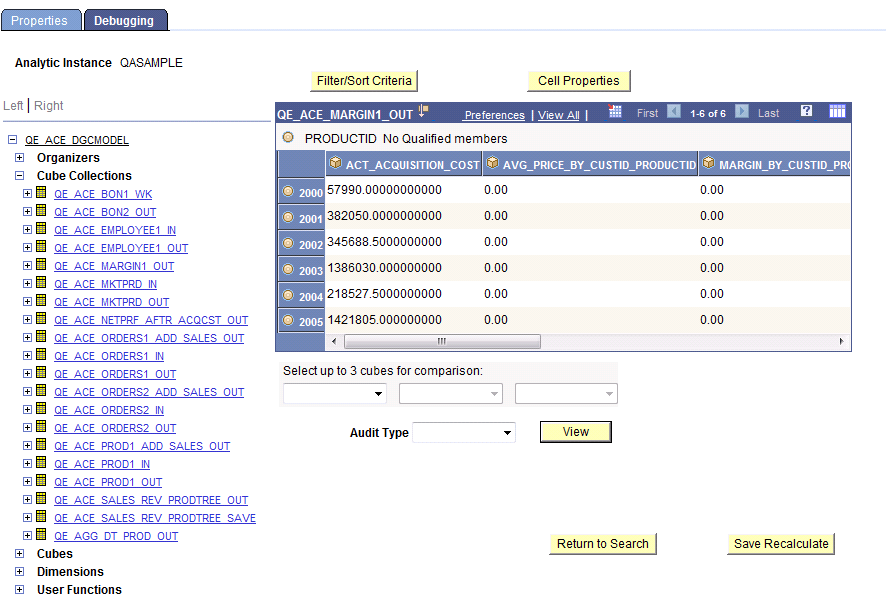
Use the Analytic Model Viewer - Debugging page (PTACEMDLVWRDBG) to perform debugging tasks related to the selected data cube or cube collection.
Navigation:
This example illustrates the fields and controls on the Analytic Model Viewer - Debugging page, Cube Collections. Definitions for the fields and controls appear following the example.
| Field or Control | Description |
|---|---|
|
Select up to 3 cubes for comparison |
Select from one to three cubes in the cube collection to audit. |
|
Audit Type |
Select from one of the audit types: all causes, all effects, all inputs, circular system, direct causes, direct effects. |
|
View |
Click to displays the results of the audit in an audit grid below the analytic grid. |
To debug a cube collection:
-
Select
-
Select a cube collection whose properties you want to view.
-
Select the Debugging tab.
The part browser, filtering and sorting features, and main grid on the Debugging tab work like those features on the Properties tab. However, this tab also enables you to audit the data.
Sorting and Filtering Cube Collections
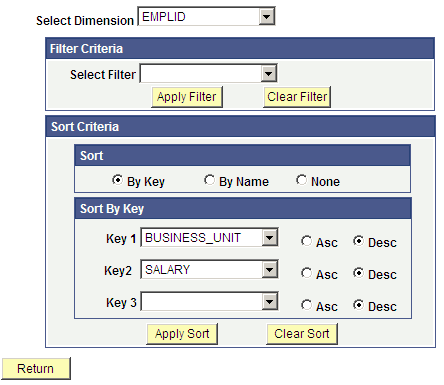
Use the Filter/Sort Criteria page (PTACEDIMPROP_SEC) to filter and sort the contents of the cube collection based on a specified dimension.
Navigation:
This example illustrates the fields and controls on the Analytic Model Viewer - Filter/Sort Criteria page. Definitions for the fields and controls appear following the example.
Note:
Members are only filtered when the filter condition is met. In addition, if an aggregate member is filtered, all its children are also filtered.
| Field or Control | Description |
|---|---|
|
Select Dimension |
Select the dimension upon which you want to base the filter or sort. |
|
Select Filter |
Select the filter. |
|
Apply Filter |
Click to apply the selected filter. |
|
Clear Filter |
Click to clear the selected filter. |
|
Sort |
Select whether to sort by key, by name, or by neither. When you elect to sort by key, you can choose from one to three keys upon which to sort, and can choose to sort each one of those keys either ascending or descending. When you sort by name, you can choose to sort either ascending or descending. |
|
Apply Sort |
Click to apply the selected sort. |
|
Clear Sort |
Click to clear the selected sort. |
|
Return |
Click to go back to the main page. |
To sort and filter cube collections:
-
Select
-
Select a cube collection whose properties you want to view.
-
Click the Filter/Sort Criteria button.